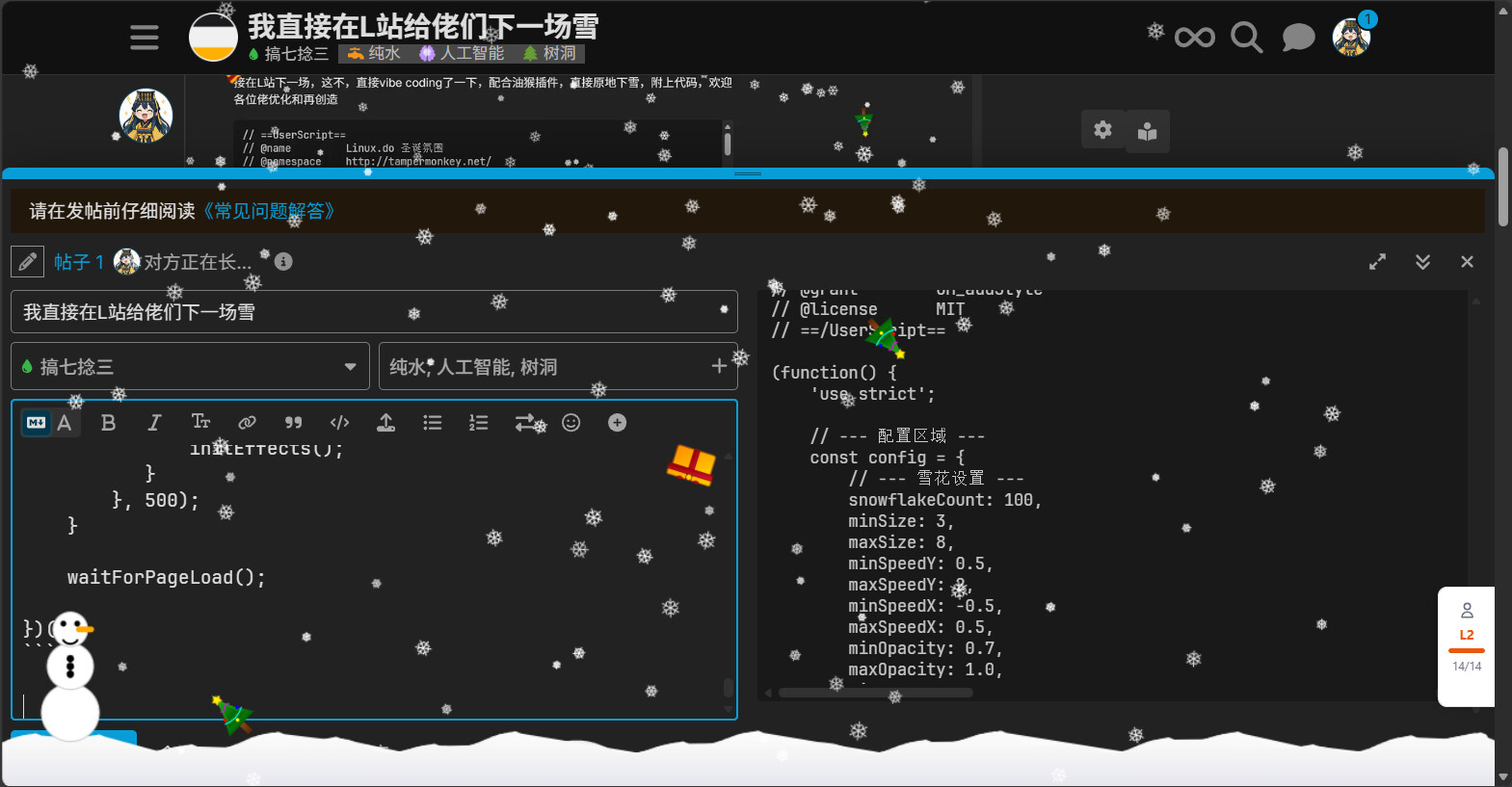
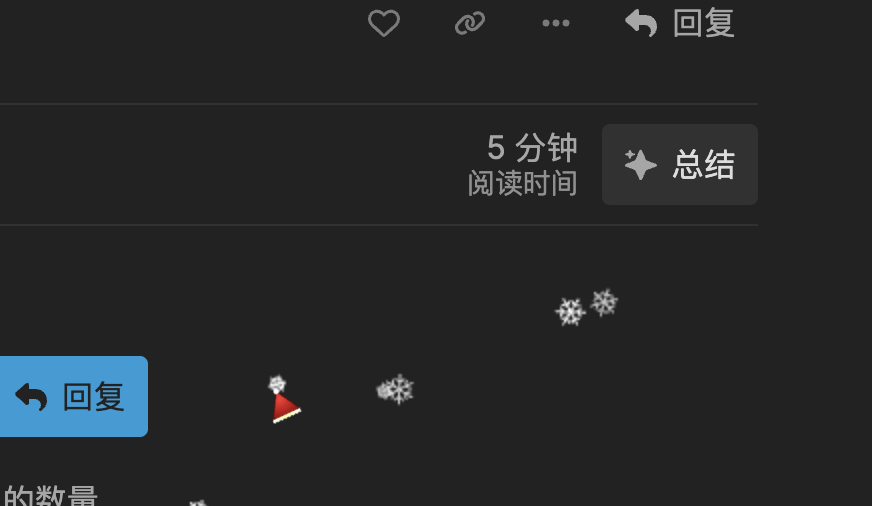
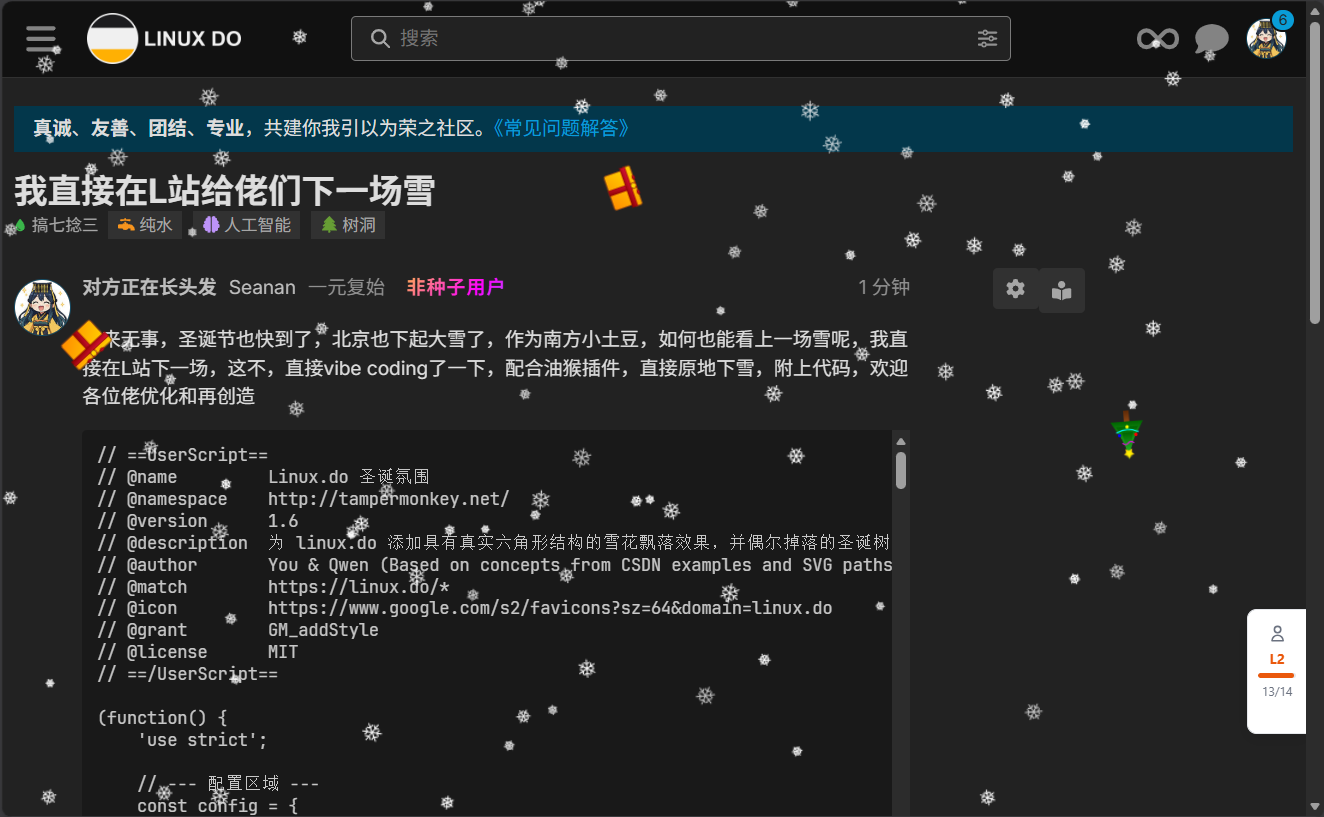
闲来无事,圣诞节也快到了,北京也下起大雪了,作为南方小土豆,如何也能看上一场雪呢,我直接在L站下一场,这不,直接vibe coding了一下,配合油猴插件,直接原地下雪,附上代码,欢迎各位佬优化和再创造
目前好像只能支持深色模式
// ==UserScript==
// @name         Linux.do 圣诞氛围
// @namespace    http://tampermonkey.net/
// @version      1.6
// @description  为 linux.do 添加具有真实六角形结构的雪花飘落效果,并偶尔掉落的圣诞树、礼物或圣诞帽。
// @author       You & Qwen (Based on concepts from CSDN examples and SVG paths)
// @match        https://linux.do/*
// @icon         https://www.google.com/s2/favicons?sz=64&domain=linux.do
// @grant        GM_addStyle
// @license      MIT
// ==/UserScript==

(function() {
    'use strict';

    // --- 配置区域 ---
    const config = {
        // --- 雪花设置 ---
        snowflakeCount: 100,        // 雪花数量
        minSize: 3,                 // 最小雪花尺寸 (影响绘制的雪花大小)
        maxSize: 8,                 // 最大雪花尺寸
        minSpeedY: 0.5,             // 最小垂直速度
        maxSpeedY: 2,               // 最大垂直速度
        minSpeedX: -0.5,            // 最小水平速度 (负值表示向左飘)
        maxSpeedX: 0.5,             // 最大水平速度 (正值表示向右飘)
        minOpacity: 0.7,            // 最小不透明度
        maxOpacity: 1.0,            // 最大不透明度
        wind: 0.005,                // 风力影响 (轻微向一侧偏移)
        swingRange: 0.2,            // 摆动幅度 (左右轻微摇摆)
        swingSpeed: 0.005,          // 摆动速度
        rotationSpeedMin: -0.5,     // 最小旋转速度 (度/帧)
        rotationSpeedMax: 0.5,      // 最大旋转速度 (度/帧)

        // --- 圣诞惊喜设置 ---
        surpriseDropInterval: 1500, // 平均多久掉落一个惊喜 (毫秒)
        maxSurprisesOnScreen: 3,    // 屏幕上同时存在的最大惊喜数量
        surpriseFallSpeedMin: 1,    // 惊喜掉落最小速度
        surpriseFallSpeedMax: 4,    // 惊喜掉落最大速度
        surpriseTypes: [            // 可掉落的惊喜类型及其权重
            { type: 'gift', weight: 3 },
            { type: 'hat', weight: 2 },
            { type: 'tree', weight: 1 }
        ],
        // --- SVG 尺寸 (关键修改点) ---
        // --- 调整这里的数值来改变掉落物品的大小 ---
        svgViewportWidth: 100,      // SVG 内部定义的视口宽度 (用于保持比例)
        svgViewportHeight: 100,     // SVG 内部定义的视口高度
        sizeRelativeToViewportWidth: 0.04 // 关键:相对视口宽度的尺寸比例 (例如 0.04 = 4% 视口宽度)
    };


    // --- 更逼真的圣诞元素 SVG 资源 (保持不变) ---
    const SURPRISE_ASSETS_SVG = {
        // --- 逼真的礼物盒 SVG ---
        gift: `<svg xmlns="http://www.w3.org/2000/svg" viewBox="0 0 ${config.svgViewportWidth} ${config.svgViewportHeight}">
                  <defs>
                    <linearGradient id="boxGrad" x1="0%" y1="0%" x2="100%" y2="100%">
                      <stop offset="0%" style="stop-color:#FFD700;stop-opacity:1" />
                      <stop offset="100%" style="stop-color:#FF8C00;stop-opacity:1" />
                    </linearGradient>
                    <linearGradient id="ribbonGrad" x1="0%" y1="0%" x2="100%" y2="100%">
                      <stop offset="0%" style="stop-color:#DC143C;stop-opacity:1" />
                      <stop offset="100%" style="stop-color:#8B0000;stop-opacity:1" />
                    </linearGradient>
                  </defs>

                  <!-- 盒子主体 -->
                  <rect x="15" y="30" width="70" height="50" rx="5" ry="5" fill="url(#boxGrad)" stroke="#8B4513" stroke-width="2"/>

                  <!-- 盒盖 -->
                  <rect x="10" y="25" width="80" height="15" rx="3" ry="3" fill="url(#boxGrad)" stroke="#8B4513" stroke-width="2"/>

                  <!-- 丝带垂直部分 -->
                  <rect x="45" y="25" width="10" height="55" fill="url(#ribbonGrad)" stroke="#8B0000" stroke-width="1"/>

                  <!-- 丝带水平部分 -->
                  <rect x="10" y="35" width="80" height="10" fill="url(#ribbonGrad)" stroke="#8B0000" stroke-width="1"/>

                  <!-- 蝴蝶结中心 -->
                  <circle cx="50" cy="30" r="5" fill="#FFD700" stroke="#8B4513" stroke-width="1"/>

                  <!-- 蝴蝶结左侧 -->
                  <path d="M40,25 Q35,20 30,25 Q35,30 40,25 Z" fill="url(#ribbonGrad)" stroke="#8B0000" stroke-width="1"/>
                  <!-- 蝴蝶结右侧 -->
                  <path d="M60,25 Q65,20 70,25 Q65,30 60,25 Z" fill="url(#ribbonGrad)" stroke="#8B0000" stroke-width="1"/>
                </svg>`,

        // --- 逼真的圣诞帽 SVG ---
        hat: `<svg xmlns="http://www.w3.org/2000/svg" viewBox="0 0 ${config.svgViewportWidth} ${config.svgViewportHeight}">
                <defs>
                    <radialGradient id="hatGrad" cx="50%" cy="30%" r="70%" fx="50%" fy="30%">
                        <stop offset="0%" stop-color="#FF3333"/>
                        <stop offset="100%" stop-color="#990000"/>
                    </radialGradient>
                     <linearGradient id="trimGrad" x1="0%" y1="0%" x2="100%" y2="0%">
                        <stop offset="0%" stop-color="#FFFFFF"/>
                        <stop offset="50%" stop-color="#FFFF99"/>
                        <stop offset="100%" stop-color="#FFFFFF"/>
                    </linearGradient>
                </defs>
                <!-- 帽子主体 (圆锥形) -->
                <path d="M50,10 L85,70 Q50,85 15,70 Z" fill="url(#hatGrad)" stroke="#660000" stroke-width="2"/>

                <!-- 帽子边缘 (蓬松毛边) -->
                <path d="M15,70 Q10,75 15,80 Q20,75 25,80 Q30,75 35,80 Q40,75 45,80 Q50,75 55,80 Q60,75 65,80 Q70,75 75,80 Q80,75 85,80 L85,70 Q80,72 75,70 Q70,72 65,70 Q60,72 55,70 Q50,72 45,70 Q40,72 35,70 Q30,72 25,70 Q20,72 15,70 Z"
                      fill="url(#trimGrad)" stroke="#CCCCCC" stroke-width="1"/>

                <!-- 帽子顶部绒球 -->
                <circle cx="50" cy="10" r="6" fill="#FFFFFF" stroke="#CCCCCC" stroke-width="1"/>
              </svg>`,

        // --- 逼真的圣诞树 SVG ---
        tree: `<svg xmlns="http://www.w3.org/2000/svg" viewBox="0 0 ${config.svgViewportWidth} ${config.svgViewportHeight}">
                <defs>
                    <!-- 绿色渐变 -->
                    <linearGradient id="treeGreen" x1="0%" y1="0%" x2="0%" y2="100%">
                        <stop offset="0%" stop-color="#32CD32"/>
                        <stop offset="100%" stop-color="#006400"/>
                    </linearGradient>
                    <!-- 树干棕色 -->
                    <linearGradient id="trunkBrown" x1="0%" y1="0%" x2="0%" y2="100%">
                        <stop offset="0%" stop-color="#8B4513"/>
                        <stop offset="100%" stop-color="#5D2906"/>
                    </linearGradient>
                    <!-- 装饰星星发光效果 -->
                     <radialGradient id="starGlow" cx="50%" cy="50%" r="50%">
                        <stop offset="0%" stop-color="#FFFF00" stop-opacity="1"/>
                        <stop offset="100%" stop-color="#FFFF00" stop-opacity="0"/>
                    </radialGradient>
                </defs>

                <!-- 树干 -->
                <rect x="45" y="70" width="10" height="20" fill="url(#trunkBrown)" />

                <!-- 树冠 (多层三角形) -->
                <!-- 底层 -->
                <polygon points="50,20 20,70 80,70" fill="url(#treeGreen)" />
                <!-- 中层 -->
                <polygon points="50,10 30,60 70,60" fill="url(#treeGreen)" />
                <!-- 顶层 -->
                <polygon points="50,0 40,50 60,50" fill="url(#treeGreen)" />

                <!-- 装饰星星 (顶部) -->
                <polygon points="50,2 53,8 59,9 55,13 56,19 50,16 44,19 45,13 41,9 47,8" fill="#FFD700" stroke="#DAA520" stroke-width="0.5"/>
                <!-- 星星发光效果 -->
                <circle cx="50" cy="10" r="8" fill="url(#starGlow)" />

                <!-- 装饰球 (示例) -->
                <circle cx="35" cy="45" r="3" fill="#FF0000" />
                <circle cx="65" cy="45" r="3" fill="#0000FF" />
                <circle cx="50" cy="60" r="3" fill="#FFFF00" />

                <!-- 装饰彩带 (示例) -->
                <path d="M40,30 Q45,35 50,30 T60,30" fill="none" stroke="#FF00FF" stroke-width="2" stroke-linecap="round"/>
                <path d="M30,50 Q50,60 70,50" fill="none" stroke="#00FFFF" stroke-width="2" stroke-linecap="round"/>

              </svg>`
    };

    // --- 注入样式 (保持不变)---
    const styles = `
        #snow-surprise-container {
            position: fixed;
            top: 0;
            left: 0;
            width: 100vw;
            height: 100vh;
            pointer-events: none; /* 让装饰不影响页面交互 */
            z-index: 9998; /* 略低于雪花 Canvas */
            overflow: hidden;
        }
        .falling-surprise-svg {
            position: absolute;
            user-select: none;
            pointer-events: none; /* 可以设为 auto 如果想让它可点击 */
            /* 使用 CSS 动画控制下落 */
            animation-name: fallSurpriseSvg;
            animation-timing-function: linear;
            animation-iteration-count: 1;
            animation-fill-mode: forwards;
            /* 默认尺寸,会被 JS 覆盖 */
            width: auto;
            height: auto;
            max-width: 100px; /* 防止过大 */
            max-height: 100px;
        }
        @keyframes fallSurpriseSvg {
            to {
                transform: translateY(100vh) rotate(360deg); /* 添加旋转效果 */
            }
        }
    `;
    if (typeof GM_addStyle !== "undefined") {
        GM_addStyle(styles);
    } else {
        const styleElement = document.createElement('style');
        styleElement.textContent = styles;
        (document.head || document.documentElement).appendChild(styleElement);
    }


    // --- 雪花类 (保持不变)---
    class Snowflake {
        constructor(canvasWidth, canvasHeight) {
            this.canvasWidth = canvasWidth;
            this.canvasHeight = canvasHeight;
            this.reset();
        }

        reset() {
            this.x = Math.random() * this.canvasWidth;
            this.y = Math.random() * -this.canvasHeight;
            this.size = Math.random() * (config.maxSize - config.minSize) + config.minSize;
            this.speedY = Math.random() * (config.maxSpeedY - config.minSpeedY) + config.minSpeedY;
            this.speedX = Math.random() * (config.maxSpeedX - config.minSpeedX) + config.minSpeedX;
            this.opacity = Math.random() * (config.maxOpacity - config.minOpacity) + config.minOpacity;
            this.swingOffset = Math.random() * Math.PI * 2;
            this.rotation = Math.random() * 360;
            this.rotationSpeed = Math.random() * (config.rotationSpeedMax - config.rotationSpeedMin) + config.rotationSpeedMin;
            this.timeAlive = 0;
        }

        update(time) {
            this.timeAlive++;
            this.y += this.speedY;
            this.x += this.speedX + config.wind + Math.sin(this.swingOffset + time * config.swingSpeed) * config.swingRange;
            this.rotation += this.rotationSpeed;
            if (this.rotation >= 360) this.rotation -= 360;
            if (this.rotation < 0) this.rotation += 360;

            if (this.y > this.canvasHeight || this.x < -this.size * 2 || this.x > this.canvasWidth + this.size * 2) {
                this.reset();
                this.y = -this.size * 2;
            }
        }

        draw(ctx) {
            ctx.save();
            ctx.translate(this.x, this.y);
            ctx.rotate(this.rotation * Math.PI / 180);
            ctx.strokeStyle = `rgba(255, 255, 255, ${this.opacity})`;
            ctx.lineWidth = 1;
            ctx.lineCap = 'round';
            ctx.lineJoin = 'round';

            const s = this.size;
            ctx.beginPath();
            for (let i = 0; i < 6; i++) {
                ctx.rotate(Math.PI / 3);
                ctx.moveTo(0, 0);
                ctx.lineTo(0, -s);
                ctx.moveTo(0, -s * 0.5);
                ctx.lineTo(-s * 0.3, -s * 0.7);
                ctx.moveTo(0, -s * 0.5);
                ctx.lineTo(s * 0.3, -s * 0.7);
            }
            ctx.stroke();
            ctx.restore();
        }
    }

    // --- 圣诞惊喜管理器 (SVG版) (关键修改点)---
    class SvgSurpriseManager {
        constructor(containerElement) {
            this.container = containerElement;
            this.currentSurprises = [];
            this.dropTimer = null;
        }

        startDropping() {
            const getRandomSurpriseType = () => {
                const totalWeight = config.surpriseTypes.reduce((sum, item) => sum + item.weight, 0);
                let randomValue = Math.random() * totalWeight;
                for (const item of config.surpriseTypes) {
                    randomValue -= item.weight;
                    if (randomValue <= 0) {
                        return item.type;
                    }
                }
                return config.surpriseTypes[0].type;
            };

            const dropSurprise = () => {
                if (this.currentSurprises.length < config.maxSurprisesOnScreen) {
                    const type = getRandomSurpriseType();
                    this.createSurprise(type);
                }
                const variance = config.surpriseDropInterval * 0.5;
                const nextDropTime = config.surpriseDropInterval + (Math.random() * variance * 2) - variance;
                this.dropTimer = setTimeout(dropSurprise, Math.max(nextDropTime, 500));
            };

            this.dropTimer = setTimeout(dropSurprise, config.surpriseDropInterval);
        }

        stopDropping() {
            if (this.dropTimer) {
                clearTimeout(this.dropTimer);
                this.dropTimer = null;
            }
        }

        createSurprise(type) {
            const svgString = SURPRISE_ASSETS_SVG[type];
            if (!svgString) {
                console.warn(`未找到类型为 '${type}' 的 SVG 惊喜资源`);
                return;
            }

            // 创建包含 SVG 的容器 div
            const surpriseWrapper = document.createElement('div');
            surpriseWrapper.className = 'falling-surprise-svg';
            surpriseWrapper.setAttribute('data-surprise-type', type);

            // --- 安全注入 SVG ---
            const parser = new DOMParser();
            const svgDoc = parser.parseFromString(svgString, 'image/svg+xml');
            const svgElement = svgDoc.documentElement;

            if (svgElement && svgElement.tagName === 'svg') {
                surpriseWrapper.appendChild(svgElement);
            } else {
                console.error('SVG 解析失败:', type);
                return;
            }
            // --- 注入结束 ---

            // 随机水平起始位置
            const startX = Math.random() * 100;
            surpriseWrapper.style.left = `${startX}vw`;

            // --- 关键修改:计算并应用更小的尺寸 ---
            // 1. 获取基础尺寸 (相对视口宽度的比例)
            const baseSizeRatio = config.sizeRelativeToViewportWidth;
            // 2. 计算最终宽度 (视口宽度 * 比例)
            const finalWidth = window.innerWidth * baseSizeRatio;
            // 3. 添加一些随机性 (可选,但保持较小)
            const randomSizeFactor = 0.9 + Math.random() * 0.2; // 0.9x 到 1.1x 之间变化
            const finalSize = finalWidth * randomSizeFactor;

            // 4. 应用尺寸到 wrapper div
            surpriseWrapper.style.width = `${finalSize}px`;
            surpriseWrapper.style.height = 'auto'; // 高度自适应宽度

            // --- 尺寸修改结束 ---

            // 设置随机下落速度和动画时长
            const speed = Math.random() * (config.surpriseFallSpeedMax - config.surpriseFallSpeedMin) + config.surpriseFallSpeedMin;
            const distance = window.innerHeight;
            const durationSeconds = distance / (speed * 60);
            surpriseWrapper.style.animationDuration = `${durationSeconds.toFixed(2)}s`;

            this.container.appendChild(surpriseWrapper);
            this.currentSurprises.push(surpriseWrapper);

            surpriseWrapper.addEventListener('animationend', () => {
                surpriseWrapper.remove();
                const index = this.currentSurprises.indexOf(surpriseWrapper);
                if (index > -1) {
                    this.currentSurprises.splice(index, 1);
                }
            });
        }
    }

    // --- 主要逻辑 (保持不变)---
    function initEffects() {
        console.log("❄️🎄🎁🎅 Tampermonkey 脚本: Linux.do 真实雪花 + 偶尔掉落惊喜 (逼真SVG - 小尺寸版) 已启动");

        // --- 初始化雪花 Canvas ---
        const canvas = document.createElement('canvas');
        canvas.id = 'realistic-snow-canvas';
        canvas.style.position = 'fixed';
        canvas.style.top = '0';
        canvas.style.left = '0';
        canvas.style.pointerEvents = 'none';
        canvas.style.zIndex = '9999';
        canvas.width = window.innerWidth;
        canvas.height = window.innerHeight;
        document.body.appendChild(canvas);
        const ctx = canvas.getContext('2d');

        let snowflakes = [];
        const resizeCanvas = () => {
            canvas.width = window.innerWidth;
            canvas.height = window.innerHeight;
        };
        resizeCanvas();
        window.addEventListener('resize', resizeCanvas);

        for (let i = 0; i < config.snowflakeCount; i++) {
            snowflakes.push(new Snowflake(canvas.width, canvas.height));
        }

        // --- 初始化圣诞惊喜容器 ---
        const surpriseContainer = document.createElement('div');
        surpriseContainer.id = 'snow-surprise-container';
        document.body.appendChild(surpriseContainer);

        const surpriseManager = new SvgSurpriseManager(surpriseContainer);
        surpriseManager.startDropping();

        // --- 动画循环 ---
        let startTime = performance.now();
        const animate = (currentTime) => {
            const elapsedTime = currentTime - startTime;
            ctx.clearRect(0, 0, canvas.width, canvas.height);

            snowflakes.forEach(flake => {
                flake.update(elapsedTime);
                flake.draw(ctx);
            });

            requestAnimationFrame(animate);
        };
        requestAnimationFrame(animate);
    }

    // --- 启动脚本 (保持不变)---
    function waitForPageLoad() {
        const checkExist = setInterval(function() {
           if (document.body && document.body.children.length > 0) {
               clearInterval(checkExist);
               initEffects();
           }
        }, 500);
    }

    waitForPageLoad();

})();
附上效果图
更新一版,加上雪地效果
// ==UserScript==
// @name Linux.do 圣诞惊喜
// @namespace http://tampermonkey.net/
// @version 2.0
// @description 为 linux.do 下一场雪
// @author You & Qwen (Based on concepts from CSDN examples and SVG paths)
// @match https://linux.do/*
// @icon https://www.google.com/s2/favicons?sz=64&domain=linux.do
// @grant GM_addStyle
// @license MIT
// ==/UserScript==
(function() {
'use strict';
// --- 配置区域 ---
const config = {
// --- 雪花设置 ---
snowflakeCount: 100,
minSize: 3,
maxSize: 8,
minSpeedY: 0.5,
maxSpeedY: 2,
minSpeedX: -0.5,
maxSpeedX: 0.5,
minOpacity: 0.7,
maxOpacity: 1.0,
wind: 0.005,
swingRange: 0.2,
swingSpeed: 0.005,
rotationSpeedMin: -0.5,
rotationSpeedMax: 0.5,
// --- 圣诞惊喜设置 ---
surpriseDropInterval: 1500,
maxSurprisesOnScreen: 3,
surpriseFallSpeedMin: 1,
surpriseFallSpeedMax: 4,
surpriseTypes: [
{ type: 'gift', weight: 3 },
{ type: 'hat', weight: 2 },
{ type: 'tree', weight: 1 }
],
svgViewportWidth: 100,
svgViewportHeight: 100,
sizeRelativeToViewportWidth: 0.04,
// --- 新增:雪地和雪人设置 (优化后,1cm厚,无透明) ---
// 假设 1 英寸 = 96px (常见屏幕DPI),1 英寸 = 2.54 厘米
// 因此 1 厘米 ≈ 96 / 2.54 ≈ 37.8 像素。取整为 38 像素。
groundHeightBase: 38, // 雪地基础高度 (像素) - 约 1 厘米
groundWaveAmplitudePrimary: 6, // 主波浪起伏幅度 (像素) - 相对较小
groundWaveLengthPrimary: 200, // 主波浪长度 (像素)
groundWaveAmplitudeSecondary: 3, // 次级波浪起伏幅度 (像素) - 增加细节
groundWaveLengthSecondary: 70, // 次级波浪长度 (像素)
groundBaseColor: '#f0f0f0', // 雪地基础颜色 (不透明)
groundTopColor: '#ffffff', // 雪地顶部高亮色 (不透明)
groundShadowColor: '#d0d0e0', // 雪地阴影颜色 (不透明,稍微偏蓝)
groundHighlightColor: '#fafafa', // 高光颜色 (不透明)
snowmanBaseRadius: 25,
snowmanMiddleRadius: 20,
snowmanHeadRadius: 15,
snowmanOffsetFromLeft: 60,
snowmanColor: '#ffffff',
snowmanOutlineColor: '#cccccc',
snowmanFeaturesColor: '#000000'
};
// --- 更逼真的圣诞元素 SVG 资源 ---
const SURPRISE_ASSETS_SVG = {
gift: `<svg xmlns="http://www.w3.org/2000/svg" viewBox="0 0 ${config.svgViewportWidth} ${config.svgViewportHeight}">
<defs>
<linearGradient id="boxGrad" x1="0%" y1="0%" x2="100%" y2="100%">
<stop offset="0%" style="stop-color:#FFD700;stop-opacity:1" />
<stop offset="100%" style="stop-color:#FF8C00;stop-opacity:1" />
</linearGradient>
<linearGradient id="ribbonGrad" x1="0%" y1="0%" x2="100%" y2="100%">
<stop offset="0%" style="stop-color:#DC143C;stop-opacity:1" />
<stop offset="100%" style="stop-color:#8B0000;stop-opacity:1" />
</linearGradient>
</defs>
<rect x="15" y="30" width="70" height="50" rx="5" ry="5" fill="url(#boxGrad)" stroke="#8B4513" stroke-width="2"/>
<rect x="10" y="25" width="80" height="15" rx="3" ry="3" fill="url(#boxGrad)" stroke="#8B4513" stroke-width="2"/>
<rect x="45" y="25" width="10" height="55" fill="url(#ribbonGrad)" stroke="#8B0000" stroke-width="1"/>
<rect x="10" y="35" width="80" height="10" fill="url(#ribbonGrad)" stroke="#8B0000" stroke-width="1"/>
<circle cx="50" cy="30" r="5" fill="#FFD700" stroke="#8B4513" stroke-width="1"/>
<path d="M40,25 Q35,20 30,25 Q35,30 40,25 Z" fill="url(#ribbonGrad)" stroke="#8B0000" stroke-width="1"/>
<path d="M60,25 Q65,20 70,25 Q65,30 60,25 Z" fill="url(#ribbonGrad)" stroke="#8B0000" stroke-width="1"/>
</svg>`,
hat: `<svg xmlns="http://www.w3.org/2000/svg" viewBox="0 0 ${config.svgViewportWidth} ${config.svgViewportHeight}">
<defs>
<radialGradient id="hatGrad" cx="50%" cy="30%" r="70%" fx="50%" fy="30%">
<stop offset="0%" stop-color="#FF3333"/>
<stop offset="100%" stop-color="#990000"/>
</radialGradient>
<linearGradient id="trimGrad" x1="0%" y1="0%" x2="100%" y2="0%">
<stop offset="0%" stop-color="#FFFFFF"/>
<stop offset="50%" stop-color="#FFFF99"/>
<stop offset="100%" stop-color="#FFFFFF"/>
</linearGradient>
</defs>
<path d="M50,10 L85,70 Q50,85 15,70 Z" fill="url(#hatGrad)" stroke="#660000" stroke-width="2"/>
<path d="M15,70 Q10,75 15,80 Q20,75 25,80 Q30,75 35,80 Q40,75 45,80 Q50,75 55,80 Q60,75 65,80 Q70,75 75,80 Q80,75 85,80 L85,70 Q80,72 75,70 Q70,72 65,70 Q60,72 55,70 Q50,72 45,70 Q40,72 35,70 Q30,72 25,70 Q20,72 15,70 Z"
fill="url(#trimGrad)" stroke="#CCCCCC" stroke-width="1"/>
<circle cx="50" cy="10" r="6" fill="#FFFFFF" stroke="#CCCCCC" stroke-width="1"/>
</svg>`,
tree: `<svg xmlns="http://www.w3.org/2000/svg" viewBox="0 0 ${config.svgViewportWidth} ${config.svgViewportHeight}">
<defs>
<linearGradient id="treeGreen" x1="0%" y1="0%" x2="0%" y2="100%">
<stop offset="0%" stop-color="#32CD32"/>
<stop offset="100%" stop-color="#006400"/>
</linearGradient>
<linearGradient id="trunkBrown" x1="0%" y1="0%" x2="0%" y2="100%">
<stop offset="0%" stop-color="#8B4513"/>
<stop offset="100%" stop-color="#5D2906"/>
</linearGradient>
<radialGradient id="starGlow" cx="50%" cy="50%" r="50%">
<stop offset="0%" stop-color="#FFFF00" stop-opacity="1"/>
<stop offset="100%" stop-color="#FFFF00" stop-opacity="0"/>
</radialGradient>
</defs>
<rect x="45" y="70" width="10" height="20" fill="url(#trunkBrown)" />
<polygon points="50,20 20,70 80,70" fill="url(#treeGreen)" />
<polygon points="50,10 30,60 70,60" fill="url(#treeGreen)" />
<polygon points="50,0 40,50 60,50" fill="url(#treeGreen)" />
<polygon points="50,2 53,8 59,9 55,13 56,19 50,16 44,19 45,13 41,9 47,8" fill="#FFD700" stroke="#DAA520" stroke-width="0.5"/>
<circle cx="50" cy="10" r="8" fill="url(#starGlow)" />
<circle cx="35" cy="45" r="3" fill="#FF0000" />
<circle cx="65" cy="45" r="3" fill="#0000FF" />
<circle cx="50" cy="60" r="3" fill="#FFFF00" />
<path d="M40,30 Q45,35 50,30 T60,30" fill="none" stroke="#FF00FF" stroke-width="2" stroke-linecap="round"/>
<path d="M30,50 Q50,60 70,50" fill="none" stroke="#00FFFF" stroke-width="2" stroke-linecap="round"/>
</svg>`
};
// --- 注入样式 ---
const styles = `
#snow-surprise-container {
position: fixed;
top: 0;
left: 0;
width: 100vw;
height: 100vh;
pointer-events: none;
z-index: 9998;
overflow: hidden;
}
.falling-surprise-svg {
position: absolute;
user-select: none;
pointer-events: none;
animation-name: fallSurpriseSvg;
animation-timing-function: linear;
animation-iteration-count: 1;
animation-fill-mode: forwards;
width: auto;
height: auto;
max-width: 100px;
max-height: 100px;
}
@keyframes fallSurpriseSvg {
to {
transform: translateY(100vh) rotate(360deg);
}
}
`;
if (typeof GM_addStyle !== "undefined") {
GM_addStyle(styles);
} else {
const styleElement = document.createElement('style');
styleElement.textContent = styles;
(document.head || document.documentElement).appendChild(styleElement);
}
// --- 雪花类 ---
class Snowflake {
constructor(canvasWidth, canvasHeight) {
this.canvasWidth = canvasWidth;
this.canvasHeight = canvasHeight;
this.reset();
}
reset() {
this.x = Math.random() * this.canvasWidth;
this.y = Math.random() * -this.canvasHeight;
this.size = Math.random() * (config.maxSize - config.minSize) + config.minSize;
this.speedY = Math.random() * (config.maxSpeedY - config.minSpeedY) + config.minSpeedY;
this.speedX = Math.random() * (config.maxSpeedX - config.minSpeedX) + config.minSpeedX;
this.opacity = Math.random() * (config.maxOpacity - config.minOpacity) + config.minOpacity;
this.swingOffset = Math.random() * Math.PI * 2;
this.rotation = Math.random() * 360;
this.rotationSpeed = Math.random() * (config.rotationSpeedMax - config.rotationSpeedMin) + config.rotationSpeedMin;
this.timeAlive = 0;
}
update(time) {
this.timeAlive++;
this.y += this.speedY;
this.x += this.speedX + config.wind + Math.sin(this.swingOffset + time * config.swingSpeed) * config.swingRange;
this.rotation += this.rotationSpeed;
if (this.rotation >= 360) this.rotation -= 360;
if (this.rotation < 0) this.rotation += 360;
if (this.y > this.canvasHeight || this.x < -this.size * 2 || this.x > this.canvasWidth + this.size * 2) {
this.reset();
this.y = -this.size * 2;
}
}
draw(ctx) {
ctx.save();
ctx.translate(this.x, this.y);
ctx.rotate(this.rotation * Math.PI / 180);
ctx.strokeStyle = `rgba(255, 255, 255, ${this.opacity})`;
ctx.lineWidth = 1;
ctx.lineCap = 'round';
ctx.lineJoin = 'round';
const s = this.size;
ctx.beginPath();
for (let i = 0; i < 6; i++) {
ctx.rotate(Math.PI / 3);
ctx.moveTo(0, 0);
ctx.lineTo(0, -s);
ctx.moveTo(0, -s * 0.5);
ctx.lineTo(-s * 0.3, -s * 0.7);
ctx.moveTo(0, -s * 0.5);
ctx.lineTo(s * 0.3, -s * 0.7);
}
ctx.stroke();
ctx.restore();
}
}
// --- 圣诞惊喜管理器 (SVG版) ---
class SvgSurpriseManager {
constructor(containerElement) {
this.container = containerElement;
this.currentSurprises = [];
this.dropTimer = null;
}
startDropping() {
const getRandomSurpriseType = () => {
const totalWeight = config.surpriseTypes.reduce((sum, item) => sum + item.weight, 0);
let randomValue = Math.random() * totalWeight;
for (const item of config.surpriseTypes) {
randomValue -= item.weight;
if (randomValue <= 0) {
return item.type;
}
}
return config.surpriseTypes[0].type;
};
const dropSurprise = () => {
if (this.currentSurprises.length < config.maxSurprisesOnScreen) {
const type = getRandomSurpriseType();
this.createSurprise(type);
}
const variance = config.surpriseDropInterval * 0.5;
const nextDropTime = config.surpriseDropInterval + (Math.random() * variance * 2) - variance;
this.dropTimer = setTimeout(dropSurprise, Math.max(nextDropTime, 500));
};
this.dropTimer = setTimeout(dropSurprise, config.surpriseDropInterval);
}
stopDropping() {
if (this.dropTimer) {
clearTimeout(this.dropTimer);
this.dropTimer = null;
}
}
createSurprise(type) {
const svgString = SURPRISE_ASSETS_SVG[type];
if (!svgString) {
console.warn(`未找到类型为 '${type}' 的 SVG 惊喜资源`);
return;
}
const surpriseWrapper = document.createElement('div');
surpriseWrapper.className = 'falling-surprise-svg';
surpriseWrapper.setAttribute('data-surprise-type', type);
const parser = new DOMParser();
const svgDoc = parser.parseFromString(svgString, 'image/svg+xml');
const svgElement = svgDoc.documentElement;
if (svgElement && svgElement.tagName === 'svg') {
surpriseWrapper.appendChild(svgElement);
} else {
console.error('SVG 解析失败:', type);
return;
}
const startX = Math.random() * 100;
surpriseWrapper.style.left = `${startX}vw`;
const baseSizeRatio = config.sizeRelativeToViewportWidth;
const finalWidth = window.innerWidth * baseSizeRatio;
const randomSizeFactor = 0.9 + Math.random() * 0.2;
const finalSize = finalWidth * randomSizeFactor;
surpriseWrapper.style.width = `${finalSize}px`;
surpriseWrapper.style.height = 'auto';
const speed = Math.random() * (config.surpriseFallSpeedMax - config.surpriseFallSpeedMin) + config.surpriseFallSpeedMin;
const distance = window.innerHeight;
const durationSeconds = distance / (speed * 60);
surpriseWrapper.style.animationDuration = `${durationSeconds.toFixed(2)}s`;
this.container.appendChild(surpriseWrapper);
this.currentSurprises.push(surpriseWrapper);
surpriseWrapper.addEventListener('animationend', () => {
surpriseWrapper.remove();
const index = this.currentSurprises.indexOf(surpriseWrapper);
if (index > -1) {
this.currentSurprises.splice(index, 1);
}
});
}
}
// --- 新增:雪地和雪人类 (优化效果, 1cm厚, 无透明) ---
class GroundAndSnowman {
constructor(canvasWidth, canvasHeight, ctx) {
this.canvasWidth = canvasWidth;
this.canvasHeight = canvasHeight;
this.ctx = ctx;
}
// --- 获取雪地顶部 Y 坐标的函数 ---
getGroundTopY(x) {
const groundLevel = this.canvasHeight - config.groundHeightBase;
// 叠加两个不同频率和振幅的正弦波来模拟复杂地形
const primaryWave = Math.sin(x / config.groundWaveLengthPrimary * Math.PI * 2) * config.groundWaveAmplitudePrimary;
const secondaryWave = Math.sin(x / config.groundWaveLengthSecondary * Math.PI * 2) * config.groundWaveAmplitudeSecondary;
return groundLevel - primaryWave - secondaryWave;
}
drawGround() {
const ctx = this.ctx;
const groundLevel = this.canvasHeight - config.groundHeightBase;
// --- 使用渐变填充 (不透明) ---
// 创建一个从雪地顶部到底部的线性渐变,模拟光照
const gradient = ctx.createLinearGradient(0, groundLevel - 20, 0, this.canvasHeight);
gradient.addColorStop(0, config.groundTopColor); // 顶部较亮 (不透明)
gradient.addColorStop(0.4, config.groundBaseColor); // 中间是基础色 (不透明)
gradient.addColorStop(1, config.groundShadowColor); // 底部带阴影 (不透明)
ctx.beginPath();
ctx.moveTo(0, this.canvasHeight); // 从左下角开始
// 绘制起伏的地面线
for (let x = 0; x <= this.canvasWidth; x += 2) { // 减少步长使曲线更平滑
const y = this.getGroundTopY(x);
ctx.lineTo(x, y);
}
ctx.lineTo(this.canvasWidth, this.canvasHeight); // 连接到右下角
ctx.closePath(); // 自动连接回起点 (0, canvasHeight)
// 填充雪地 (使用渐变)
ctx.fillStyle = gradient;
ctx.fill();
// --- 添加高光 (可选,更高级,使用不透明颜色) ---
// 在雪堆凸起的部分添加一些白色高光
ctx.beginPath();
ctx.moveTo(0, this.canvasHeight);
let lastY = this.canvasHeight;
for (let x = 0; x <= this.canvasWidth; x += 5) {
const y = this.getGroundTopY(x);
// 简单判断斜率,如果向上(凸起),就添加高光
if (y < lastY - 0.5) {
ctx.lineTo(x, y);
// 高光位置稍微抬高一点,并限制宽度
ctx.lineTo(Math.min(x + 10, this.canvasWidth), y - 2);
ctx.lineTo(x + 15, y);
}
lastY = y;
}
ctx.lineTo(this.canvasWidth, this.canvasHeight);
ctx.closePath();
ctx.fillStyle = config.groundHighlightColor; // 使用不透明高光色
// 使用柔和混合模式,使高光更自然
ctx.globalCompositeOperation = 'soft-light';
ctx.fill();
// 恢复默认混合模式
ctx.globalCompositeOperation = 'source-over';
}
drawSnowman() {
const ctx = this.ctx;
const groundLevel = this.canvasHeight - config.groundHeightBase;
// 雪人的底部坐标 (放在靠近左下角)
const baseX = config.snowmanOffsetFromLeft;
// 放在地面上 (使用优化后的地面高度)
// 略微提高一点,让雪人底部与地面更贴合,而不是陷入其中
const baseY = this.getGroundTopY(baseX) - config.snowmanBaseRadius + 2;
// 绘制底部的大球
ctx.beginPath();
ctx.arc(baseX, baseY, config.snowmanBaseRadius, 0, Math.PI * 2);
ctx.fillStyle = config.snowmanColor;
ctx.fill();
ctx.strokeStyle = config.snowmanOutlineColor;
ctx.lineWidth = 1;
ctx.stroke();
// 绘制中间的球
const middleY = baseY - config.snowmanBaseRadius - config.snowmanMiddleRadius + 5; // 稍微重叠一点
ctx.beginPath();
ctx.arc(baseX, middleY, config.snowmanMiddleRadius, 0, Math.PI * 2);
ctx.fillStyle = config.snowmanColor;
ctx.fill();
ctx.strokeStyle = config.snowmanOutlineColor;
ctx.lineWidth = 1;
ctx.stroke();
// 绘制头部的小球
const headY = middleY - config.snowmanMiddleRadius - config.snowmanHeadRadius + 3; // 稍微重叠一点
ctx.beginPath();
ctx.arc(baseX, headY, config.snowmanHeadRadius, 0, Math.PI * 2);
ctx.fillStyle = config.snowmanColor;
ctx.fill();
ctx.strokeStyle = config.snowmanOutlineColor;
ctx.lineWidth = 1;
ctx.stroke();
// --- 绘制五官 ---
ctx.fillStyle = config.snowmanFeaturesColor;
// 眼睛
const eyeOffsetX = config.snowmanHeadRadius / 2.5;
const eyeY = headY - config.snowmanHeadRadius / 3;
ctx.beginPath();
ctx.arc(baseX - eyeOffsetX, eyeY, config.snowmanHeadRadius / 6, 0, Math.PI * 2); // 左眼
ctx.fill();
ctx.beginPath();
ctx.arc(baseX + eyeOffsetX, eyeY, config.snowmanHeadRadius / 6, 0, Math.PI * 2); // 右眼
ctx.fill();
// 鼻子 (胡萝卜)
ctx.beginPath();
const noseStartX = baseX + config.snowmanHeadRadius / 2;
const noseStartY = headY;
const noseEndX = baseX + config.snowmanHeadRadius * 1.2;
const noseEndY = headY;
ctx.moveTo(noseStartX, noseStartY);
ctx.lineTo(noseEndX, noseEndY);
ctx.strokeStyle = '#FFA500'; // 橙色
ctx.lineWidth = config.snowmanHeadRadius / 3;
ctx.lineCap = 'round';
ctx.stroke();
// 嘴巴 (微笑)
ctx.beginPath();
const mouthCenterX = baseX;
const mouthCenterY = headY + config.snowmanHeadRadius / 3;
const mouthRadius = config.snowmanHeadRadius / 2;
ctx.arc(mouthCenterX, mouthCenterY, mouthRadius, 0.2 * Math.PI, 0.8 * Math.PI); // 绘制弧线
ctx.strokeStyle = config.snowmanFeaturesColor;
ctx.lineWidth = config.snowmanHeadRadius / 8;
ctx.lineCap = 'round';
ctx.stroke();
// 扣子 (中间球上)
ctx.beginPath();
const buttonY1 = middleY - config.snowmanMiddleRadius / 3;
const buttonY2 = middleY;
const buttonY3 = middleY + config.snowmanMiddleRadius / 3;
ctx.arc(baseX, buttonY1, config.snowmanMiddleRadius / 6, 0, Math.PI * 2);
ctx.arc(baseX, buttonY2, config.snowmanMiddleRadius / 6, 0, Math.PI * 2);
ctx.arc(baseX, buttonY3, config.snowmanMiddleRadius / 6, 0, Math.PI * 2);
ctx.fill();
}
}
// --- 主要逻辑 ---
function initEffects() {
console.log("❄️🎄🎁🎅 Tampermonkey 脚本: Linux.do 真实雪花 + 偶尔掉落惊喜 + 1cm厚不透明雪地雪人 (逼真SVG - 小尺寸版 v2.0) 已启动");
// --- 初始化雪花 Canvas ---
const canvas = document.createElement('canvas');
canvas.id = 'realistic-snow-canvas';
canvas.style.position = 'fixed';
canvas.style.top = '0';
canvas.style.left = '0';
canvas.style.pointerEvents = 'none';
canvas.style.zIndex = '9999';
canvas.width = window.innerWidth;
canvas.height = window.innerHeight;
document.body.appendChild(canvas);
const ctx = canvas.getContext('2d');
let snowflakes = [];
let groundAndSnowmanInstance = null; // 存储雪地雪人实例
const resizeCanvas = () => {
canvas.width = window.innerWidth;
canvas.height = window.innerHeight;
// 重新初始化雪地雪人实例,因为尺寸变了
groundAndSnowmanInstance = new GroundAndSnowman(canvas.width, canvas.height, ctx);
};
resizeCanvas();
window.addEventListener('resize', resizeCanvas);
for (let i = 0; i < config.snowflakeCount; i++) {
snowflakes.push(new Snowflake(canvas.width, canvas.height));
}
// 初始化雪地雪人实例
groundAndSnowmanInstance = new GroundAndSnowman(canvas.width, canvas.height, ctx);
// --- 初始化圣诞惊喜容器 ---
const surpriseContainer = document.createElement('div');
surpriseContainer.id = 'snow-surprise-container';
document.body.appendChild(surpriseContainer);
const surpriseManager = new SvgSurpriseManager(surpriseContainer);
surpriseManager.startDropping();
// --- 动画循环 ---
let startTime = performance.now();
const animate = (currentTime) => {
const elapsedTime = currentTime - startTime;
ctx.clearRect(0, 0, canvas.width, canvas.height);
// --- 绘制雪地和雪人 (先画,被雪花覆盖) ---
if (groundAndSnowmanInstance) {
groundAndSnowmanInstance.drawGround();
groundAndSnowmanInstance.drawSnowman();
}
snowflakes.forEach(flake => {
flake.update(elapsedTime);
flake.draw(ctx);
});
requestAnimationFrame(animate);
};
requestAnimationFrame(animate);
}
// --- 启动脚本 ---
function waitForPageLoad() {
const checkExist = setInterval(function() {
if (document.body && document.body.children.length > 0) {
clearInterval(checkExist);
initEffects();
}
}, 500);
}
waitForPageLoad();
})();
附上截图