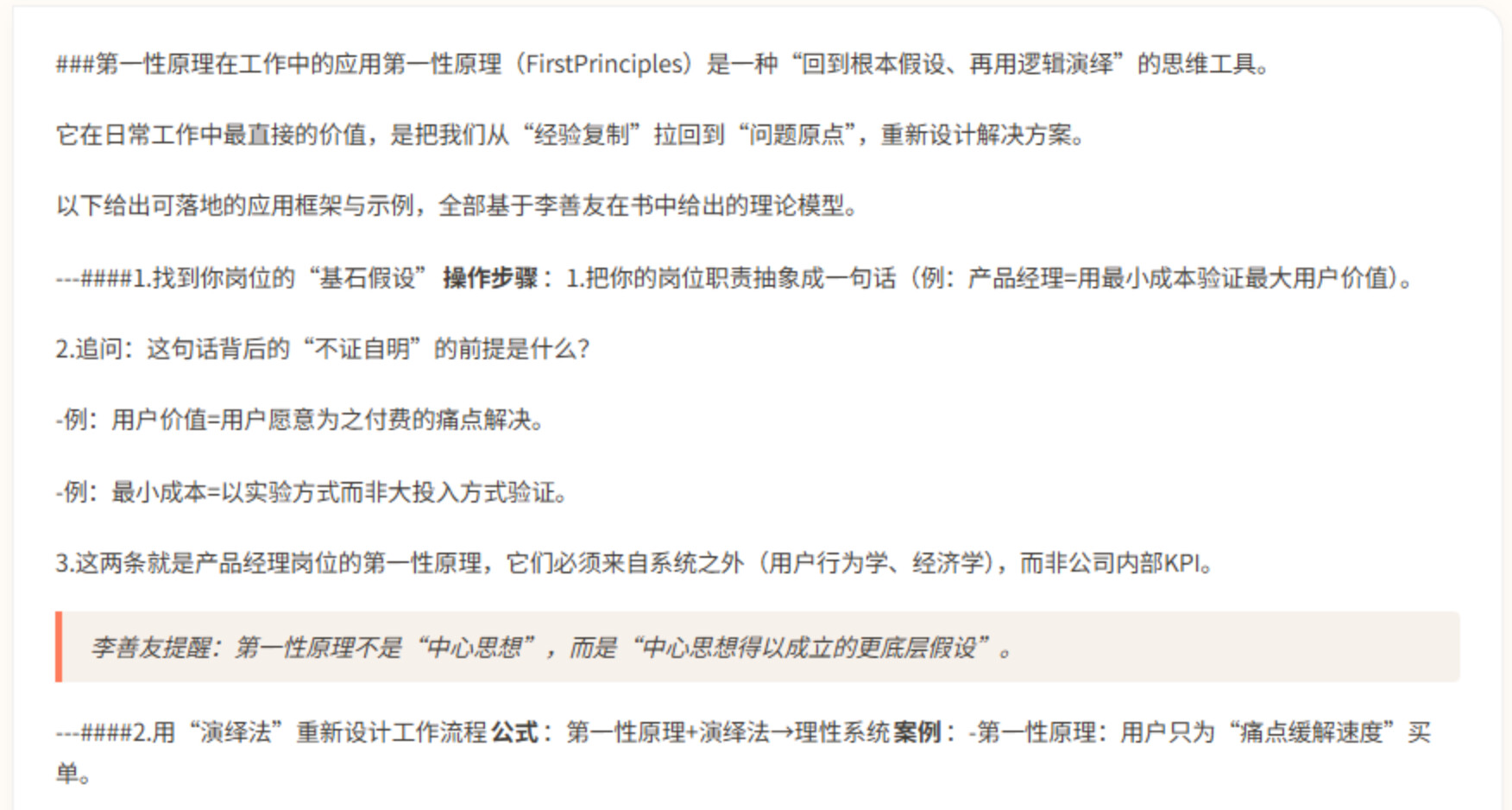
求助大佬,流式输出前端markdown显示不正确


以前主要写后端,这种改了多次都不满意,有没有大佬指点一下。

// src/utils/markdown.ts

import { marked } from 'marked';
import hljs from 'highlight.js';
import 'highlight.js/styles/atom-one-dark.css';

// 配置 marked (使用现代 API)
marked.setOptions({
  highlight: function(code: string, lang: string) {
    const language = hljs.getLanguage(lang) ? lang : 'plaintext';
    try {
      return hljs.highlight(code, { language }).value;
    } catch (e) {
      return code;
    }
  },
  langPrefix: 'hljs language-',
  breaks: false, // 使用标准 Markdown 换行规则(双换行符 = 段落)
  gfm: true      // GitHub 风格 Markdown
} as any);

/**
 * 智能处理段落分隔和标题格式
 * 1. 确保标题前有空行(Markdown 标准要求)
 * 2. 将中文标点后的单换行符转换为双换行符
 */
function normalizeParagraphBreaks(text: string): string {
  if (!text || text.length < 20) {
    return text;
  }
  
  let result = text;
  
  // 关键修复1:处理分割线后紧跟标题的情况(如 `---###附:`)
  // 将 `---` 或 `---\n###` 转换为 `---\n\n###`,确保标题前有空行
  result = result.replace(/(---)\s*\n?\s*(#{1,6}\s+)/g, '$1\n\n$2');
  result = result.replace(/(---)(#{1,6}\s+)/g, '$1\n\n$2');
  
  // 关键修复2:确保标题前有空行
  // 匹配行首的标题(### 或 ## 或 #),如果前面不是空行,则添加空行
  result = result.replace(/([^\n])\n(#{1,6}\s+)/g, '$1\n\n$2');
  
  // 关键修复3:处理行内标题(如文本后直接跟标题,没有换行)
  // 将 `文本###标题` 转换为 `文本\n\n###标题`
  result = result.replace(/([^\n#])(#{1,6}\s+)/g, '$1\n\n$2');
  
  // 策略1:将中文标点(。!?)后的单换行符转换为双换行符
  result = result.replace(/([。!?])\n(?!\n)/g, '$1\n\n');
  
  // 策略2:如果文本没有双换行符,但在中文标点后有其他字符,添加双换行符
  if (!result.includes('\n\n')) {
    // 在中文标点后添加双换行符(但避免在连续标点后添加)
    result = result.replace(/([。!?])([^\n。!?\s])/g, (match, punc, next) => {
      // 如果下一个字符是标点或空格,不添加换行
      if (/[。!?\s]/.test(next)) {
        return match;
      }
      return punc + '\n\n' + next;
    });
  }
  
  // 清理多余的换行符(超过2个的)
  result = result.replace(/\n{3,}/g, '\n\n');
  
  // 清理首尾空白(但保留开头的标题)
  return result.trim();
}

/**
 * 渲染 Markdown 为 HTML
 */
export const renderMarkdown = (text: string): string => {
  if (!text) return '';

  try {
    // 预处理:规范化段落分隔和标题格式
    let processedText = normalizeParagraphBreaks(text);
    
    // 调试:检查标题格式(开发环境)
    if (import.meta.env.DEV) {
      const headingMatches = processedText.match(/^#{1,6}\s+.+$/gm);
      if (headingMatches && headingMatches.length > 0) {
        console.log('检测到标题:', headingMatches.slice(0, 5));
      }
    }
    
    // 使用 marked 同步解析
    const html = marked.parse(processedText) as string;
    
    // 调试:检查渲染结果(开发环境)
    if (import.meta.env.DEV && html) {
      const hasH3 = html.includes('<h3>');
      const hasH2 = html.includes('<h2>');
      const hasH1 = html.includes('<h1>');
      if (hasH1 || hasH2 || hasH3) {
        console.log('Markdown 渲染包含标题:', { hasH1, hasH2, hasH3 });
      }
    }
    
    return html;
  } catch (error: unknown) {
    console.error('Markdown 渲染错误:', error);
    // 降级方案:基本 HTML 转义和换行处理
    return text
      .replace(/&/g, '&amp;')
      .replace(/</g, '&lt;')
      .replace(/>/g, '&gt;')
      .replace(/\n\n+/g, '</p><p>')
      .replace(/\n/g, '<br>')
      .replace(/^(.*)$/, '<p>$1</p>');
  }
};

/**
 * 渲染 Markdown(流式友好版):增强预处理,确保流式输出时 Markdown 能正确显示
 * 策略:规范化标题、列表、表格格式,确保即使是不完整的片段也能被正确识别
 */
export const renderMarkdownStreaming = (text: string): string => {
  if (!text) return '';
  try {
    let processedText = text;
    
    // 1. 规范化标题格式:确保标题前有空行,标题后可以有空格或直接跟文字
    // 处理行首的标题(### 或 ## 或 #),如果前面不是空行,则添加空行
    processedText = processedText.replace(/([^\n])\n(#{1,6}\s*)/g, '$1\n\n$2');
    // 处理分割线后紧跟标题的情况(如 `---####1.`)
    processedText = processedText.replace(/(---)\s*\n?\s*(#{1,6}\s*)/g, '$1\n\n$2');
    // 处理行内标题(如文本后直接跟标题,没有换行)
    processedText = processedText.replace(/([^\n#\s])(#{1,6}\s*)/g, '$1\n\n$2');
    
    // 关键:处理标题后没有空格的情况(如 `###用第一性原理`)
    // 在标题标记和文字之间添加空格,确保 Markdown 能识别
    // 只处理标题后直接跟非空白字符的情况,避免重复处理
    processedText = processedText.replace(/(#{1,6})([^\s\n#])/g, '$1 $2');
    
    // 2. 规范化列表格式:确保列表项前有空行(如果前面不是列表)
    // 处理无序列表:`-` 或 `*` 开头,后面没有空格时添加空格
    // 先处理行首的列表项(前面可能有空行)
    processedText = processedText.replace(/(\n|^)([-*])([^\s\n-*])/g, '$1$2 $3');
    // 再确保列表项前有空行(如果前面不是列表)
    processedText = processedText.replace(/([^\n])\n([-*]\s+)/g, '$1\n\n$2');
    // 处理有序列表:数字开头,后面没有空格时添加空格
    processedText = processedText.replace(/(\n|^)(\d+\.)([^\s\n\d])/g, '$1$2 $3');
    processedText = processedText.replace(/([^\n])\n(\d+\.\s+)/g, '$1\n\n$2');
    
    // 3. 规范化表格格式:确保表格前有空行
    processedText = processedText.replace(/([^\n])\n(\|.*\|)/g, (match, before, tableLine) => {
      // 如果下一行是表格行(包含 |),在前面添加空行
      if (tableLine.includes('|')) {
        return before + '\n\n' + tableLine;
      }
      return match;
    });
    
    // 4. 规范化引用块格式:确保引用块前有空行
    processedText = processedText.replace(/([^\n])\n(>\s*)/g, '$1\n\n$2');
    
    // 5. 规范化代码块格式:确保代码块前有空行
    processedText = processedText.replace(/([^\n])\n(```)/g, '$1\n\n$2');
    
    // 使用 marked 解析,临时启用 breaks 让单换行也能显示(流式友好)
    // 注意:marked 的配置是全局的,所以这里需要临时修改然后恢复
    const originalBreaks = (marked as any).defaults?.breaks ?? false;
    marked.setOptions({ breaks: true, gfm: true } as any);
    const html = marked.parse(processedText) as string;
    marked.setOptions({ breaks: originalBreaks, gfm: true } as any);
    
    return html;
  } catch (error: unknown) {
    console.error('Markdown 流式渲染错误:', error);
    return text
      .replace(/&/g, '&amp;')
      .replace(/</g, '&lt;')
      .replace(/>/g, '&gt;')
      .replace(/\n\n+/g, '</p><p>')
      .replace(/\n/g, '<br>')
      .replace(/^(.*)$/, '<p>$1</p>');
  }
};

啊 真的要手搓吗

呃,你这是自己写的渲染markdown的方法么,可以在网上找找有没有封装好的

让AI整的,搞了几个版本都不行

https://www.ai-elements-vue.com/ 试试这个组件 有react和vue版本

试试调库:frowning_face_with_open_mouth:,不用手搓吧

有很多渲染md的组件的我记得,ai也会用

可以问问ai有没有现成的可以集成到项目中

不用手搓啊,markdownit呀

我选择的方案都是让它输出完了再重新渲染一次消息界面,这样做的问题就是输出过程观感比较差

当然也用了highlight.js、codemirror、ReactMarkdown

AI有时候喜欢瞎整,我先换一下其他大佬的库试一下

蹲个结果,现在也是用的marked感觉稀碎。

找个好点的项目抄吧,我给 nextchat 加了很多补丁,还是免不了会遇到异常情况 :weary_face:

还是找个库吧


你这不是你自己markdown的问题吗

###直接并在一起怎么读
image
-也是
image

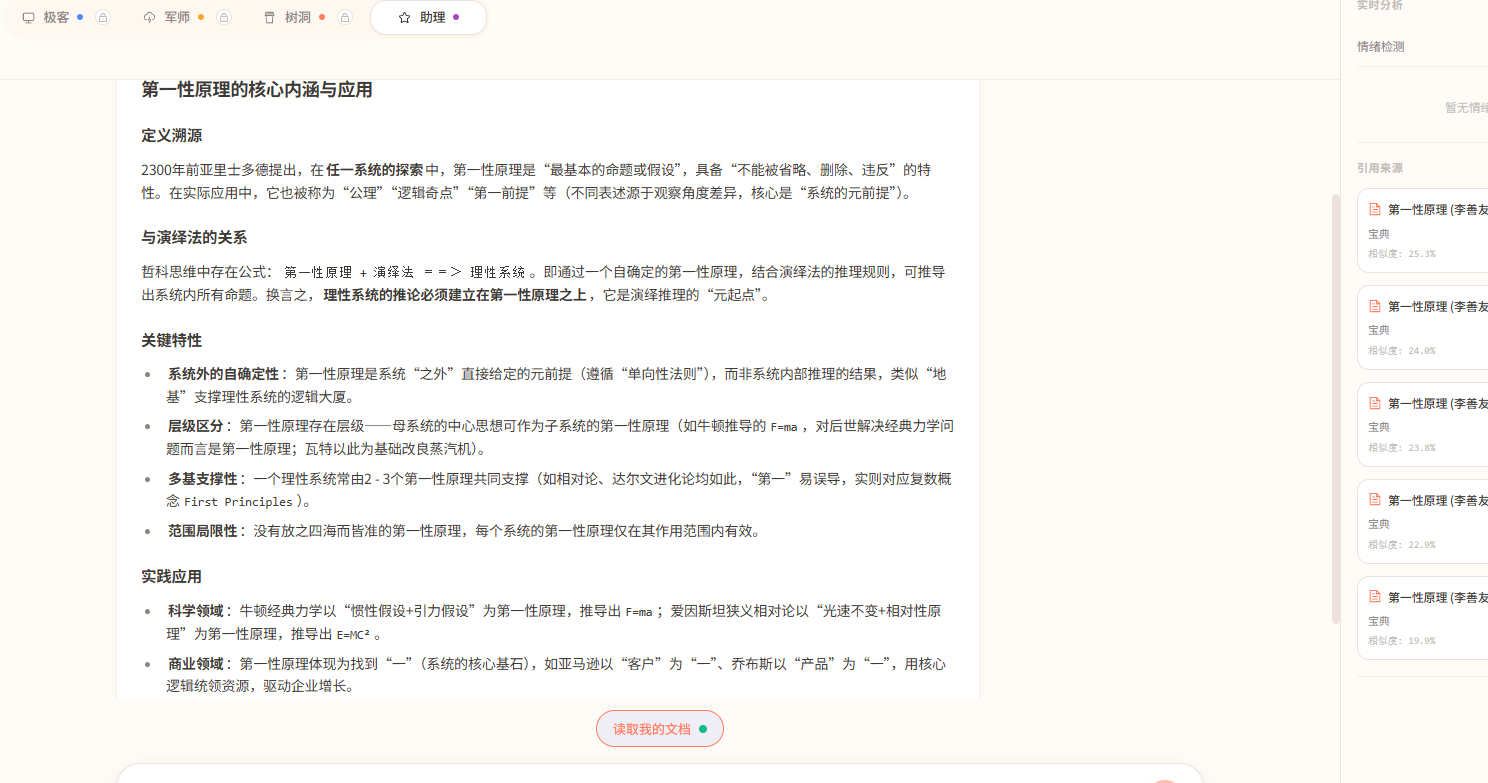
很明显 引用 和 加粗 都正常渲染了啊


image

这跟手搓有什么关系 marked.js 就不是库了吗 怎么都扯上手搓了

@here

感谢各位大佬指点,效果如下:

问题原因:
1.后端flux返回自己解析使得“\n”换行符等丢失,透传全部返回,前端解析;
2.前端使用markdown-it。

// src/utils/markdown.ts
import MarkdownIt from 'markdown-it'
import hljs from 'highlight.js'
import DOMPurify from 'dompurify'
import 'highlight.js/styles/atom-one-dark.css'

// 初始化 markdown-it
const md = new MarkdownIt({
  html: true,
  linkify: true,
  breaks: true,      // 开启软换行 (转换为 <br>)
  typographer: true,
  highlight: function (str: string, lang: string): string {
    if (lang && hljs.getLanguage(lang)) {
      try {
        const highlighted = hljs.highlight(str, { language: lang, ignoreIllegals: true }).value
        return `<pre class="hljs code-block"><code class="language-${lang}">${highlighted}</code></pre>`
      } catch (err) { }
    }
    return `<pre class="hljs code-block"><code>${md.utils.escapeHtml(str)}</code></pre>`
  }
})

/**
 * 智能修复 LLM 输出格式(基于状态机处理)
 * 解决了表格被错误截断、标题粘连等问题
 */
function fixLLMFormat(content: string): string {
  if (!content) return ''

  // 1. 全局预处理:修复最明显的标题和分割线粘连
  // 注意:这里只处理最安全的模式,避免破坏代码块内部
  let result = content
    // 修复粘连的标题 (###标题 -> ### 标题),排除代码块内的 #
    .replace(/(^|\n)(#{1,6})([^\s#\n])/g, '$1$2 $3')
    // 修复粘连的列表 (-列表 -> - 列表)
    .replace(/(^|\n)([-*])([^\s\-*\n])/g, '$1$2 $3')
    // 修复粘连的引用 (>引用 -> > 引用)
    .replace(/(^|\n)(>)([^\s>\n])/g, '$1$2 $3')
    // 修复分割线粘连 (---### -> ---\n\n###)
    .replace(/(-{3,})([^\s\n-])/g, '$1\n\n$2')

  // 2. 基于行的状态机处理 (解决表格和段落问题)
  const lines = result.split('\n')
  const processedLines: string[] = []
  
  let inCodeBlock = false
  let inTable = false
  
  for (let i = 0; i < lines.length; i++) {
    let line = lines[i]
    const trimmed = line.trim()
    
    // --- 状态检测 ---
    
    // 1. 检测代码块边界
    if (trimmed.startsWith('```')) {
      inCodeBlock = !inCodeBlock
      // 代码块开始或结束时,重置表格状态
      inTable = false 
      processedLines.push(line)
      continue
    }

    // 如果在代码块内,直接保留原样,不做任何处理
    if (inCodeBlock) {
      processedLines.push(line)
      continue
    }

    // 2. 检测表格
    // 表格行的特征:以 | 开头和结尾(或包含 | 且看起来像数据行)
    // 为了容错,只要行内包含 | 且不是由其他 Markdown 符号开头,我们假设它可能是表格的一部分
    // 更严格的表格检测:
    // - 分割行必须匹配 |---|---| 模式
    // - 数据行必须包含 |
    const isTableSeparator = /^\|?(\s*:?-+:?\s*\|)+\s*:?-+:?\s*\|?$/.test(trimmed)
    const isTableRow = trimmed.includes('|') && !/^(#|>|-|\*|\d+\.)/.test(trimmed)

    if (isTableSeparator) {
      inTable = true
    } else if (inTable) {
      // 如果当前在表格模式下
      if (trimmed === '') {
        // 空行意味着表格结束
        inTable = false
      } else if (!isTableRow) {
        // 遇到非表格行,表格结束
        inTable = false
      }
    } else {
      // 如果不在表格模式下,但遇到了潜在的表格行
      // 我们需要向前看一行,或者向后看一行来确认
      const nextLine = lines[i + 1]?.trim() || ''
      const prevLine = lines[i - 1]?.trim() || ''
      
      // 如果下一行是分割线,或者上一行是分割线,那当前行就是表格
      if (/^\|?(\s*:?-+:?\s*\|)+\s*:?-+:?\s*\|?$/.test(nextLine) || 
          /^\|?(\s*:?-+:?\s*\|)+\s*:?-+:?\s*\|?$/.test(prevLine)) {
        inTable = true
      }
    }

    // --- 内容处理 ---

    if (inTable) {
      // 在表格内:绝对禁止插入空行,保持原样
      // 修复表格内可能的半角符号问题(可选)
      processedLines.push(line)
      continue
    }

    // 在普通文本区域:执行增强的段落分隔逻辑
    
    // 逻辑:如果当前行是文本(非标题、非列表),且上一行以中文标点结尾,
    // 且当前行和上一行之间没有空行,则强制插入空行,形成段落。
    if (i > 0) {
      const prevRaw = lines[i - 1]
      const prevTrimmed = prevRaw.trim()
      
      // 只有当上一行是非空文本行时才处理
      if (prevTrimmed !== '' && !processedLines[processedLines.length - 1].trim().startsWith('```')) {
        // 检查上一行结尾是否为标点
        const endsWithPunctuation = /[。!?:;…]$/.test(prevTrimmed)
        // 检查当前行是否为新段落的开始(非特殊符号开头)
        const isNewParagraphStart = !/^(#|>|-|\*|\d+\.|\|)/.test(trimmed)
        
        // 如果满足条件,且之前没有空行,插入空行
        if (endsWithPunctuation && isNewParagraphStart && trimmed !== '') {
          // 检查 processedLines 最后一行是否已经是空行
          if (processedLines[processedLines.length - 1] !== '') {
             processedLines.push('') 
          }
        }
      }
    }
    
    processedLines.push(line)
  }

  return processedLines.join('\n')
}

export const renderMarkdown = (text: string, stream = false): string => {
  if (!text) return ''

  try {
    // 1. 格式清洗
    const cleanContent = fixLLMFormat(text)
    
    // 2. 渲染
    const html = md.render(cleanContent)
    
    // 3. 安全净化
    return DOMPurify.sanitize(html, {
      ADD_ATTR: ['target'],
      FORBID_TAGS: ['style', 'script', 'iframe'], // 明确禁止危险标签
    })
  } catch (error) {
    console.error('Markdown rendering error:', error)
    return `<p>${text}</p>`
  }
}

确实有这个原因

可以看一下回复

你为啥要自己操作 markdown 的内容?我没想通的是

你是指大模型返回的内容吗?还是前端代码处理