首先谢谢这个帖子的佬友推荐了他的脚本,虽然挺好用但是我觉得没有那么还原哈基米里的侧边栏。
https://linux.do/t/topic/1341845?u=hkxbk
于是我这个纯小白完全靠哈基米自己做了个脚本,并且还加了个可以给节点上色的功能。效果如下:
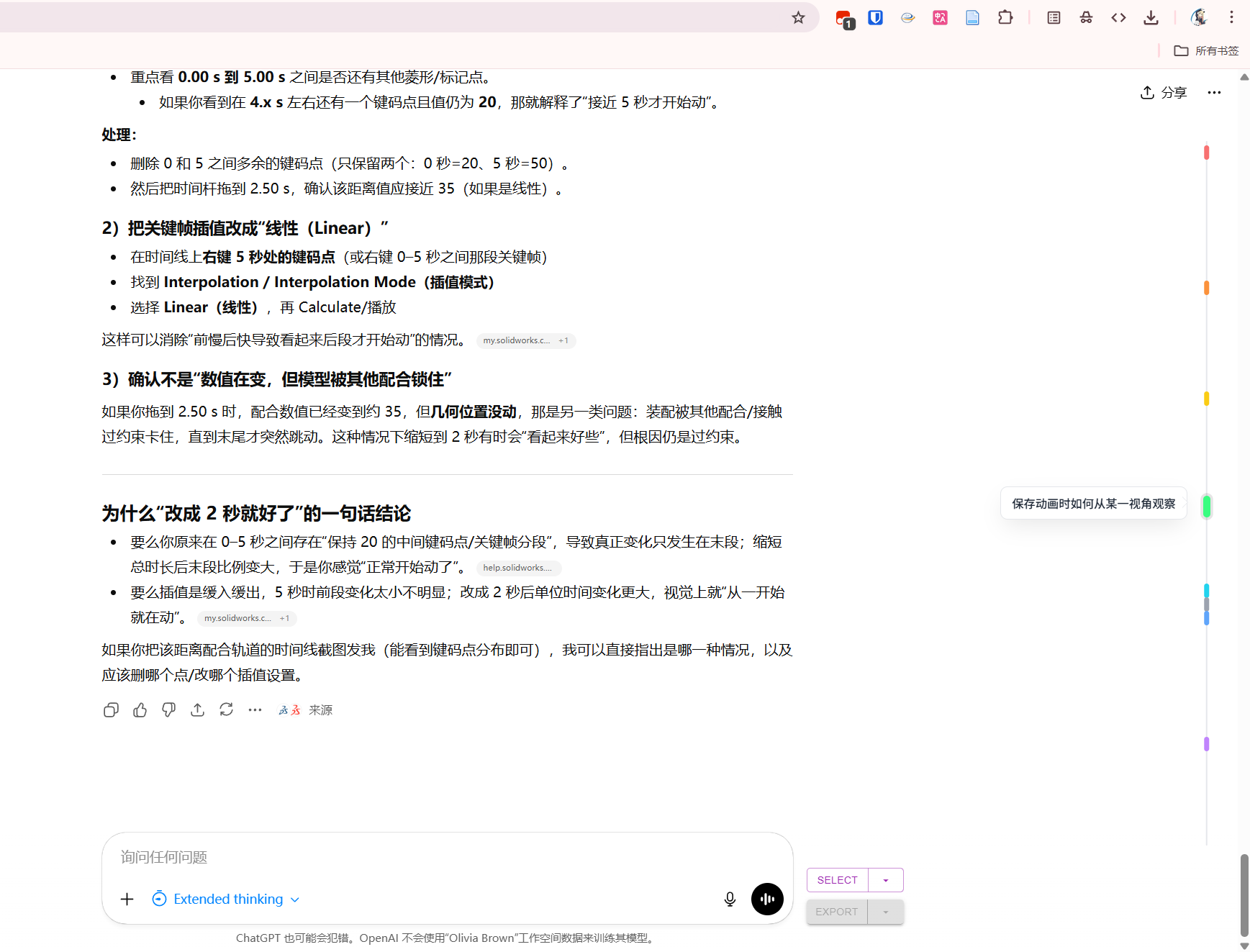
然后本来是加了一个提问数量过多时间轴可以滑动的功能,但是因为我没有在一段对话内提出过这么长的问题,所以就没有测试了

哈基米写的代码如下,复制到油猴里即可使用:
// ==UserScript==
// @name ChatGPT 侧边时间轴 (V11.0 颜色标记收藏版)
// @namespace http://tampermonkey.net/
// @version 11.0
// @description 右键点击节点可选择颜色进行标记(低饱和度),支持持久化保存,完美支持长列表滚动与置底吸附。
// @author YourName
// @match https://chatgpt.com/*
// @icon https://www.google.com/s2/favicons?sz=64&domain=openai.com
// @grant none
// @run-at document-idle
// ==/UserScript==
(function() {
'use strict';
// 全局状态
let isHoveringSidebar = false;
let currentColorMap = {}; // 存储当前对话的颜色配置 { index: colorHex }
// 配置参数
const CONFIG = {
nodeHeight: 16,
triggerHeight: 22,
sidebarRight: 32,
tooltipGap: 18,
// 低饱和度配色表 (Tailwind 400/500 mix)
colors: [
{ name: 'Default', hex: '#9CA3AF' }, // 灰色 (恢复默认)
{ name: 'Red', hex: '#F87171' }, // 柔红
{ name: 'Orange', hex: '#FB923C' }, // 暖橙
{ name: 'Yellow', hex: '#FACC15' }, // 姜黄
{ name: 'Green', hex: '#4ADE80' }, // 草绿
{ name: 'Cyan', hex: '#22D3EE' }, // 青色
{ name: 'Blue', hex: '#60A5FA' }, // 天蓝
{ name: 'Purple', hex: '#C084FC' } // 香芋紫
]
};
// --- 1. CSS 样式 ---
const styleSheet = document.createElement('style');
styleSheet.innerText = `
/* 主容器 */
#gpt-timeline-wrapper {
position: fixed;
top: 80px;
bottom: 120px;
right: ${CONFIG.sidebarRight}px;
width: 36px;
z-index: 9990;
pointer-events: auto !important;
display: flex;
flex-direction: column;
align-items: center;
overflow-y: hidden;
transition: right 0.3s ease;
contain: layout;
}
#gpt-timeline-wrapper:hover {
overflow-y: auto;
}
#gpt-timeline-wrapper::-webkit-scrollbar { width: 0 !important; }
#gpt-timeline-wrapper { scrollbar-width: none; }
/* 轨道 */
#gpt-timeline-track {
position: relative;
width: 100%;
min-height: 100%;
padding-bottom: 30px;
}
/* 轴线 */
#gpt-timeline-line {
position: absolute;
left: 50%;
top: 0; bottom: 0;
width: 2px;
background-color: #E5E7EB;
transform: translateX(-50%);
border-radius: 99px;
z-index: 0;
}
@media (prefers-color-scheme: dark) {
#gpt-timeline-line { background-color: #4B5563; }
}
/* 节点 */
.gpt-timeline-node {
position: absolute;
left: 50%;
transform: translateX(-50%);
width: 6px;
height: ${CONFIG.nodeHeight}px;
border-radius: 4px;
/* 默认背景色,会被行内样式覆盖 */
background-color: #9CA3AF;
cursor: pointer;
z-index: 10;
transition: background-color 0.2s, height 0.2s, width 0.2s, transform 0.2s;
}
.gpt-timeline-node::before {
content: "";
position: absolute;
top: -6px; bottom: -6px; left: -20px; right: -20px;
background: transparent;
}
/* 悬停效果 (注意:如果设置了自定义颜色,悬停时不应强制变蓝,而是变亮或保持)
这里使用 filter brightness 来处理所有颜色的悬停态 */
.gpt-timeline-node:hover {
height: 24px;
width: 8px;
filter: brightness(1.1) saturate(1.2); /* 稍微提亮 */
box-shadow: 0 0 0 3px rgba(0, 0, 0, 0.1);
z-index: 100;
}
/* 吸附节点 */
#gpt-timeline-sticky-node {
position: absolute;
bottom: 5px;
left: 50%;
transform: translateX(-50%);
z-index: 100;
width: 6px;
height: ${CONFIG.nodeHeight}px;
border-radius: 4px;
background-color: #9CA3AF;
cursor: pointer;
opacity: 0;
pointer-events: none;
transition: opacity 0.2s ease;
}
#gpt-timeline-sticky-node:hover {
height: 24px;
width: 8px;
filter: brightness(1.1) saturate(1.2);
box-shadow: 0 0 0 3px rgba(0, 0, 0, 0.1);
}
/* 全局气泡 */
#gpt-timeline-global-tooltip {
position: fixed;
z-index: 2147483647;
background-color: #FFFFFF;
color: #1F2937;
border: 1px solid #E5E7EB;
box-shadow: 0 10px 25px -5px rgba(0, 0, 0, 0.1);
padding: 8px 12px;
border-radius: 8px;
font-size: 13px;
line-height: 1.5;
font-family: sans-serif;
font-weight: 500;
max-width: 280px;
pointer-events: none;
visibility: hidden;
opacity: 0;
top: 0; left: 0;
transition: opacity 0.15s ease-out;
}
#gpt-timeline-global-tooltip::after {
content: "";
position: absolute;
top: 50%;
right: -7px;
margin-top: -7px;
border-width: 7px;
border-style: solid;
border-color: transparent transparent transparent #FFFFFF;
filter: drop-shadow(1px 0 0 #E5E7EB);
}
/* --- 右键颜色菜单 --- */
#gpt-timeline-context-menu {
position: fixed;
z-index: 2147483647;
background: rgba(255, 255, 255, 0.95);
backdrop-filter: blur(5px);
border: 1px solid #E5E7EB;
box-shadow: 0 10px 15px -3px rgba(0, 0, 0, 0.1);
border-radius: 12px;
padding: 8px;
display: grid;
grid-template-columns: repeat(4, 1fr);
gap: 8px;
opacity: 0;
visibility: hidden;
transform: scale(0.9);
transition: opacity 0.15s, transform 0.15s;
}
/* 暗色模式适配菜单 */
@media (prefers-color-scheme: dark) {
#gpt-timeline-context-menu {
background: rgba(32, 33, 35, 0.95);
border-color: #4B5563;
}
}
.gpt-color-option {
width: 20px;
height: 20px;
border-radius: 50%;
cursor: pointer;
border: 2px solid transparent;
transition: transform 0.1s;
}
.gpt-color-option:hover {
transform: scale(1.2);
border-color: rgba(0,0,0,0.2);
}
`;
document.head.appendChild(styleSheet);
// --- 2. 存储管理 (LocalStorage) ---
// 根据 URL 生成唯一的 Key,这样每个对话的标记是独立的
function getStorageKey() {
const path = window.location.pathname;
// 简单处理:提取 URL 中的 UUID,如果没有则认为是临时对话
const match = path.match(/\/c\/([a-z0-9-]+)/) || path.match(/\/chat\/([a-z0-9-]+)/);
const id = match ? match[1] : 'temp-chat';
return `gpt-timeline-colors-${id}`;
}
function loadColors() {
const key = getStorageKey();
try {
const data = localStorage.getItem(key);
currentColorMap = data ? JSON.parse(data) : {};
} catch (e) {
currentColorMap = {};
}
}
function saveColor(index, colorHex) {
const key = getStorageKey();
if (colorHex === CONFIG.colors[0].hex) {
// 如果选了默认灰色,则从存储中删除
delete currentColorMap[index];
} else {
currentColorMap[index] = colorHex;
}
localStorage.setItem(key, JSON.stringify(currentColorMap));
// 立即刷新视图
updateTimelineNodesStyle();
}
// --- 3. UI 组件 ---
// 气泡
function showTooltip(text, targetNode) {
let tooltip = document.getElementById('gpt-timeline-global-tooltip');
if (!tooltip) {
tooltip = document.createElement('div');
tooltip.id = 'gpt-timeline-global-tooltip';
document.body.appendChild(tooltip);
}
tooltip.innerText = text;
tooltip.style.display = 'block';
tooltip.style.visibility = 'hidden';
tooltip.style.opacity = '0';
const tooltipWidth = tooltip.offsetWidth;
const tooltipHeight = tooltip.offsetHeight;
const nodeRect = targetNode.getBoundingClientRect();
const top = nodeRect.top + (nodeRect.height / 2) - (tooltipHeight / 2);
const left = nodeRect.left - tooltipWidth - CONFIG.tooltipGap;
tooltip.style.top = `${top}px`;
tooltip.style.left = `${left}px`;
requestAnimationFrame(() => {
tooltip.style.visibility = 'visible';
tooltip.style.opacity = '1';
});
}
function hideTooltip() {
const tooltip = document.getElementById('gpt-timeline-global-tooltip');
if (tooltip) {
tooltip.style.opacity = '0';
setTimeout(() => {
if (tooltip.style.opacity === '0') tooltip.style.visibility = 'hidden';
}, 150);
}
}
// 右键菜单
let activeContextMenuIndex = -1; // 当前正在操作哪个节点的索引
function createContextMenu() {
if (document.getElementById('gpt-timeline-context-menu')) return;
const menu = document.createElement('div');
menu.id = 'gpt-timeline-context-menu';
CONFIG.colors.forEach(c => {
const dot = document.createElement('div');
dot.className = 'gpt-color-option';
dot.style.backgroundColor = c.hex;
dot.title = c.name;
dot.onclick = (e) => {
e.stopPropagation();
if (activeContextMenuIndex !== -1) {
saveColor(activeContextMenuIndex, c.hex);
}
hideContextMenu();
};
menu.appendChild(dot);
});
document.body.appendChild(menu);
// 点击页面其他地方关闭菜单
document.addEventListener('click', hideContextMenu);
// 滚动时关闭菜单
document.addEventListener('scroll', hideContextMenu, true);
}
function showContextMenu(e, index) {
e.preventDefault(); // 阻止默认右键菜单
activeContextMenuIndex = index;
createContextMenu();
const menu = document.getElementById('gpt-timeline-context-menu');
// 定位到鼠标左侧
menu.style.visibility = 'hidden';
menu.style.display = 'grid';
const menuWidth = 120; // 估算
const left = e.clientX - menuWidth - 10;
const top = e.clientY - 40;
menu.style.left = `${left}px`;
menu.style.top = `${top}px`;
requestAnimationFrame(() => {
menu.style.visibility = 'visible';
menu.style.opacity = '1';
menu.style.transform = 'scale(1)';
});
}
function hideContextMenu() {
const menu = document.getElementById('gpt-timeline-context-menu');
if (menu) {
menu.style.opacity = '0';
menu.style.transform = 'scale(0.9)';
setTimeout(() => { menu.style.visibility = 'hidden'; }, 150);
}
}
// --- 4. 核心逻辑 ---
// 辅助:只更新节点的颜色,不重新生成 DOM
function updateTimelineNodesStyle() {
const track = document.getElementById('gpt-timeline-track');
if (!track) return;
// 更新普通节点
const nodes = track.querySelectorAll('.gpt-timeline-node');
nodes.forEach((node, i) => {
const savedColor = currentColorMap[i];
node.style.backgroundColor = savedColor || CONFIG.colors[0].hex;
});
// 更新吸附节点 (它对应最后一个索引)
const stickyNode = document.getElementById('gpt-timeline-sticky-node');
if (stickyNode) {
const lastIndex = nodes.length - 1;
const savedColor = currentColorMap[lastIndex];
stickyNode.style.backgroundColor = savedColor || CONFIG.colors[0].hex;
}
}
function findScrollContainer() {
const candidates = document.querySelectorAll('div[class*="overflow-y-auto"], main div.h-full.overflow-y-auto');
for (let el of candidates) {
if (el.scrollHeight > el.clientHeight && el.scrollHeight > 0) return el;
}
return document.documentElement;
}
function updateTimeline() {
if (isHoveringSidebar) return;
// 加载颜色数据
loadColors();
let wrapper = document.getElementById('gpt-timeline-wrapper');
let track, line, stickyNode;
if (!wrapper) {
wrapper = document.createElement('div');
wrapper.id = 'gpt-timeline-wrapper';
wrapper.addEventListener('mouseenter', () => isHoveringSidebar = true);
wrapper.addEventListener('mouseleave', () => isHoveringSidebar = false);
track = document.createElement('div');
track.id = 'gpt-timeline-track';
line = document.createElement('div');
line.id = 'gpt-timeline-line';
stickyNode = document.createElement('div');
stickyNode.id = 'gpt-timeline-sticky-node';
track.appendChild(line);
wrapper.appendChild(track);
wrapper.appendChild(stickyNode);
document.body.appendChild(wrapper);
// 滚动监听
wrapper.onscroll = () => {
const scrollDiff = track.scrollHeight - wrapper.scrollTop - wrapper.clientHeight;
if (scrollDiff > 30) {
stickyNode.style.opacity = '1';
stickyNode.style.pointerEvents = 'auto';
} else {
stickyNode.style.opacity = '0';
stickyNode.style.pointerEvents = 'none';
hideTooltip();
}
};
} else {
track = document.getElementById('gpt-timeline-track');
stickyNode = document.getElementById('gpt-timeline-sticky-node');
}
const scrollContainer = findScrollContainer();
if (!scrollContainer) return;
const userMessages = document.querySelectorAll('[data-message-author-role="user"]');
if (userMessages.length === 0) return;
const wrapperHeight = wrapper.clientHeight || (window.innerHeight - 200);
const nodeCount = userMessages.length;
const isOverflowMode = (wrapperHeight / nodeCount) < CONFIG.triggerHeight;
const existingNodes = track.querySelectorAll('.gpt-timeline-node');
existingNodes.forEach(n => n.remove());
if (isOverflowMode) {
track.style.height = `${nodeCount * CONFIG.triggerHeight + 40}px`;
stickyNode.style.display = 'block';
} else {
track.style.height = '100%';
stickyNode.style.display = 'none';
}
const totalContentHeight = scrollContainer.scrollHeight;
const containerRect = scrollContainer.getBoundingClientRect();
const scrollTop = scrollContainer.scrollTop;
// 渲染节点
userMessages.forEach((msg, index) => {
let text = msg.innerText || "";
text = text.replace(/\s+/g, ' ').trim();
if (!text) return;
if (text.length > 200) text = text.substring(0, 200) + "...";
const node = document.createElement('div');
node.className = 'gpt-timeline-node';
// 设置初始颜色
if (currentColorMap[index]) {
node.style.backgroundColor = currentColorMap[index];
}
if (isOverflowMode) {
node.style.top = `${15 + index * CONFIG.triggerHeight}px`;
} else {
const msgRect = msg.getBoundingClientRect();
const absoluteTop = msgRect.top - containerRect.top + scrollTop;
let percent = (absoluteTop / totalContentHeight) * 100;
if (percent < 0) percent = 0;
if (percent > 99) percent = 99;
node.style.top = `${percent}%`;
}
// 事件:气泡
node.addEventListener('mouseenter', () => showTooltip(text, node));
node.addEventListener('mouseleave', () => hideTooltip());
// 事件:右键菜单
node.addEventListener('contextmenu', (e) => showContextMenu(e, index));
// 事件:点击跳转
node.onclick = (e) => {
e.stopPropagation();
msg.scrollIntoView({ behavior: 'smooth', block: 'center' });
highlightMessage(msg);
};
track.appendChild(node);
});
// 配置吸附节点 (总是对应最后一个)
if (userMessages.length > 0) {
const lastIndex = userMessages.length - 1;
const lastMsg = userMessages[lastIndex];
let lastText = lastMsg.innerText || "";
lastText = lastText.replace(/\s+/g, ' ').trim().substring(0, 200);
// 更新引用,防止事件重复
const newSticky = stickyNode.cloneNode(true);
stickyNode.parentNode.replaceChild(newSticky, stickyNode);
stickyNode = newSticky;
// 设置颜色
if (currentColorMap[lastIndex]) {
stickyNode.style.backgroundColor = currentColorMap[lastIndex];
} else {
stickyNode.style.backgroundColor = CONFIG.colors[0].hex;
}
stickyNode.addEventListener('mouseenter', () => showTooltip(lastText, stickyNode));
stickyNode.addEventListener('mouseleave', () => hideTooltip());
// 吸附节点也支持右键标记颜色!
stickyNode.addEventListener('contextmenu', (e) => showContextMenu(e, lastIndex));
stickyNode.onclick = (e) => {
e.stopPropagation();
lastMsg.scrollIntoView({ behavior: 'smooth', block: 'center' });
highlightMessage(lastMsg);
wrapper.scrollTo({ top: track.scrollHeight, behavior: 'smooth' });
};
}
}
function highlightMessage(msg) {
msg.style.transition = 'background-color 0.3s';
const originalBg = msg.style.backgroundColor;
msg.style.backgroundColor = 'rgba(59, 130, 246, 0.15)';
setTimeout(() => { msg.style.backgroundColor = originalBg; }, 800);
}
// --- 5. 初始化 ---
let debounceTimer;
const observer = new MutationObserver(() => {
clearTimeout(debounceTimer);
if (!isHoveringSidebar) {
debounceTimer = setTimeout(updateTimeline, 600);
}
});
function init() {
setTimeout(updateTimeline, 1500);
observer.observe(document.body, { childList: true, subtree: true });
let lastUrl = location.href;
new MutationObserver(() => {
if (location.href !== lastUrl) {
lastUrl = location.href;
isHoveringSidebar = false;
hideTooltip();
hideContextMenu();
setTimeout(() => {
const wrapper = document.getElementById('gpt-timeline-wrapper');
if (wrapper) wrapper.remove();
updateTimeline();
}, 1000);
}
}).observe(document, {subtree: true, childList: true});
window.addEventListener('resize', () => {
if (!isHoveringSidebar) {
clearTimeout(debounceTimer);
debounceTimer = setTimeout(updateTimeline, 500);
}
});
}
init();
})();