Never send to know for whom the bell tolls; it tolls for thee.
— John Donne
前言
15天我终于2级啦,继上次分享站内思路帖又过去了一周。第一周最大的进展其实是完成了cliproxyAPI的远程部署,不担心没有稳定的claude或者codex用——原本是这么想的,结果在一月底赶上了大善人的抽杀,gemini死伤过半,这对我来说不啻于一场浩劫  。好在天无绝人之路,靠着仅剩下的账号还能苟延残喘,但也花了很多时间。
然而现状是我还用着基础的claude code,上次提到的MCP、skill、和cgg之类的复杂工作流。我仅仅是体验过,尚且不清楚我是否真正需要。我的思绪就此再次展开:
- MCP和skill,我最迫切需要的是什么?需要哪些功能?
- 工作流越来越多,为什么会有这么多工作流?他们都在以什么方式解决了哪些问题?
- 我怎么选择工作流?
这次先手撕一下MCP,本文继续以意识流的形式展开。
1 深入调研MCP和Skills
能够随便使用CC后,刚开始我的关注点在于:MCP和Skills到底哪个更好?
因为我是个user,安装skills和MCP都是有学习成本的,我的想法是一次到位。或者他们在不同领域各有千秋,我就一次配完,省的夜长梦多。所以我看了很帖子,并且自己发帖求助:
https://linux.do/t/topic/1488917
但这个东西并不想我想的那么简单,刚开始接触这个东西还是一团雾水。我记不得是在哪里看到了一句话说:了解MCP和Skill要结合其诞生最初解决的问题,这让我不得不回到最基础的部分,LLM的Function/Tool Calling,或者说最基础的LLM使用。
2 LLM 怎么实现超出文字生成的功能的——Tool Calling
以下是能工智人的CoT:
我分析了一下,按照我最朴素的想法,LLM是token预测机,所以天生是和脚本信息没关系的。所以肯定在某些地方存了工具信息(至少要有路径、调用条件和调用方法什么的,让我人工跑脚本也得搞明白这些东西)。
而要搞明白这个问题,恐怕要知道:我和AI聊天,实际上发生了什么。还是按照最朴素的想法,我肯定是给什么地方发送了一种请求(request),然后远程处理完了给我一个响应(response),Tool八成都在里边。所以要知道这个东西。
(实际上回过头来了解到这东西就是API补全请求)
想明白了就开干,直接看claude给出请求内容是最方便的,直接在cli中说:“我想知道上述对话是怎样进行的?去想知道具体的请求是怎么写的,给我完整的request和response结构。”我得到了如下内容:
2.1 请求
首先是请求,我了解到远程通讯中最常见的方式是提http请求:
  HTTP Headers

  POST /v1/messages HTTP/1.1
  Host: api.anthropic.com
  Content-Type: application/json
  x-api-key: xxxxxxxxxxxxxxxxxxxxxxxxxxxxxxxx
  anthropic-version: 20xx-xx-xx
  anthropic-beta: xxxxxxx
{
  "model": "claude-opus-4-5-20251101",
  "max_tokens": 8192,
  "temperature": 1,
  "top_p": 1,
  "top_k": 0,
  "stream": true,
  "stop_sequences": [],
  "system": "You are Claude Code, Anthropic's official CLI for Claude.\nYou are an interactive CLI tool that helps users with software engineering tasks...\n\n# Tool usage policy\n...(完整的系统提示词)",
  "messages": [
    {
      "role": "user",
      "content": [
        {
          "type": "text",
          "text": "你好"
        }
      ]
    },
    {
      "role": "assistant",
      "content": [
        {
          "type": "text",
          "text": "你好!有什么我可以帮助你的吗?"
        }
      ]
    },
    {
      "role": "user",
      "content": [
        {
          "type": "text",
          "text": "我想知道上述对话是怎样进行的?..."
        }
      ]
    }
  ],
  "tools": [
    {
      "name": "Bash",
      "description": "Executes a given bash command with optional timeout...",
      "input_schema": {
        "type": "object",
        "properties": {
          "command": {
            "type": "string",
            "description": "The command to execute"
          },
          "timeout": {
            "type": "number",
            "description": "Optional timeout in milliseconds"
          },
          "run_in_background": {
            "type": "boolean",
            "description": "Set to true to run in background"
          }
        },
        "required": ["command"]
      }
    },
    {
      "name": "Read",
      "description": "Reads a file from the local filesystem...",
      "input_schema": {
        "type": "object",
        "properties": {
          "file_path": {
            "type": "string",
            "description": "The absolute path to the file to read"
          },
          "offset": {
            "type": "number",
            "description": "The line number to start reading from"
          },
          "limit": {
            "type": "number",
            "description": "The number of lines to read"
          }
        },
        "required": ["file_path"]
      }
    },
    {
      "name": "Edit",
      "description": "Performs exact string replacements in files...",
      "input_schema": { "..." : "..." }
    },
    {
      "name": "Write",
      "description": "Writes a file to the local filesystem...",
      "input_schema": { "..." : "..." }
    },
    {
      "name": "Glob",
      "description": "Fast file pattern matching tool...",
      "input_schema": { "..." : "..." }
    },
    {
      "name": "Grep",
      "description": "A powerful search tool built on ripgrep...",
      "input_schema": { "..." : "..." }
    },
    {
      "name": "Task",
      "description": "Launch a new agent to handle complex tasks...",
      "input_schema": { "..." : "..." }
    },
    {
      "name": "WebFetch",
      "description": "Fetches content from a specified URL...",
      "input_schema": { "..." : "..." }
    },
    {
      "name": "WebSearch",
      "description": "Allows Claude to search the web...",
      "input_schema": { "..." : "..." }
    }
  ],
  "metadata": {
    "user_id": "user_xxxxxxxx"
  }
}
这个请求分为请求头Header和主体信息Body两部分,在最核心的Body中,三个东西最值得关注——system、message和tools。 这时我知道A社为了提升CC能力做了什么。
2.2 Host处理
当A社host(Anthropic API)接受到请求:
- system, messages 拼合为prompt,送进LLM
- model, temperature, max_tokens, stream进行外部控制
- tools 以结构化约束的形式参与模型解码 (以结构化约束的形式参与模型解码、以结构化约束的形式参与模型解码、以结构化约束的形式参与模型解码
 。算是各种大模型给出最好理解的一句话了。反正不是按照prompt写进去的,是解码的时候按住LLM的头说:你已经决定要调工具了,你就老老实实按照我的要求写出能运行工具的话来,比如说bash工具里bash下一个词就是ls、echo、cat等等,
别蹦个doge出来。我是这么理解的。)
LLM进行文本输出,但输出的情况分为两类:
如果LLM觉得不需要调用任何工具,那么仅仅进行纯文本输出(如:你好–>你好!有什么我可以帮助你的吗?)。
如果LLM觉得需要调用工具,那么会输出一个带特殊标记的的工具调用信息(如:查看当前目录文件–>计划运行bash ls -la命令,按下列格式的输出)。
# 在技术层级应该是一堆token_id,如果翻译成自然语言,类似于:

<tool_use>
Bash
command
ls
-
la
</tool_use>
2.3 响应
Anthropic API服务器负责将LLM的输出包装为响应发出。如果是纯文本输出,不调用任何工具,stop_reason被记为end_turn,代表这轮对话结束了。 CC把回复拆出来放在TUI中。
 {
    "id": "msg_01XFDUDYJgAACzvnptvVoYEL",
    "type": "message",
    "role": "assistant",
    "content": [
      {
        "type": "text",
        "text": "你好!有什么我可以帮助你的吗?"
      }
    ],
    "model": "claude-opus-4-5-20251101",
    "stop_reason": "end_turn",
    "stop_sequence": null,
    "usage": {
      "input_tokens": 15234,
      "output_tokens": 48,
      "cache_creation_input_tokens": 0,
      "cache_read_input_tokens": 12000
    }
  }
如果调用工具,那么应该是如下形式的reponse(根据我对各种资料的翻阅,如果LLM按照调用工具的方式生成token,那么打一开始Anthropic API服务器就知道他是tool_use,类似于一种属性, 而不是靠读取文本中的<tool_use>约束),stop_reason被记为tool_use,代表这轮对话还需要调用工具。
 {
    "id": "msg_01XFDUDYJgAACzvnptvVoYEL",
    "type": "message",
    "role": "assistant",
    "content": [
       {
         "type": "tool_use",
         "id": "toolu_01D7FLrfh4GYq7yT1ULFeyMV",
         "name": "Bash",
         "input": {
           "command": "ls -la"
         }
       }
    ],
    "model": "claude-opus-4-5-20251101",
    "stop_reason": "tool_use",
    "stop_sequence": null,
    "usage": {
      "input_tokens": 15234,
      "output_tokens": 48,
      "cache_creation_input_tokens": 0,
      "cache_read_input_tokens": 12000
    }
  }
2.4 调用工具的二次请求-响应
大模型只是判断了是否调用工具并初次返回工具调用方法,进一步翻阅API文档发现,工具调用仍在本地。client拿到response后进行安全检查(rm -rf),最后运行脚本,拿到stdout(输出)、stderr(错误信息)、exit_code(退出编码)。
stdout = "drwxrwxrwx 1 laurel laurel  4096 Jan 29 15:34 .claude\n
drwxrwxrwx 1 laurel laurel  4096 Jan 29 15:23 .git……"
stderr = ""
exit_code = 0
这会对应一个类型为tool_result的content条目,其身份为user而非assistant:
{
  "role": "user",
  "content": [
    {
      "type": "tool_result",
      "tool_use_id": "toolu_01D7FLrfh4GYq7yT1ULFeyMV",
      "content": [
        {
          "type": "text",
          "text": "drwxrwxrwx 1 laurel laurel  4096 Jan 29 15:34 .claude\n drwxrwxrwx 1 laurel laurel  4096 Jan 29 15:23 .git……"
        }
      ]
    }
  ]
}
将这个content添加到message中,告诉LLM,我的工具调用结束了,现在该你生成内容了。于是形成新的request:
{
  "model": "claude-opus-4-5-20251101",
  "max_tokens": 8192,
  "temperature": 1,
  "top_p": 1,
  "top_k": 0,
  "stream": true,
  "stop_sequences": [],
  "system": "You are Claude Code, Anthropic's official CLI for Claude.\nYou are an interactive CLI tool that helps users with software engineering tasks...\n\n# Tool usage policy\n...(完整的系统提示词)",
  "messages": [
    {
      "role": "user",
      "content": [
        { "type": "text", "text": "请查看当前目录下的文件" }
      ]
    },

    {
      "role": "assistant",
      "content": [
        {
          "type": "tool_use",
          "id": "toolu_01D7FLrfh4GYq7yT1ULFeyMV",
          "name": "Bash",
          "input": { "command": "ls -la" }
        }
      ]
    },

    {
      "role": "user",
      "content": [
        {
          "type": "tool_result",
          "tool_use_id": "toolu_01D7FLrfh4GYq7yT1ULFeyMV",
          "content": [
            {
              "type": "text",
              "text": "total 12437\n drwxr-xr-x 1 Administrator ...\n ..."
            }
          ]
        }
      ]
    }
  ],
  "tools": [
    {
      "name": "Bash",
      "description": "Executes a given bash command with optional timeout...",
      "input_schema": {
        "type": "object",
        "properties": {
          "command": {
            "type": "string",
            "description": "The command to execute"
          },
          "timeout": {
            "type": "number",
            "description": "Optional timeout in milliseconds"
          },
          "run_in_background": {
            "type": "boolean",
            "description": "Set to true to run in background"
          }
        },
        "required": ["command"]
      }
    },
    # ……其他tools
  ],
  "metadata": {
    "user_id": "user_xxxxxxxx"
  }
}
最后如法炮制,LLM根据工具返回的信息和上下文,给出response,如果就调用一次工具,就标记为end_turn:
{
  "role": "assistant",
  "content": [
    {
      "type": "text",
      "text": "当前目录下有以下文件/目录:\n- main.py\n- README.md\n- src/\n..."
    }
  ],
  "stop_reason": "end_turn"
  ……
}
如果还有其他工具调用,就再来一轮。
3 MCP在干什么?
3.1 MCP是什么?
我进一步了解,有几个概念其实都被叫做MCP:
- MCP(Model Context Protocol)模型上下文协议:是上一章讲的内容——怎么在request和response中通过tool_use和tool_result进行工具调用,怎么在client和host间传递标准化的tools信息。
定义了:
initializetools/listtools/calltool_use / tool_resulttools schema 的标准格式
- MCP Server :MCP 协议的实现方法,运行在本地,是一个内部处理API信息,外部暴露工具的中转站。
如果没有MCP Server,MCP这些结构化的内容看起来就像是繁文缛节。但有了Server这些东西就真正可复用、可维护了。
- 某某MCP(github-mcp):实现了 MCP 协议的工具服务器项目
3.2 MCP怎么介入上一章提到的request-response过程?
结论是“Claude Code 根据 MCP Server 返回的 tools/list,把工具 schema 注入到了发送给 Anthropic API 的 tools 字段中”。
以github-mcp为例,当claude启动时,实际上运行了在~/.claude.json中的mcp设置,创建(spawn)了一个github mcp server子进程:
# 大概长这样
  "mcpServers": {
……
    "github": {
      "args": [
        "/c",
        "npx",
        "-y",
        "@modelcontextprotocol/server-github"
      ],
      "command": "cmd",
      "env": {
        "GITHUB_PERSONAL_ACCESS_TOKEN": "ghp_xxxxxxxxx"
      },
      "type": "stdio"
    },
……
claude对这些mcp server发送tools/list 请求,并在给 Anthropic API发送的http请求的tools字段中添加了(一大堆)新工具:
    "tools": [
      // ========== MCP 工具会被转换成这种格式 ==========
……
      {
        "name": "mcp__github__list_issues",
        "description": "List issues in a GitHub repository with filtering options",
        "input_schema": {
          "type": "object",
          "properties": {
            "owner": {"type": "string"},
            "repo": {"type": "string"},
            "state": {"enum": ["open", "closed", "all"], "type": "string"},
            "labels": {"items": {"type": "string"}, "type": "array"},
            "page": {"type": "number"},
            "per_page": {"type": "number"}
          },
          "required": ["owner", "repo"]
        }
      },
……
然后就是请求-响应,决定调用工具时,再又MCP server调用API,返回信息后传给cc,再传给host,其时序图是这样的:
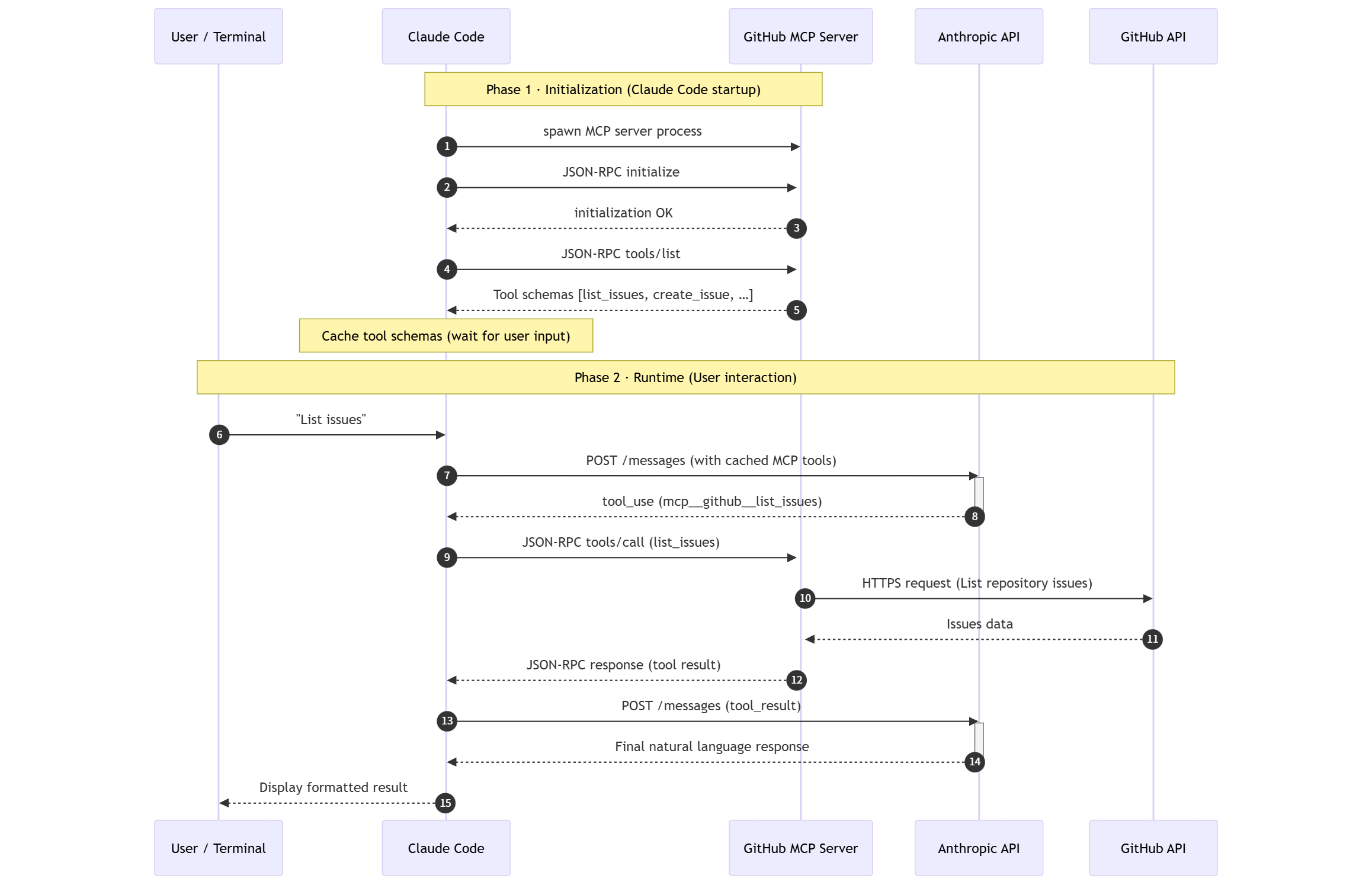
至此function/tool calling、MCP协议、MCP Server的东西我就有点明白了,下边就是继续啃Skills。
PS 日后谈
本来打算一篇文章写完MCP+skill+workflow,结果越写越多只写了MCP部分。现如今AI工具如此发达,互联网的知识从未像今天这样唾手可得,但是想法比技术本身重要太多。争当弄潮儿的多半不是纯技术出身,我觉得自己也没那个百舸争流的本事。有时候发现自己没法将能力转化为收益,还怪可惜的。
年前事情反倒繁杂起来,家中老人受伤,家养犬今日又突发癫痫。尽管有惊无险,但实在是糟心无力,将生活的些许废话写在技术帖子中,聊以慰藉罢了。
我的梦想是搞个量化躺着挣钱,但是不是金融专科出身哈哈哈。或许有大佬与我有相同的想法,我们可以交流交流。


 好小子
好小子