起因碎碎念
自问自答一下,因为之前一直在自己的9950x3d上使用chromium avx512浏览器
(推荐新amd cpu 有支持avx512条件的佬友都使用一下 Chromium_Clang项目,可谷歌账户同步,在视频解码还有网页加载渲染亲测有优化,包括11th 之前的intel的酷睿cpu,网页浏览体验5肉眼可知avx2拉出距离)
,但是没有gemini in chrome这个星标的侧边栏,感觉有了pro读一读,flash调用skills的加深对网页归类和自动化都是非常有效的。
,于是提问chromium如何打开gemini,可惜看到的佬友不太知道,说可能是branding拦截,我试了一下js逆向无果。
昨晚谷歌搜索topic时候无意之中看到了这个开源项目(非本人编写,若有不妥请修正)
然后发现里面提到只需要修正glic绕过后是支持chromium的随使用codex还有本地debug看看,没想到Windows和Linux都成功了
- windows

skills也是支持的
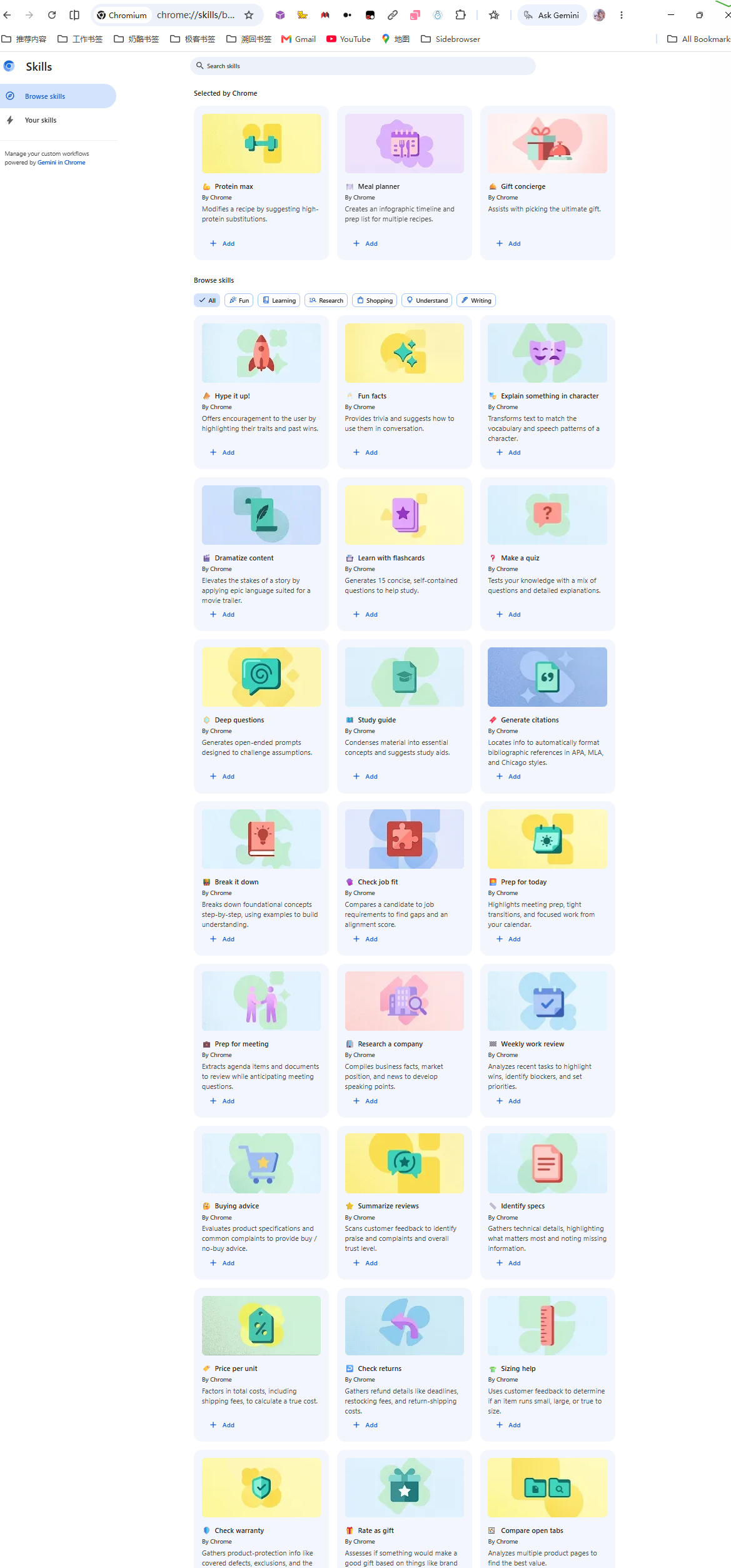
- linux
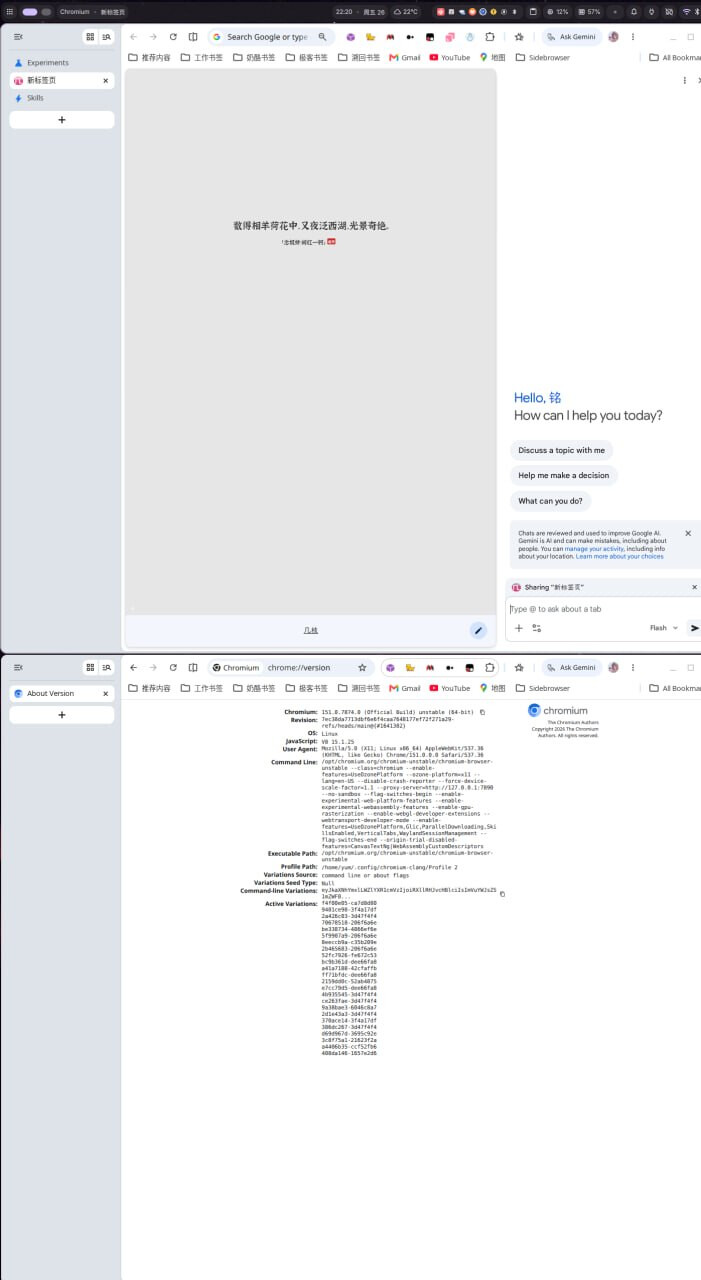
要点
首次打开gemini按照以下readme中的步骤
步骤一:使用支持地区的 Google 账号登录
支持地区目前包括:美国、加拿大、英国、日本、韩国、印度、巴西、墨西哥、澳大利亚、新西兰,以及大部分欧盟国家。中国大陆账号目前不支持。
判断账号是否在支持地区:
-
访问
https://myaccount.google.com/ -
查看「个人信息」→ 国家或地区
-
若显示中国大陆,则当前账号无法启用 Gemini
步骤二:设置 Chrome 主语言为 English (United States)
-
地址栏输入
chrome://settings/languages -
点击 Add languages 添加 English (United States)
-
把它拖到列表最顶部
-
勾选「Display Google Chrome in this language」
-
重启 Chrome
步骤三:退出隐身 / 访客模式
Gemini 在隐身模式与访客模式下都不显示。必须用普通窗口。
步骤四:在浏览器顶部点击 Gemini 图标
Chrome 工具栏右侧会出现一个 飞鸟 星星状的 Gemini 图标。第一次点击会弹出 opt-in 提示,同意服务条款后即可使用。
如果按完全部步骤后仍看不到图标,说明你的账号或环境有污染问题,再次运行工具修复脚本即可解决。
注意测试下来要保证英文还有谷歌账户地区环境,linux和windows都可以通过–lang=en-US指定,还有就是设置后不会自动enable glic
需要手动打开 chrome://flags 找到glic 打开后重启
脚本
以下是我改好的测试过chromium的脚本,throium还没有测试不过应该可以
- 修复脚本-Windows.ps1
修复脚本-Windows.txt (32.5 KB)
param(
[string]$ChromiumApplicationDir = “$env:LOCALAPPDATA\Chromium\Application”,
[switch]$DebugProbe
)
============================================================
编码自适应:自动识别并强制切换为 UTF-8
Windows 中文系统默认控制台编码是 GBK(CP936),脚本中的中文会乱码
切换到 UTF-8(CP65001)后,无论原系统是 GBK 还是 UTF-8 均能正确显示
============================================================
$script:OriginalConsoleEncoding = [Console]::OutputEncoding
$script:OriginalConsoleInputEncoding = [Console]::InputEncoding
$script:OriginalOutputEncoding = $OutputEncoding
$script:OriginalCodePage = $null
try {
# ----- 记录原始代码页(脚本结束时恢复,避免影响后续命令)-----
$cpOutput = & chcp.com 2>$null
if ($cpOutput -match ‘\d+’) {
$script:OriginalCodePage = ($cpOutput -replace ‘[^\d]’, ‘’)
}
# ----- 强制切换到 UTF-8 -----
[Console]::OutputEncoding = [System.Text.Encoding]::UTF8
[Console]::InputEncoding  = [System.Text.Encoding]::UTF8
$OutputEncoding = [System.Text.Encoding]::UTF8
& chcp.com 65001 | Out-Null
}
catch {
# 即使编码切换失败也不中断(某些受限环境会失败,但脚本主体功能依然可用)
}
============================================================
终端颜色辅助(不影响功能,仅美化输出)
============================================================
function Write-Info { param([string]$msg) Write-Host "[信息] " -ForegroundColor Cyan -NoNewline; Write-Host $msg }
function Write-Ok { param([string]$msg) Write-Host "[成功] " -ForegroundColor Green -NoNewline; Write-Host $msg }
function Write-Warn { param([string]$msg) Write-Host "[警告] " -ForegroundColor Yellow -NoNewline; Write-Host $msg }
function Write-Err { param([string]$msg) Write-Host “[错误] " -ForegroundColor Red -NoNewline; Write-Host $msg }
function Write-Step { param([string]$msg) Write-Host “”; Write-Host “━━━ $msg ━━━” -ForegroundColor Blue }
function Write-Header {
param([string]$msg)
Write-Host “”
Write-Host “════════════════════════════════════════════════════” -ForegroundColor Cyan
Write-Host " $msg” -ForegroundColor Cyan
Write-Host “════════════════════════════════════════════════════” -ForegroundColor Cyan
Write-Host “”
}
============================================================
Chrome 数据目录探测
Windows 标准路径:%LOCALAPPDATA%\Google\Chrome\User Data
兼容:Chrome 主版本、Beta、Canary 与 Chromium
Chromium 程序目录:%LOCALAPPDATA%\Chromium\Application
Chromium 数据目录:%LOCALAPPDATA%\Chromium\User Data
============================================================
function Test-ChromeDataDirCandidate {
param([string]$Path)
if ([string]::IsNullOrWhiteSpace($Path)) {
    return $false
}
if (-not (Test-Path -LiteralPath $Path)) {
    return $false
}

$lsPath = Join-Path $Path "Local State"
if (-not (Test-Path -LiteralPath $lsPath)) {
    return $false
}

return $true
}
function Resolve-UserDataDirFromApplicationDir {
param([string]$ApplicationDir)
if ([string]::IsNullOrWhiteSpace($ApplicationDir)) {
    return $null
}
if (-not (Test-Path -LiteralPath $ApplicationDir)) {
    return $null
}

$appItem = Get-Item -LiteralPath $ApplicationDir -ErrorAction SilentlyContinue
if (-not $appItem) {
    return $null
}

$rootDir = $appItem.Parent.FullName
$dataCandidates = @(
    (Join-Path $rootDir "User Data"),
    (Join-Path $rootDir "Data")
)

foreach ($p in $dataCandidates) {
    if (Test-ChromeDataDirCandidate -Path $p) {
        return $p
    }
}

return $null
}
function Get-ChromeDataDir {
$candidates = @(
(Resolve-UserDataDirFromApplicationDir -ApplicationDir $ChromiumApplicationDir),
“$env:LOCALAPPDATA\Chromium\Data”,
“$env:LOCALAPPDATA\Chromium\User Data”,
“$env:LOCALAPPDATA\Google\Chrome\User Data”,
“$env:LOCALAPPDATA\Google\Chrome Beta\User Data”,
“$env:LOCALAPPDATA\Google\Chrome SxS\User Data”
)
foreach ($p in $candidates) {
if (Test-ChromeDataDirCandidate -Path $p) {
return $p
}
}
return $null
}
============================================================
依赖校验:PowerShell 版本
PowerShell 5.1 是 Windows 10/11 自带版本,本脚本完全兼容
============================================================
function Test-Dependencies {
$ver = $PSVersionTable.PSVersion
Write-Info “PowerShell 版本:$ver”
if ($ver.Major -lt 5) {
Write-Err “PowerShell 版本过低,需要 5.1 或更高版本”
Write-Info “Windows 10/11 自带 PowerShell 5.1,可在「开始」搜索 PowerShell 启动”
exit 1
}
}
============================================================
关闭 Chrome
必须完全关闭,否则 Local State 修改会被 Chrome 退出时覆盖
============================================================
function Stop-ChromeProcesses {
Write-Step “关闭 Chrome 浏览器”
$names = @(“chrome”, “chromium”)
$procs = Get-Process -Name $names -ErrorAction SilentlyContinue
if ($procs) {
Write-Info “正在优雅关闭 Chrome…”
foreach ($p in $procs) {
try {
$p.CloseMainWindow() | Out-Null
} catch {}
}
Start-Sleep -Seconds 3
$procs = Get-Process -Name $names -ErrorAction SilentlyContinue
if ($procs) {
Write-Warn “Chrome 未优雅退出,强制结束”
Stop-Process -Name $names -Force -ErrorAction SilentlyContinue
Start-Sleep -Seconds 2
}
}
$remaining = Get-Process -Name $names -ErrorAction SilentlyContinue
if (-not $remaining) {
Write-Ok “Chrome 已完全关闭”
} else {
Write-Err “无法关闭 Chrome(残留 $($remaining.Count) 个进程),请手动关闭后重试”
exit 1
}
}
============================================================
创建精简配置备份
只备份 Local State 与各 profile 的 Preferences,避免复制整个 Data 目录
============================================================
$script:BackupTs = [int][double]::Parse((Get-Date -UFormat %s))
$script:BackupBase = $null
function New-ConfigBackup {
param([string]$ChromeDir)
Write-Step “创建精简配置备份(时间戳:$script:BackupTs)”
$script:BackupBase = Join-Path $ChromeDir ".gemini_fix_backup_$script:BackupTs"
New-Item -ItemType Directory -Path $script:BackupBase -Force | Out-Null

$lsPath = Join-Path $ChromeDir "Local State"
if (Test-Path -LiteralPath $lsPath) {
    Copy-Item -LiteralPath $lsPath -Destination (Join-Path $script:BackupBase "Local State") -Force
    Write-Ok "已备份 Local State"
}

foreach ($prof in (Get-ChildItem -LiteralPath $ChromeDir -Directory | Where-Object {
    $_.Name -eq "Default" -or $_.Name -match "^Profile \d+$"
})) {
    $prefSrc = Join-Path $prof.FullName "Preferences"
    if (Test-Path -LiteralPath $prefSrc) {
        $profBak = Join-Path $script:BackupBase $prof.Name
        New-Item -ItemType Directory -Path $profBak -Force | Out-Null
        Copy-Item -LiteralPath $prefSrc -Destination (Join-Path $profBak "Preferences") -Force
        Write-Ok "已备份 $($prof.Name)/Preferences"
    }
}
Write-Info "备份目录:$script:BackupBase"
}
============================================================
扫描指纹浏览器残留
============================================================
function Find-FingerprintBrowsers {
Write-Step “扫描指纹浏览器残留”
$found = @()
$paths = @(
“$env:LOCALAPPDATA\RoxyBrowser”,
“$env:APPDATA\RoxyBrowser”,
“$env:LOCALAPPDATA\AdsPower”,
“$env:APPDATA\AdsPower_Global”,
“$env:LOCALAPPDATA\MultiLogin”,
“$env:LOCALAPPDATA\GoLogin”,
“$env:APPDATA\GoLogin”,
“$env:LOCALAPPDATA\Incogniton”,
“$env:LOCALAPPDATA\Dolphin{anty}”,
“${env:ProgramFiles}\RoxyBrowser”,
“${env:ProgramFiles}\AdsPower”,
“${env:ProgramFiles(x86)}\RoxyBrowser”,
“${env:ProgramFiles(x86)}\AdsPower”
)
foreach ($p in $paths) {
if ($p -and (Test-Path -LiteralPath $p)) {
$found += $p
}
}
if ($found.Count -gt 0) {
Write-Warn “检测到 $($found.Count) 项指纹浏览器残留:”
foreach ($f in $found) {
Write-Host " · $f"
}
Write-Warn “建议先卸载这些工具再继续(否则修复后会被再次污染)”
} else {
Write-Ok “未检测到指纹浏览器残留”
}
}
============================================================
JSON 读取 / 写入辅助
Chrome 的 Local State 与 Preferences 都是 UTF-8 编码 JSON(不带 BOM)
PowerShell 5.x 的 ConvertFrom-Json 默认只解析 2 层,必须用 -AsHashtable + -Depth
但 PowerShell 5.1 不支持 -AsHashtable,所以用 PSCustomObject + 递归处理
============================================================
function Read-JsonFile {
param([string]$Path)
$bytes = [System.IO.File]::ReadAllBytes($Path)
$text = [System.Text.Encoding]::UTF8.GetString($bytes)
# 处理可能的 BOM
if ($text.Length -gt 0 -and $text[0] -eq [char]0xFEFF) {
$text = $text.Substring(1)
}
return $text | ConvertFrom-Json
}
function Write-JsonFile {
param(
[string]$Path,
$Data
)
# 紧凑格式(与 Chrome 原生写出一致),UTF-8 无 BOM
$json = $Data | ConvertTo-Json -Depth 64 -Compress
$tmp = “$Path.tmp_write”
$utf8NoBom = New-Object System.Text.UTF8Encoding $false
[System.IO.File]::WriteAllText($tmp, $json, $utf8NoBom)
Move-Item -LiteralPath $tmp -Destination $Path -Force
}
function Set-JsonProperty {
param(
$Object,
[string]$Name,
$Value
)
if ($Object.PSObject.Properties[$Name]) {
    $Object.$Name = $Value
} else {
    $Object | Add-Member -NotePropertyName $Name -NotePropertyValue $Value
}
}
function Ensure-BrowserExperimentFlags {
param($Data)
if (-not $Data.PSObject.Properties["browser"] -or -not $Data.browser) {
    Set-JsonProperty -Object $Data -Name "browser" -Value (New-Object PSObject)
}

if (-not $Data.browser.PSObject.Properties["enabled_labs_experiments"]) {
    Set-JsonProperty -Object $Data.browser -Name "enabled_labs_experiments" -Value @()
} elseif ($null -eq $Data.browser.enabled_labs_experiments) {
    $Data.browser.enabled_labs_experiments = @()
}
}
function Write-ChromeDataDebug {
param(
[string]$ChromeDir,
[string]$Label
)
if (-not $DebugProbe) {
    return
}

Write-Step "调试探针:$Label"
Write-Host "  Chromium 程序目录:$ChromiumApplicationDir"
Write-Host "  当前数据目录:$ChromeDir"

$lsPath = Join-Path $ChromeDir "Local State"
Write-Host "  Local State:$lsPath"
Write-Host "  Local State 存在:$(Test-Path -LiteralPath $lsPath)"

$profiles = @(Get-ChildItem -LiteralPath $ChromeDir -Directory -ErrorAction SilentlyContinue | Where-Object {
    $_.Name -eq "Default" -or $_.Name -match "^Profile \d+$"
})
Write-Host "  Profile 数量:$($profiles.Count)"
foreach ($prof in $profiles) {
    $prefPath = Join-Path $prof.FullName "Preferences"
    Write-Host "    $($prof.Name):Preferences 存在=$(Test-Path -LiteralPath $prefPath)"
}

if (Test-Path -LiteralPath $lsPath) {
    try {
        $data = Read-JsonFile -Path $lsPath
        $flags = @()
        if ($data.browser -and $data.browser.enabled_labs_experiments) {
            $flags = @($data.browser.enabled_labs_experiments)
        }
        $glicFlags = @($flags | Where-Object { $_ -match "(?i)(glic|actor)" })
        Write-Host "  flag 数量:$($flags.Count)"
        Write-Host "  Glic/actor flag:$($glicFlags -join ', ')"
        Write-Host "  variations_country:$($data.variations_country)"
        Write-Host "  variations_permanent_consistency_country:$($data.variations_permanent_consistency_country -join ',')"
    } catch {
        Write-Warn "Local State 解析失败:$_"
    }
}
}
============================================================
核心修复一:清理 Local State 异常 flag
重点:移除 glic-disable-actor-safety-checks 等会触发 Glic 熔断的污染 flag
============================================================
function Repair-LocalState {
param([string]$ChromeDir)
Write-Step “核心修复一:清理 Local State 异常 flag”
$lsPath = Join-Path $ChromeDir “Local State”
if (-not (Test-Path -LiteralPath $lsPath)) {
Write-Warn “Local State 不存在,跳过”
return
}
$data = Read-JsonFile -Path $lsPath
Ensure-BrowserExperimentFlags -Data $data

$flagsBefore = @($data.browser.enabled_labs_experiments)
Write-Host "  修复前 flag 总数:$($flagsBefore.Count)"

# ----- 黑名单:必删的污染 flag(无论是否带 @N 后缀均删除)-----
$blacklist = @(
    "glic-disable-actor-safety-checks",
    "disable-actor-safety-checks",
    "optimization-guide-debug-logs",
    "optimization-guide-enable-dogfood-logging"
)

# ----- 双重过滤:①不在黑名单 ②必须有 @N 后缀(格式正确)-----
$flagsAfter = @()
$removed = @()
foreach ($f in $flagsBefore) {
    $isBlack = $false
    foreach ($p in $blacklist) {
        if ($f -eq $p -or $f.StartsWith("$p@")) {
            $isBlack = $true; break
        }
    }
    $hasFormat = $f -match "@"
    if ($isBlack -or -not $hasFormat) {
        $removed += $f
    } else {
        $flagsAfter += $f
    }
}

$data.browser.enabled_labs_experiments = $flagsAfter
Write-Host "  修复后 flag 总数:$($flagsAfter.Count)"
Write-Host "  移除异常 flag:$($removed.Count) 条"
foreach ($r in $removed) {
    Write-Host "    剪除:$r"
}

# ----- 递归搜索并启用所有 is_glic_eligible(Chrome 可能在嵌套层也有此字段)-----
$nGlic = 0
function Set-GlicRecursive {
    param($obj)
    $count = 0
    if ($obj -is [PSObject]) {
        $propsToCheck = @($obj.PSObject.Properties)
        foreach ($prop in $propsToCheck) {
            if ($prop.Name -eq "is_glic_eligible" -and $prop.Value -ne $true) {
                $obj.$($prop.Name) = $true
                $count++
            } else {
                $count += Set-GlicRecursive -obj $prop.Value
            }
        }
    } elseif ($obj -is [System.Collections.IList]) {
        foreach ($item in $obj) {
            $count += Set-GlicRecursive -obj $item
        }
    }
    return $count
}
$nGlic = Set-GlicRecursive -obj $data
Write-Host "  递归启用 is_glic_eligible:$nGlic 处"

# ----- 添加 Glic 实验 flag(帮助 Chrome 注册 Glic 子系统)-----
$glicFlags = @("glic@2", "glic-side-panel@1", "glic-actor@1", "glic-pre-warming@1")
Ensure-BrowserExperimentFlags -Data $data
$existingFlags = @($data.browser.enabled_labs_experiments)
$addedFlags = @()
foreach ($f in $glicFlags) {
    $found = $false
    foreach ($e in $existingFlags) {
        if ($e -eq $f) { $found = $true; break }
    }
    if (-not $found) {
        $addedFlags += $f
    }
}
if ($addedFlags.Count -gt 0) {
    $data.browser.enabled_labs_experiments = $existingFlags + $addedFlags
    Write-Host "  添加 Glic 实验 flag:$($addedFlags -join ', ')"
}

# ----- 设置地区码为支持地区(关键:不设置则 Gemini 不显示)-----
$country = ""
if ($data.PSObject.Properties["variations_country"]) {
    $country = $data.variations_country
}
if ([string]::IsNullOrEmpty($country) -or $country -eq "cn" -or $country -eq "CN") {
    Set-JsonProperty -Object $data -Name "variations_country" -Value "us"
    Write-Host "  已设置 variations_country='us'(原值:'$country')"
}

# ----- 设置永久一致性地区码(保留 Chrome 版本号,仅改国家为 us)-----
$permProp = $data.PSObject.Properties["variations_permanent_consistency_country"]
$needsPermFix = $true
if ($permProp -and $data.variations_permanent_consistency_country) {
    $pv = $data.variations_permanent_consistency_country
    if ($pv -is [array] -and $pv.Count -ge 2) {
        $needsPermFix = $pv[-1] -ne "us"
    } elseif ($pv -is [string] -and $pv.ToLower() -eq "us") {
        $needsPermFix = $false
    }
}
if ($needsPermFix) {
    $oldPermStr = if ($permProp) { "$($data.variations_permanent_consistency_country)" } else { "None" }
    if (-not $permProp) {
        Set-JsonProperty -Object $data -Name "variations_permanent_consistency_country" -Value @(" ", "us")
    } elseif ($pv -is [array]) {
        $data.variations_permanent_consistency_country[-1] = "us"
    } else {
        Set-JsonProperty -Object $data -Name "variations_permanent_consistency_country" -Value @(" ", "us")
    }
    Write-Host "  已修正 variations_permanent_consistency_country(原值:'$oldPermStr')"
}

Write-JsonFile -Path $lsPath -Data $data
Write-Ok "Local State 修复完成"
}
============================================================
核心修复二:所有 profile 的语言设置改为 English (United States) 首位
============================================================
function Repair-ProfileLanguages {
param([string]$ChromeDir)
Write-Step “核心修复二:调整所有 profile 的语言优先级”
$fixed = 0
foreach ($prof in (Get-ChildItem -LiteralPath $ChromeDir -Directory | Where-Object {
    $_.Name -eq "Default" -or $_.Name -match "^Profile \d+$"
})) {
    $prefPath = Join-Path $prof.FullName "Preferences"
    if (-not (Test-Path -LiteralPath $prefPath)) { continue }

    try {
        $data = Read-JsonFile -Path $prefPath
    } catch {
        Write-Host "  跳过 $($prof.Name):$_"
        continue
    }

    if (-not $data.intl) {
        $data | Add-Member -NotePropertyName intl -NotePropertyValue (New-Object PSObject) -Force
    }

    $changed = $false
    foreach ($key in @("accept_languages", "selected_languages")) {
        $old = ""
        if ($data.intl.PSObject.Properties[$key]) {
            $old = $data.intl.$key
        }
        $items = @()
        if (-not [string]::IsNullOrEmpty($old)) {
            $items = @($old -split "," | ForEach-Object { $_.Trim() } | Where-Object { $_ -and ($_ -notmatch "^(en-US|en)$") })
        }
        $new = (@("en-US") + $items) -join ","
        if ($items.Count -eq 0 -and [string]::IsNullOrEmpty($old)) {
            $new = "en-US,zh-CN,zh"
        }
        if ($new -ne $old) {
            if ($data.intl.PSObject.Properties[$key]) {
                $data.intl.$key = $new
            } else {
                $data.intl | Add-Member -NotePropertyName $key -NotePropertyValue $new
            }
            $changed = $true
        }
    }

    if ($changed) {
        Write-JsonFile -Path $prefPath -Data $data
        $fixed++
        Write-Host "  ✓ $($prof.Name)"
    }
}
Write-Host "  共修复 $fixed 个 profile"
Write-Ok "语言修复完成"
}
============================================================
核心修复三:清空 chrome://flags 用户偏好
============================================================
function Reset-FlagsPreference {
param([string]$ChromeDir)
Write-Step “核心修复三:清空 chrome://flags 偏好(让 Chrome 重新评估)”
$lsPath = Join-Path $ChromeDir “Local State”
if (-not (Test-Path -LiteralPath $lsPath)) {
Write-Warn “Local State 不存在,跳过”
return
}
$data = Read-JsonFile -Path $lsPath
Ensure-BrowserExperimentFlags -Data $data
$count = @($data.browser.enabled_labs_experiments).Count
Write-Host "  清空前 flag 数:$count"
$data.browser.enabled_labs_experiments = @()
Write-JsonFile -Path $lsPath -Data $data
Write-Host "  清空完成(Chrome 重启后 chrome://flags 全部回到 Default 状态)"
Write-Ok "chrome://flags 偏好已重置"
}
============================================================
核心修复四:清理 Sync 同步缓存
让 Chrome 重新做账号握手,避免云端旧污染状态再次拉回
============================================================
function Clear-SyncCache {
param([string]$ChromeDir)
Write-Step “核心修复四:清理 Sync 同步缓存”
$syncDirs = @("Sync Data", "Sync Extension Settings", "Sync App Settings", "GCM Store", "Sessions")
$cleared = 0
foreach ($prof in (Get-ChildItem -LiteralPath $ChromeDir -Directory | Where-Object {
    $_.Name -eq "Default" -or $_.Name -match "^Profile \d+$"
})) {
    foreach ($d in $syncDirs) {
        $target = Join-Path $prof.FullName $d
        if (Test-Path -LiteralPath $target) {
            Remove-Item -LiteralPath $target -Recurse -Force -ErrorAction SilentlyContinue
            $cleared++
            Write-Ok "已清除 $($prof.Name)/$d"
        }
    }
}
Write-Info "共清除 $cleared 个同步缓存目录"
Write-Info "重启 Chrome 后会自动从云端重建(密码、书签、扩展等不会丢失)"
}
============================================================
辅助修复一:清除代理站点 IndexedDB
============================================================
function Clear-ProxyIndexedDB {
param([string]$ChromeDir)
Write-Step “辅助修复一:清除代理站点 IndexedDB”
$patterns = @("*roxy*", "*1024proxy*", "*lokiproxy*", "*antidetect*", "*multilogin*", "*adspower*", "*gologin*", "*incogniton*")
$total = 0
foreach ($prof in (Get-ChildItem -LiteralPath $ChromeDir -Directory | Where-Object {
    $_.Name -eq "Default" -or $_.Name -match "^Profile \d+$"
})) {
    $idb = Join-Path $prof.FullName "IndexedDB"
    if (-not (Test-Path -LiteralPath $idb)) { continue }
    foreach ($pat in $patterns) {
        $items = Get-ChildItem -LiteralPath $idb -Filter $pat -ErrorAction SilentlyContinue
        foreach ($item in $items) {
            Remove-Item -LiteralPath $item.FullName -Recurse -Force -ErrorAction SilentlyContinue
            Write-Host "  ✂ $($prof.Name)/IndexedDB/$($item.Name)"
            $total++
        }
    }
}
Write-Host "  共清除 $total 个污染数据库"
Write-Ok "代理站点 IndexedDB 清理完成"
}
============================================================
辅助修复二:清除优化引擎 hint cache
============================================================
function Clear-OptimizationHints {
param([string]$ChromeDir)
Write-Step “辅助修复二:清除优化引擎 hint cache”
$cleared = 0
foreach ($prof in (Get-ChildItem -LiteralPath $ChromeDir -Directory | Where-Object {
    $_.Name -eq "Default" -or $_.Name -match "^Profile \d+$"
})) {
    $cache = Join-Path $prof.FullName "optimization_guide_hint_cache_store"
    if (Test-Path -LiteralPath $cache) {
        Remove-Item -LiteralPath $cache -Recurse -Force -ErrorAction SilentlyContinue
        Write-Ok "已清除 $($prof.Name) 的 hint cache"
        $cleared++
    }
}
Write-Info "共清除 $cleared 个 hint cache 目录"
}
============================================================
辅助修复三:清除 Preferences 内 content_settings 的代理站点污染
============================================================
function Clean-ContentSettings {
param([string]$ChromeDir)
Write-Step “辅助修复三:清除 content_settings 污染”
$dirtyRegex = '(?i)(roxybrowser|1024proxy|lokiproxy|antidetect)'

function Remove-DirtyKeys {
    param($obj)
    $count = 0
    if ($obj -is [PSObject]) {
        $keysToRemove = @()
        foreach ($prop in $obj.PSObject.Properties) {
            if ($prop.Name -match $dirtyRegex) {
                $keysToRemove += $prop.Name
            } else {
                $count += Remove-DirtyKeys -obj $prop.Value
            }
        }
        foreach ($k in $keysToRemove) {
            $obj.PSObject.Properties.Remove($k)
            $count++
        }
    } elseif ($obj -is [System.Collections.IList]) {
        foreach ($item in $obj) {
            $count += Remove-DirtyKeys -obj $item
        }
    }
    return $count
}

$total = 0
foreach ($prof in (Get-ChildItem -LiteralPath $ChromeDir -Directory | Where-Object {
    $_.Name -eq "Default" -or $_.Name -match "^Profile \d+$"
})) {
    $prefPath = Join-Path $prof.FullName "Preferences"
    if (-not (Test-Path -LiteralPath $prefPath)) { continue }
    try {
        $data = Read-JsonFile -Path $prefPath
    } catch {
        continue
    }
    $n = Remove-DirtyKeys -obj $data
    if ($n -gt 0) {
        Write-JsonFile -Path $prefPath -Data $data
        $total += $n
        Write-Host "  ✓ $($prof.Name) 清除 $n 条"
    }
}
Write-Host "  共清除 $total 条污染"
Write-Ok "content_settings 清理完成"
}
============================================================
用户数据完整性校验
============================================================
function Test-UserDataIntegrity {
param([string]$ChromeDir)
Write-Step “用户数据完整性校验”
$critical = @("History", "Bookmarks", "Login Data", "Cookies", "Web Data", "Top Sites", "Favicons")
foreach ($prof in (Get-ChildItem -LiteralPath $ChromeDir -Directory | Where-Object {
    $_.Name -eq "Default" -or $_.Name -match "^Profile \d+$"
})) {
    Write-Host "  ── $($prof.Name) ──" -ForegroundColor Cyan
    foreach ($f in $critical) {
        $p = Join-Path $prof.FullName $f
        if (Test-Path -LiteralPath $p) {
            $sz = (Get-Item -LiteralPath $p).Length
            Write-Host "    ✓ $f ($sz bytes)"
        }
    }
}
}
============================================================
修复完成总结 + 后续手动操作指引
============================================================
function Show-Summary {
param([string]$ChromeDir)
Write-Header “修复完成 — 重要后续操作”
Write-Host "所有自动修复步骤已完成。请按以下顺序进行手动操作:" -ForegroundColor Green
Write-Host ""
Write-Host "步骤一:启动 Chrome" -ForegroundColor White
Write-Host "  从开始菜单或桌面直接打开,不要使用任何命令行参数"
Write-Host ""
Write-Host "步骤二:检查浏览器顶部黄色警告条" -ForegroundColor White
Write-Host "  如果出现「您使用的是不受支持的命令行标记 --disable-actor-safety-checks」"
Write-Host "  说明 chrome://flags 偏好还有残留,操作如下:"
Write-Host "    1. 地址栏输入:chrome://flags"
Write-Host "    2. 右上角点击红色 Reset all 按钮"
Write-Host "    3. 底部点击蓝色 Relaunch 按钮"
Write-Host ""
Write-Host "步骤三:确认账号资格" -ForegroundColor White
Write-Host "  · 必须是个人 Google 账号(非企业 / 学校 / 未成年账号)"
Write-Host "  · 账号注册地需为支持地区(美国、日本、加拿大、英国等)"
Write-Host "  · QQ 邮箱注册的 Google 账号会被视为中国账号,无法启用"
Write-Host ""
Write-Host "步骤四:寻找 Gemini 按钮" -ForegroundColor White
Write-Host "  浏览器右上区域应出现 Gemini 图标(星星状)"
Write-Host "  首次点击时跟着 opt-in 引导完成即可使用"
Write-Host ""
Write-Host "步骤五:等待服务端灰度(如果按钮仍未出现)" -ForegroundColor White
Write-Host "  Gemini in Chrome 是逐步放量功能"
Write-Host "  账号资格通过后可能需要 1 至 72 小时才能激活"
Write-Host ""
Write-Host "备份位置:" -NoNewline -ForegroundColor Yellow
Write-Host "$script:BackupBase"
Write-Host ""
Write-Host "作者:万能程序员" -ForegroundColor White
Write-Host "  微信:1837620622(传康Kk)"
Write-Host "  邮箱:2040168455@qq.com"
Write-Host ""
}
============================================================
编码恢复(脚本结束时调用,避免影响后续命令)
============================================================
function Restore-Encoding {
try {
if ($script:OriginalCodePage) {
& chcp.com $script:OriginalCodePage | Out-Null
}
if ($script:OriginalConsoleEncoding) {
[Console]::OutputEncoding = $script:OriginalConsoleEncoding
}
if ($script:OriginalConsoleInputEncoding) {
[Console]::InputEncoding = $script:OriginalConsoleInputEncoding
}
if ($script:OriginalOutputEncoding) {
$script:OriginalOutputEncoding | Out-Null
}
} catch {}
}
============================================================
主流程
============================================================
function Invoke-Main {
Write-Header “Gemini in Chrome 完整修复工具(Windows 版)”
$chromeDir = Get-ChromeDataDir
if (-not $chromeDir) {
    Write-Err "未检测到 Chrome 数据目录"
    Write-Info "请确认已安装 Chrome 或 Chromium"
    Write-Info "Chrome 默认路径:C:\Users\<你的用户名>\AppData\Local\Google\Chrome\User Data"
    Write-Info "Chromium 默认路径:C:\Users\<你的用户名>\AppData\Local\Chromium\User Data"
    Write-Info "也可以指定 Chromium 程序目录:.\修复脚本-Windows.ps1 -ChromiumApplicationDir 'C:\Users\<你的用户名>\AppData\Local\Chromium\Application'"
    exit 1
}
Write-Info "Chrome 数据目录:$chromeDir"

Test-Dependencies
Write-ChromeDataDebug -ChromeDir $chromeDir -Label "修复前"
Stop-ChromeProcesses
New-ConfigBackup      -ChromeDir $chromeDir
Find-FingerprintBrowsers
Reset-FlagsPreference -ChromeDir $chromeDir
Repair-LocalState     -ChromeDir $chromeDir
Repair-ProfileLanguages -ChromeDir $chromeDir
Clear-ProxyIndexedDB  -ChromeDir $chromeDir
Clear-OptimizationHints -ChromeDir $chromeDir
Clean-ContentSettings -ChromeDir $chromeDir
Clear-SyncCache       -ChromeDir $chromeDir
Test-UserDataIntegrity -ChromeDir $chromeDir
Write-ChromeDataDebug -ChromeDir $chromeDir -Label "修复后"
Show-Summary          -ChromeDir $chromeDir
}
try {
Invoke-Main
}
finally {
Restore-Encoding
}
- 修复脚本-macOS-Linux.sh
修复脚本-macOS-Linux.txt (22.5 KB)
#!/usr/bin/env bash
============================================================
Gemini in Chrome 完整修复脚本(macOS / Linux 通用)
------------------------------------------------------------
适用场景一:从未启用过 Gemini in Chrome,想要从零开始启用
适用场景二:之前能用 Gemini,被指纹浏览器或错误教程污染后失效
------------------------------------------------------------
set -uo pipefail 2>/dev/null || set -u
export LC_ALL=en_US.UTF-8 2>/dev/null || true
============================================================
终端颜色辅助(不影响功能,仅美化输出)
============================================================
RED=$‘\033[0;31m’
GREEN=$‘\033[0;32m’
YELLOW=$‘\033[1;33m’
BLUE=$‘\033[0;34m’
CYAN=$‘\033[0;36m’
BOLD=$‘\033[1m’
NC=$‘\033[0m’
log_info() { echo “{CYAN}[信息]{NC} $1”; }
log_ok() { echo “{GREEN}[成功]{NC} $1”; }
log_warn() { echo “{YELLOW}[警告]{NC} $1”; }
log_error() { echo “{RED}[错误]{NC} $1”; }
log_step() { echo; echo “{BOLD}{BLUE}━━━ 1 ━━━{NC}”; }
log_header() { echo; echo “{BOLD}{CYAN}════════════════════════════════════════════════════${NC}”; echo “{BOLD}{CYAN} 1{NC}”; echo “{BOLD}{CYAN}════════════════════════════════════════════════════${NC}”; echo; }
============================================================
平台识别:自动选择 Chrome 数据目录
兼容 macOS 与 Linux(Chrome、Chromium 与本地 chromium-clang 均支持)
============================================================
detect_platform() {
case “$(uname -s)” in
Darwin)
PLATFORM=“macOS”
CHROME_DIR=“$HOME/Library/Application Support/Google/Chrome”
;;
Linux)
PLATFORM=“Linux”
local candidates=(
“$HOME/.config/google-chrome”
“$HOME/.config/google-chrome-beta”
“$HOME/.config/google-chrome-unstable”
“$HOME/.config/chromium-clang”
“$HOME/.config/chromium”
)
CHROME_DIR=“”
for p in “${candidates[@]}”; do
if [ -d “$p” ]; then
CHROME_DIR=“$p”
break
fi
done
if [ -z “$CHROME_DIR” ]; then
log_error “未检测到 Chrome 或 Chromium 数据目录”
log_info “请确认已安装 Chrome 或 Chromium 后再运行本脚本”
log_info “已尝试路径:”
for p in “${candidates[@]}”; do
log_info " - $p"
done
exit 1
fi
;;
*)
log_error “不支持的操作系统:$(uname -s)”
log_info “本脚本仅适配 macOS 与 Linux。Windows 用户请使用 修复脚本-Windows.ps1”
exit 1
;;
esac
log_info “平台:$PLATFORM”
log_info “Chrome 数据目录:$CHROME_DIR”
}
============================================================
依赖校验:本脚本依赖 python3 处理 JSON(系统通常自带)
============================================================
check_dependencies() {
if ! command -v python3 >/dev/null 2>&1; then
log_error “未找到 python3,请先安装”
log_info “macOS 安装方法:brew install python3”
log_info “Ubuntu 安装方法:sudo apt update && sudo apt install -y python3”
log_info “CentOS 安装方法:sudo yum install -y python3”
exit 1
fi
}
============================================================
关闭 Chrome 浏览器
必须完全关闭,否则 Local State 修改会被 Chrome 退出时覆盖
============================================================
quit_chrome() {
log_step “关闭 Chrome 浏览器”
if [ “$PLATFORM” = “macOS” ]; then
osascript -e ‘quit app “Google Chrome”’ 2>/dev/null || true
else
pkill -TERM -f “google-chrome|chromium” 2>/dev/null || true
fi
sleep 3
local chrome_pattern=“Google Chrome.app/Contents/MacOS/Google Chrome|google-chrome|chromium-browser|chromium”
if pgrep -f “$chrome_pattern” >/dev/null 2>&1; then
log_warn “Chrome 未优雅退出,强制结束所有进程”
pkill -9 -f “$chrome_pattern” 2>/dev/null || true
sleep 2
fi
local count
count=$(pgrep -f “$chrome_pattern” 2>/dev/null | wc -l | tr -d ’ ')
if [ “$count” = “0” ]; then
log_ok “Chrome 已完全关闭”
else
log_error “无法关闭 Chrome(残留 $count 个进程),请手动关闭后重试”
exit 1
fi
}
============================================================
创建完整备份
时间戳化目录,所有修改均可秒级回滚
============================================================
create_backup() {
BACKUP_TS=“{BACKUP_TS:-(date +%s)}”
BACKUP_BASE=“${BACKUP_BASE:-}”
log_step “创建完整备份(时间戳: ${BACKUP_TS})”
BACKUP_BASE=“$CHROME_DIR/.gemini_fix_backup_$BACKUP_TS”
mkdir -p “$BACKUP_BASE”
if [ -f "$CHROME_DIR/Local State" ]; then
    cp "$CHROME_DIR/Local State" "$BACKUP_BASE/Local State"
    log_ok "已备份 Local State"
fi

for prof_dir in "$CHROME_DIR"/Default "$CHROME_DIR"/Profile\ *; do
    if [ -d "$prof_dir" ]; then
        local prof_name
        prof_name=$(basename "$prof_dir")
        mkdir -p "$BACKUP_BASE/$prof_name"
        if [ -f "$prof_dir/Preferences" ]; then
            cp "$prof_dir/Preferences" "$BACKUP_BASE/$prof_name/Preferences"
            log_ok "已备份 $prof_name/Preferences"
        fi
    fi
done

log_info "备份目录:$BACKUP_BASE"
}
============================================================
扫描指纹浏览器残留
这类工具是 Gemini in Chrome 失效的主要污染源
============================================================
scan_fingerprint_browsers() {
log_step “扫描指纹浏览器残留”
local found=()
local apps=(“RoxyBrowser” “AdsPower” “MultiLogin” “GoLogin” “Incogniton” “Kameleo” “Hidemyacc” “Dolphin Anty” “Bit Browser” “MaskPro”)
if [ "$PLATFORM" = "macOS" ]; then
    for app in "${apps[@]}"; do
        [ -d "/Applications/$app.app" ] && found+=("$app")
    done
    for data in "$HOME/Library/Application Support/RoxyBrowser" \
                "$HOME/Library/Application Support/AdsPower" \
                "$HOME/Library/Application Support/MultiLogin" \
                "$HOME/Library/Application Support/GoLogin" \
                "$HOME/Library/Application Support/Incogniton"; do
        [ -d "$data" ] && found+=("$(basename "$data") (数据残留)")
    done
else
    for app in roxybrowser adspower multilogin gologin incogniton dolphin-anty; do
        command -v "$app" >/dev/null 2>&1 && found+=("$app")
    done
fi

if [ ${#found[@]} -gt 0 ]; then
    log_warn "检测到 ${#found[@]} 项指纹浏览器残留:"
    for item in "${found[@]}"; do
        echo "    · $item"
    done
    log_warn "这类工具会污染系统 Chrome 的 Local State 与 chrome://flags"
    log_warn "建议先卸载这些工具再继续修复(否则修复后会被再次污染)"
else
    log_ok "未检测到指纹浏览器残留"
fi
}
============================================================
核心修复一:清理 Local State 异常 flag
重点:移除 glic-disable-actor-safety-checks 等会触发 Glic 熔断的污染 flag
============================================================
fix_local_state() {
log_step “核心修复一:清理 Local State 异常 flag”
local ls_path=“$CHROME_DIR/Local State”
if [ ! -f “$ls_path” ]; then
log_warn “Local State 文件不存在,跳过”
return
fi
python3 - "$ls_path" <<'PYEOF'
import json, os, sys
ls_path = sys.argv[1]
with open(ls_path, ‘r’, encoding=‘utf-8’) as f:
data = json.load(f)
flags_before = data.get(‘browser’, {}).get(‘enabled_labs_experiments’, )
print(f" 修复前 flag 总数:{len(flags_before)}")
----- 黑名单:必删的污染 flag(无论是否带 @N 后缀均删除)-----
blacklist_prefixes = [
‘glic-disable-actor-safety-checks’,
‘disable-actor-safety-checks’,
‘optimization-guide-debug-logs’,
‘optimization-guide-enable-dogfood-logging’,
]
----- 双重过滤:①不在黑名单 ②必须有 @N 后缀(格式正确)-----
flags_after, removed = ,
for f in flags_before:
is_black = any(f == p or f.startswith(p + ‘@’) for p in blacklist_prefixes)
has_format = ‘@’ in f
if is_black or not has_format:
removed.append(f)
else:
flags_after.append(f)
data.setdefault(‘browser’, {})[‘enabled_labs_experiments’] = flags_after
print(f" 修复后 flag 总数:{len(flags_after)}“)
print(f” 移除异常 flag:{len(removed)} 条")
for r in removed:
print(f" 剪除:{r}")
----- 递归搜索并启用所有 is_glic_eligible(Chrome 可能在嵌套层也有此字段)-----
def _set_glic_recursive(obj, depth=0):
count = 0
if isinstance(obj, dict):
for k, v in list(obj.items()):
if k == ‘is_glic_eligible’ and v is not True:
obj[k] = True
count += 1
else:
count += _set_glic_recursive(v, depth + 1)
elif isinstance(obj, list):
for item in obj:
count += _set_glic_recursive(item, depth + 1)
return count
n_glic = _set_glic_recursive(data)
print(f" 递归启用 is_glic_eligible:{n_glic} 处")
----- 添加 Glic 实验 flag(帮助 Chrome 注册 Glic 子系统)-----
glic_flags_to_add = [‘glic@2’, ‘glic-side-panel@1’, ‘glic-actor@1’, ‘glic-pre-warming@1’]
browser = data.setdefault(‘browser’, {})
existing_flags = set(browser.get(‘enabled_labs_experiments’, ))
added = [f for f in glic_flags_to_add if f not in existing_flags]
if added:
browser[‘enabled_labs_experiments’] = list(existing_flags) + added
print(f" 添加 Glic 实验 flag:{', '.join(added)}")
----- 设置地区码为支持地区(关键:不设置则 Gemini 不显示)-----
current_country = data.get(‘variations_country’, ‘’)
if not current_country or str(current_country).lower() in (‘’, ‘cn’):
data[‘variations_country’] = ‘us’
print(f" 已设置 variations_country=‘us’(原值:‘{current_country}’)")
----- 设置永久一致性地区码(保留 Chrome 版本号,仅改国家为 us)-----
current_perm = data.get(‘variations_permanent_consistency_country’)
def _is_perm_ok(v):
if isinstance(v, list):
return any(‘us’ in str(x).lower() for x in v[1:]) if len(v) > 1 else False
if isinstance(v, str):
return v.lower() == ‘us’
return False
if not _is_perm_ok(current_perm):
old_display = str(current_perm) if current_perm else ‘None’
if isinstance(current_perm, list) and len(current_perm) >= 1:
current_perm[-1] = ‘us’
data[‘variations_permanent_consistency_country’] = current_perm
else:
data[‘variations_permanent_consistency_country’] = [’ ‘, ‘us’]
print(f" 已修正 variations_permanent_consistency_country(原值:’{old_display}')")
----- 紧凑格式原子写回,与 Chrome 原生格式保持一致 -----
tmp = ls_path + ‘.tmp_write’
with open(tmp, ‘w’, encoding=‘utf-8’) as f:
json.dump(data, f, ensure_ascii=False, separators=(‘,’, ‘:’))
os.replace(tmp, ls_path)
print(" Local State 写回完成")
PYEOF
log_ok “Local State 修复完成”
}
============================================================
核心修复二:所有 profile 的语言设置改为 English (United States) 首位
Gemini 推荐英语 US,其他语言虽能用但启用率较低
============================================================
fix_languages() {
log_step “核心修复二:调整所有 profile 的语言优先级”
python3 - “$CHROME_DIR” <<‘PYEOF’
import json, os, pathlib, sys
chrome_root = pathlib.Path(sys.argv[1])
def reorder(lang_str):
if not lang_str:
return ‘en-US,zh-CN,zh’
items = [x.strip() for x in lang_str.split(‘,’) if x.strip()]
items = [x for x in items if x.lower() not in (‘en-us’, ‘en’)]
return ‘,’.join([‘en-US’] + items)
fixed = 0
for pref_path in chrome_root.glob(‘*/Preferences’):
if any(skip in str(pref_path) for skip in [‘System Profile’, ‘Guest Profile’]):
continue
try:
with open(pref_path, ‘r’, encoding=‘utf-8’) as f:
data = json.load(f)
except Exception as e:
print(f" 跳过 {pref_path.parent.name}:{e}")
continue
intl = data.setdefault('intl', {})
changed = False
for key in ('accept_languages', 'selected_languages'):
    old = intl.get(key, '')
    new = reorder(old)
    if new != old:
        intl[key] = new
        changed = True

if changed:
    tmp = str(pref_path) + '.tmp_write'
    with open(tmp, 'w', encoding='utf-8') as f:
        json.dump(data, f, ensure_ascii=False, separators=(',', ':'))
    os.replace(tmp, pref_path)
    fixed += 1
    print(f"  ✓ {pref_path.parent.name}")
print(f" 共修复 {fixed} 个 profile")
PYEOF
log_ok “语言修复完成”
}
============================================================
核心修复三:清空 chrome://flags 用户偏好
让 Chrome 重新评估 Glic 子系统状态
注意:会清除你启用过的所有 chrome://flags 偏好(Gemini 不依赖手动启用 flag)
============================================================
reset_flags_preference() {
log_step “核心修复三:清空 chrome://flags 偏好(让 Chrome 重新评估)”
python3 - “$CHROME_DIR” <<‘PYEOF’
import json, os, pathlib, sys
ls_path = pathlib.Path(sys.argv[1]) / ‘Local State’
if not ls_path.exists():
print(" Local State 不存在,跳过")
else:
with open(ls_path, ‘r’, encoding=‘utf-8’) as f:
data = json.load(f)
flags = data.get(‘browser’, {}).get(‘enabled_labs_experiments’, )
print(f" 清空前 flag 数:{len(flags)}“)
data.setdefault(‘browser’, {})[‘enabled_labs_experiments’] =
tmp = str(ls_path) + ‘.tmp_reset’
with open(tmp, ‘w’, encoding=‘utf-8’) as f:
json.dump(data, f, ensure_ascii=False, separators=(‘,’, ‘:’))
os.replace(tmp, ls_path)
print(” 清空完成(Chrome 重启后 chrome://flags 全部回到 Default 状态)")
PYEOF
log_ok “chrome://flags 偏好已重置”
}
============================================================
核心修复四:清理 Sync 同步缓存
这是修复"曾启用过但失效"的关键步骤
Chrome Sync 会把异常 flag 同步到云端,本地清完会被云端拉回
============================================================
clear_sync_cache() {
log_step “核心修复四:清理 Sync 同步缓存(让 Chrome 重新做账号握手)”
local cleared=0
for prof_dir in “$CHROME_DIR”/Default “$CHROME_DIR”/Profile\ *; do
[ -d “$prof_dir” ] || continue
for sync_item in “Sync Data” “Sync Extension Settings” “Sync App Settings” “GCM Store” “Sessions”; do
if [ -d “$prof_dir/$sync_item” ]; then
rm -rf “$prof_dir/$sync_item”
cleared=$((cleared + 1))
log_ok “已清除 $(basename “$prof_dir”)/$sync_item”
fi
done
done
log_info “共清除 $cleared 个同步缓存目录”
log_info “重启 Chrome 后会自动从云端重建(密码、书签、扩展等不会丢失)”
}
============================================================
辅助修复一:清除指纹浏览器站点的 IndexedDB
Roxy / 1024proxy / lokiproxy 等代理站访问留下的数据库
============================================================
clear_proxy_indexeddb() {
log_step “辅助修复一:清除代理站点 IndexedDB”
python3 - “$CHROME_DIR” <<‘PYEOF’
import re, shutil, sys, pathlib
chrome_root = pathlib.Path(sys.argv[1])
DIRTY = re.compile(r’(roxy|1024proxy|lokiproxy|antidetect|multilogin|adspower|gologin|incogniton)‘, re.IGNORECASE)
total = 0
for idb_dir in chrome_root.glob(’*/IndexedDB’):
if not idb_dir.is_dir():
continue
for item in idb_dir.iterdir():
if DIRTY.search(item.name):
if item.is_dir():
shutil.rmtree(item, ignore_errors=True)
else:
try:
item.unlink()
except Exception:
pass
print(f"  {idb_dir.parent.name}/IndexedDB/{item.name}“)
total += 1
print(f” 共清除 {total} 个污染数据库")
PYEOF
log_ok “代理站点 IndexedDB 清理完成”
}
============================================================
辅助修复二:清除优化引擎 hint cache
这是 Glic 的决策缓存,可能存有 GLIC_ACTION_PAGE_BLOCK 之类的污染标记
清掉后 Chrome 启动时会向服务端重拉新的 hint
============================================================
clear_optimization_hints() {
log_step “辅助修复二:清除优化引擎 hint cache”
local cleared=0
for prof_dir in “$CHROME_DIR”/Default “$CHROME_DIR”/Profile\ *; do
[ -d “$prof_dir” ] || continue
local cache=“$prof_dir/optimization_guide_hint_cache_store”
if [ -d “$cache” ]; then
rm -rf “$cache”
cleared=$((cleared + 1))
log_ok “已清除 $(basename “$prof_dir”) 的 hint cache”
fi
done
log_info “共清除 $cleared 个 hint cache 目录”
}
============================================================
辅助修复三:清除 Preferences 内 content_settings 的代理站点污染
============================================================
clean_content_settings() {
log_step “辅助修复三:清除 content_settings 污染”
python3 - “$CHROME_DIR” <<‘PYEOF’
import json, os, re, sys, pathlib
chrome_root = pathlib.Path(sys.argv[1])
DIRTY = re.compile(r’(roxybrowser|1024proxy|lokiproxy|antidetect)', re.IGNORECASE)
def clean(obj):
n = 0
if isinstance(obj, dict):
for k in list(obj.keys()):
if DIRTY.search(str(k)):
del obj[k]; n += 1
else:
n += clean(obj[k])
elif isinstance(obj, list):
for item in obj:
n += clean(item)
return n
total = 0
for pref_path in chrome_root.glob(‘*/Preferences’):
if any(skip in str(pref_path) for skip in [‘System Profile’, ‘Guest Profile’]):
continue
try:
with open(pref_path, ‘r’, encoding=‘utf-8’) as f:
data = json.load(f)
except Exception:
continue
n = clean(data)
if n > 0:
tmp = str(pref_path) + ‘.tmp_clean’
with open(tmp, ‘w’, encoding=‘utf-8’) as f:
json.dump(data, f, ensure_ascii=False, separators=(‘,’, ‘:’))
os.replace(tmp, pref_path)
total += n
print(f" ✓ {pref_path.parent.name} 清除 {n} 条")
print(f" 共清除 {total} 条污染")
PYEOF
log_ok “content_settings 清理完成”
}
============================================================
用户数据完整性校验
确保 History、Bookmarks、Login Data、Cookies 等未受影响
============================================================
verify_user_data() {
log_step “用户数据完整性校验”
local critical=(“History” “Bookmarks” “Login Data” “Cookies” “Web Data” “Top Sites” “Favicons”)
for prof_dir in “$CHROME_DIR”/Default “$CHROME_DIR”/Profile\ *; do
[ -d “$prof_dir” ] || continue
local pname
pname=$(basename “$prof_dir”)
echo " ${CYAN}── pname ──{NC}"
for f in “${critical[@]}”; do
local p=“$prof_dir/$f”
if [ -f “$p” ]; then
local sz
sz=$(stat -f ‘%z’ “$p” 2>/dev/null || stat -c ‘%s’ “$p” 2>/dev/null)
echo " ✓ $f ($sz bytes)"
fi
done
done
}
============================================================
修复完成总结 + 后续手动操作指引
============================================================
show_summary() {
log_header “修复完成 — 重要后续操作”
cat <<EOF
{GREEN}所有自动修复步骤已完成。请按以下顺序进行手动操作:{NC}
{BOLD}步骤一:启动 Chrome{NC}
从应用程序里直接打开,不要使用任何命令行参数
{BOLD}步骤二:检查浏览器顶部黄色警告条{NC}
如果出现"您使用的是不受支持的命令行标记 --disable-actor-safety-checks"
说明 chrome://flags 偏好还有残留,操作如下:
1. 地址栏输入:chrome://flags
2. 右上角点击红色 Reset all 按钮
3. 底部点击蓝色 Relaunch 按钮
{BOLD}步骤三:确认账号资格{NC}
· 必须是个人 Google 账号(非企业 / 学校 / 未成年账号)
· 账号注册地需为支持地区(美国、日本、加拿大、英国等)
· 用 QQ 邮箱注册的账号 Google 视为中国账号,无法启用
· 在 Chrome 完整登录账号(点击右上角头像确认)
{BOLD}步骤四:寻找 Gemini 按钮{NC}
浏览器右上区域应出现 ✦ Gemini 图标
首次点击时跟着 opt-in 引导完成即可使用
{BOLD}步骤五:等待服务端灰度(如果按钮仍未出现){NC}
Gemini in Chrome 是逐步放量功能,账号资格通过后
可能需要等待 1 至 72 小时才能在你的账号上激活
{YELLOW}备份位置:{NC}${BACKUP_BASE:-(未创建)}
{YELLOW}回滚命令(如果已备份):{NC}
[ -n “${BACKUP_BASE:-}” ] && cp -R “$BACKUP_BASE/Local State” “$CHROME_DIR/Local State”
[ -n “${BACKUP_BASE:-}” ] && for p in Default Profile\ 1 Profile\ 2; do
[ -f “$BACKUP_BASE/$p/Preferences” ] && \
cp “$BACKUP_BASE/$p/Preferences” “$CHROME_DIR/$p/Preferences”
done
{BOLD}{CYAN}作者:万能程序员${NC}
微信:1837620622(传康Kk)
邮箱:2040168455@qq.com
EOF
}
============================================================
主流程:按顺序执行所有修复步骤
============================================================
main() {
log_header “Gemini in Chrome 完整修复工具”
detect_platform
check_dependencies
quit_chrome
create_backup
scan_fingerprint_browsers
fix_local_state
fix_languages
clear_proxy_indexeddb
clear_optimization_hints
clean_content_settings
reset_flags_preference
clear_sync_cache
verify_user_data
show_summary
}
main “$@”
 以为linux不支持的,跟着操作后确实成功开启了。另外账号地区在新加坡的也可以开。