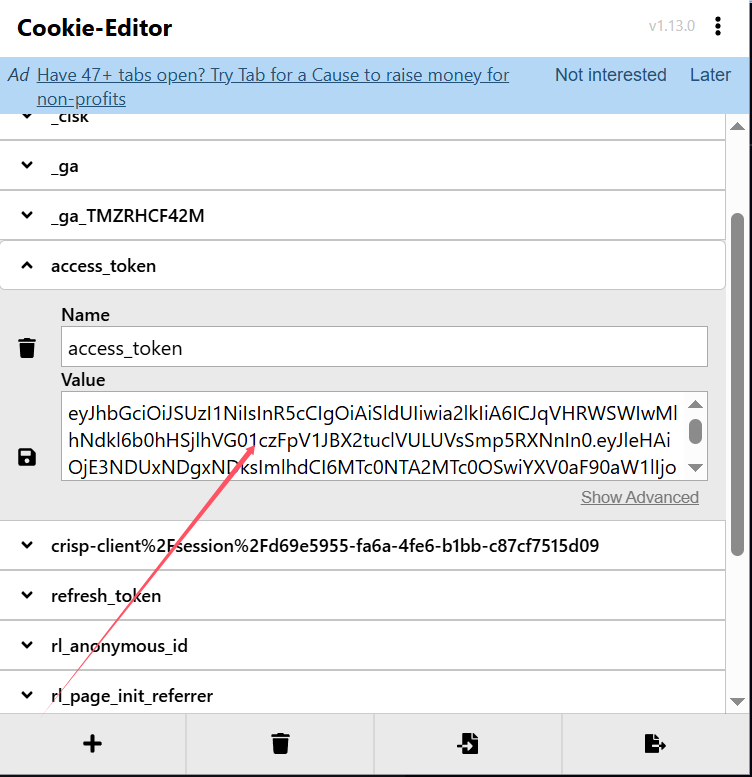
登陆后,用Cookie-Editor插件很方便拿token
https://microsoftedge.microsoft.com/addons/detail/cookieeditor/neaplmfkghagebokkhpjpoebhdledlfi
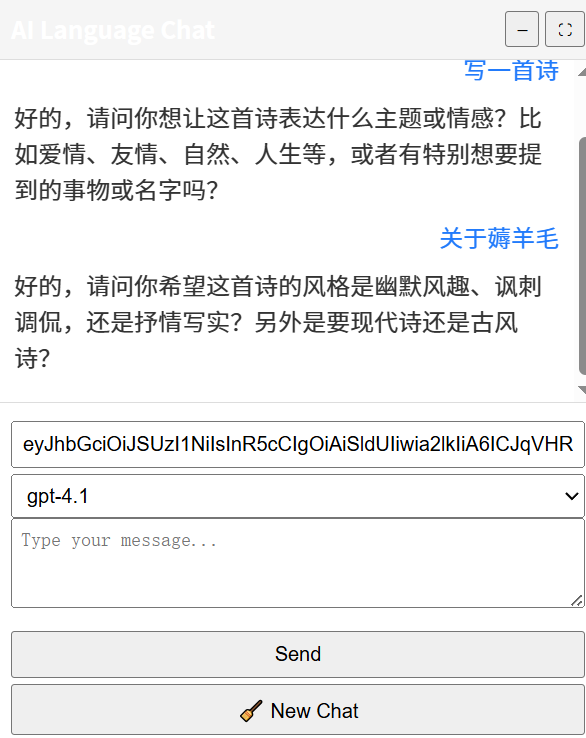
1 个赞
脚本加上了,怎么调出聊天框啊
强大a.。。
开启,刷新页面就有
提示一下刷新 token 的方法
/api/v1/auth/login
/auth/realms/helix/protocol/openid-connect/auth
/api/v1/auth/callback
https://client.crisp.chat/settings/website/d69e5955-fa6a-4fe6-b1bb-c87cf7515d09/
2 个赞
输出有限制,不能写代码
嗯,看到了
1 个赞
感谢分享,已经用上了。
1 个赞
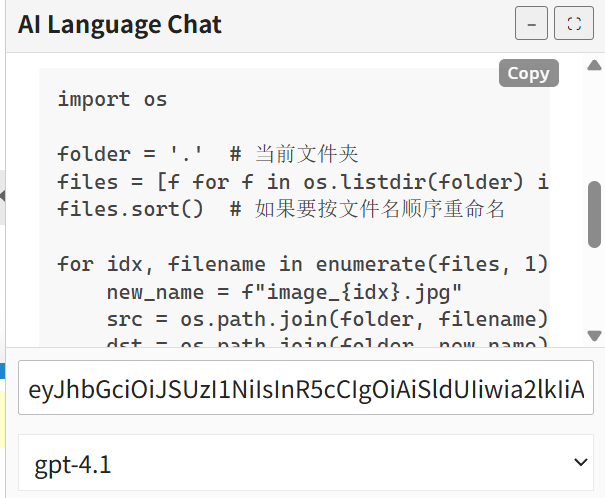
安排,已更新,支持代码框和markdown格式渲染:
// ==UserScript==
// @name         AI Chat Panel
// @namespace    http://tampermonkey.net/
// @version      2.2
// @description  AI Chat with Markdown rendering, code highlight & copy button
// @author       Finch
// @match        *://*/*
// @grant        GM_addStyle
// @grant        GM_xmlhttpRequest
// @grant        GM_setValue
// @grant        GM_getValue
// @connect      app.tryhelix.ai
// @require      https://cdn.jsdelivr.net/npm/marked/marked.min.js
// @require      https://cdn.jsdelivr.net/npm/dompurify@3.0.5/dist/purify.min.js
// @require      https://cdnjs.cloudflare.com/ajax/libs/highlight.js/11.9.0/highlight.min.js
// ==/UserScript==

(function () {
    'use strict';

    /* ------------------------- 模型列表 ------------------------- */
    const modelList = [
        // OpenAI — GPT‑3.5
        "gpt-3.5-turbo", "gpt-3.5-turbo-0125", "gpt-3.5-turbo-1106",
        "gpt-3.5-turbo-16k", "gpt-3.5-turbo-16k-0613",
        "gpt-3.5-turbo-instruct", "gpt-3.5-turbo-instruct-0914",

        // OpenAI — GPT‑4
        "gpt-4", "gpt-4-0125-preview", "gpt-4-0613", "gpt-4-1106-preview",
        "gpt-4-turbo", "gpt-4-turbo-2024-04-09", "gpt-4-turbo-preview",

        // OpenAI — GPT‑4.1 / 4.5
        "gpt-4.1", "gpt-4.1-2025-04-14", "gpt-4.1-mini",
        "gpt-4.1-mini-2025-04-14", "gpt-4.1-nano", "gpt-4.1-nano-2025-04-14",
        "gpt-4.5-preview", "gpt-4.5-preview-2025-02-27",

        // OpenAI — GPT‑4o
        "gpt-4o", "gpt-4o-2024-05-13", "gpt-4o-2024-08-06",
        "gpt-4o-2024-11-20", "gpt-4o-mini", "gpt-4o-mini-2024-07-18",
        "gpt-4o-search-preview", "gpt-4o-search-preview-2025-03-11",
        "gpt-4o-mini-search-preview", "gpt-4o-mini-search-preview-2025-03-11",

        // Helix
        "llama3:70b", "llama3:instruct", "llama3.1:8b-instruct-q8_0",
        "llama3.2:1b-instruct-q8_0", "llama3.2:3b-instruct-q8_0",
        "llama3.3:70b-instruct-q4_K_M", "deepseek-r1:8b-llama-distill-q8_0",
        "deepseek-r1:32b-qwen-distill-q8_0", "phi3:instruct",
        "phi3.5:3.8b-mini-instruct-q8_0", "aya:8b-23-q8_0", "aya:35b-23-q4_0",
        "gemma2:2b-instruct-q8_0", "qwen2.5:7b-instruct-q8_0",

        // Together AI
        "meta-llama/Llama-3-70b-chat-hf",
        "meta-llama/Llama-3.3-70B-Instruct-Turbo",
        "meta-llama/Llama-3.2-3B-Instruct-Turbo",
        "meta-llama/Llama-3.2-11B-Vision-Instruct-Turbo",
        "meta-llama/Llama-3.3-70B-Instruct-Turbo-Free",
        "meta-llama/Llama-4-Maverick-17B-128E-Instruct-FP8",
        "mistralai/Mixtral-8x7B-Instruct-v0.1",
        "mistralai/Mistral-7B-Instruct-v0.3",
        "Qwen/Qwen2.5-72B-Instruct-Turbo", "Qwen/Qwen2-VL-72B-Instruct",
        "Qwen/Qwen2.5-Coder-32B-Instruct", "deepseek-ai/DeepSeek-R1",
        "deepseek-ai/DeepSeek-V3", "deepseek-ai/DeepSeek-R1-Distill-Qwen-1.5B",
        "google/gemma-2-27b-it", "google/gemma-2-9b-it", "google/gemma-2b-it",
        "arcee-ai/arcee-blitz", "arcee-ai/maestro-reasoning",
        "arcee-ai/virtuoso-large"
    ];

    /* ------------------------- OpenAI 模型集合 ------------------------- */
    const openaiModels = new Set([
        // GPT‑3.5
        "gpt-3.5-turbo", "gpt-3.5-turbo-0125", "gpt-3.5-turbo-1106",
        "gpt-3.5-turbo-16k", "gpt-3.5-turbo-16k-0613",
        "gpt-3.5-turbo-instruct", "gpt-3.5-turbo-instruct-0914",

        // GPT‑4
        "gpt-4", "gpt-4-0125-preview", "gpt-4-0613", "gpt-4-1106-preview",
        "gpt-4-turbo", "gpt-4-turbo-2024-04-09", "gpt-4-turbo-preview",

        // GPT‑4.1 / 4.5
        "gpt-4.1", "gpt-4.1-2025-04-14", "gpt-4.1-mini",
        "gpt-4.1-mini-2025-04-14", "gpt-4.1-nano", "gpt-4.1-nano-2025-04-14",
        "gpt-4.5-preview", "gpt-4.5-preview-2025-02-27",

        // GPT‑4o
        "gpt-4o", "gpt-4o-2024-05-13", "gpt-4o-2024-08-06",
        "gpt-4o-2024-11-20", "gpt-4o-mini", "gpt-4o-mini-2024-07-18",
        "gpt-4o-search-preview", "gpt-4o-search-preview-2025-03-11",
        "gpt-4o-mini-search-preview", "gpt-4o-mini-search-preview-2025-03-11"
    ]);

    /* ------------------------- 样式 ------------------------- */
    const style = `
        #ai-panel{
            position:fixed;
            bottom:0;
            right:0;
            width:400px;
            height:500px;
            background:#fff;
            border:1px solid #ccc;
            display:flex;
            flex-direction:column;
            font-family:sans-serif;
            z-index:9999;
            transition:all .3s ease;
        }
        #ai-panel.minimized{height:40px;}
        #ai-panel.fullscreen{
            top:0;left:0;right:0;bottom:0;   /* 完整贴边 */
            width:100vw;height:100vh;
        }
        #ai-header{
            padding:8px;border-bottom:1px solid #ddd;
            background:#f5f5f5;display:flex;
            justify-content:space-between;align-items:center;
        }
        #ai-header span{font-weight:bold;}
        #ai-header .ai-controls{display:flex;gap:4px;}
        #ai-header button{font-size:12px;padding:2px 6px;cursor:pointer;}
        #ai-messages{flex:1;overflow-y:auto;padding:10px;}
        .ai-msg{margin-bottom:8px;line-height:1.4;}
        .ai-user{text-align:right;color:#007aff;}
        .ai-assistant{text-align:left;color:#333;}
        #ai-controls{
            border-top:1px solid #ddd;padding:8px;background:#fafafa;
            display:flex;flex-direction:column;gap:4px;
        }
        #ai-controls textarea{width:100%;height:60px;padding:6px;resize:vertical;}
        #ai-controls button,#ai-controls select,#ai-controls input{
            width:100%;padding:6px;box-sizing:border-box;cursor:pointer;
        }

        /* 代码高亮 & 复制按钮 */
        @import url("https://cdnjs.cloudflare.com/ajax/libs/highlight.js/11.9.0/styles/atom-one-dark.min.css");
        #ai-messages pre{
            overflow-x:auto;padding:.75em;border-radius:6px;position:relative;
        }
        .ai-copy-btn{
            position:absolute;top:6px;right:6px;
            background:#444;color:#fff;font-size:12px;
            padding:2px 6px;border:none;border-radius:4px;
            cursor:pointer;opacity:.6;user-select:none;
        }
        .ai-copy-btn:hover{opacity:1;}
    `;

    /* ------------------------- UI HTML ------------------------- */
    const html = `
        <div id="ai-panel">
            <div id="ai-header">
                <span>AI Language Chat</span>
                <div class="ai-controls">
                    <button id="ai-toggle">–</button>
                    <button id="ai-fullscreen">⛶</button>
                </div>
            </div>
            <div id="ai-messages"></div>
            <div id="ai-controls">
                <input type="text" id="ai-token" placeholder="Enter your token..." />
                <select id="ai-model">
                    ${modelList.map(m=>`<option value="${m}">${m}</option>`).join('')}
                </select>
                <textarea id="ai-message" placeholder="Type your message..."></textarea>
                <button id="ai-send">Send</button>
                <button id="ai-reset">🧹 New Chat</button>
            </div>
        </div>
    `;

    /* ------------------------- 注入页面 ------------------------- */
    document.body.insertAdjacentHTML('beforeend', html);
    GM_addStyle(style);

    /* ------------------------- DOM 句柄 & 状态 ------------------------- */
    const panel       = document.getElementById('ai-panel');
    const tokenInput  = document.getElementById('ai-token');
    const modelSelect = document.getElementById('ai-model');
    const textArea    = document.getElementById('ai-message');
    const messageList = document.getElementById('ai-messages');

    let historyText = '';
    let isMinimized = false;
    let isFullscreen = false;

    const cachedToken = GM_getValue('helix_token', '');
    if (cachedToken) tokenInput.value = cachedToken;

    /* ------------------------- 渲染消息 ------------------------- */
    function appendMessage(role, text) {
        const div = document.createElement('div');
        div.className = `ai-msg ai-${role}`;

        if (role === 'assistant') {
            const dirtyHTML = marked.parse(text);
            const cleanHTML = DOMPurify.sanitize(dirtyHTML);
            div.innerHTML = cleanHTML;
            hljs.highlightAll();
            addCopyButtons(div);          // 给代码块加复制按钮
        } else {
            div.textContent = text;
        }

        messageList.appendChild(div);
        messageList.scrollTop = messageList.scrollHeight;
    }

    /* ---------- 为每个 <pre> 添加 Copy 按钮 ---------- */
    function addCopyButtons(container) {
        container.querySelectorAll('pre').forEach(pre => {
            if (pre.querySelector('.ai-copy-btn')) return;       // 已处理
            const btn = document.createElement('button');
            btn.className = 'ai-copy-btn';
            btn.textContent = 'Copy';
            btn.addEventListener('click', () => {
                navigator.clipboard.writeText(pre.innerText).then(() => {
                    btn.textContent = 'Copied!';
                    setTimeout(() => btn.textContent = 'Copy', 1500);
                }).catch(() => alert('复制失败,请手动选择文本'));
            });
            pre.appendChild(btn);
        });
    }

    /* ------------------------- Provider 解析 ------------------------- */
    function getProvider(name) {
        if (openaiModels.has(name)) return 'openai';
        if (/^(llama|phi|aya|gemma|deepseek|qwen)/.test(name)) return 'helix';
        return 'togetherai';
    }

    /* ------------------------- 发送请求 ------------------------- */
    function sendMessage(userText) {
        const token = tokenInput.value.trim();
        const model = modelSelect.value;

        if (!token || !userText) {
            alert('Token and message required.');
            return;
        }
        GM_setValue('helix_token', token);

        appendMessage('user', userText);
        historyText += `用户:${userText}\n`;

        const payload = {
            type: 'text',
            stream: false,
            provider: getProvider(model),
            model,
            messages: [{
                role: 'user',
                content: { content_type: 'text', parts: [historyText.trim()] }
            }]
        };

        GM_xmlhttpRequest({
            method: 'POST',
            url: 'https://app.tryhelix.ai/api/v1/sessions/chat',
            headers: {
                'Content-Type': 'application/json',
                'Authorization': 'Bearer ' + token
            },
            data: JSON.stringify(payload),
            onload: res => {
                try {
                    const result = JSON.parse(res.responseText);
                    const reply = result.choices?.[0]?.message?.content || '[No response]';
                    appendMessage('assistant', reply);
                    historyText += `AI:${reply}\n`;
                } catch (err) {
                    appendMessage('assistant', '❌ Parse error: ' + err);
                }
            },
            onerror: err => {
                appendMessage('assistant', '❌ Request error: ' + JSON.stringify(err));
            }
        });
    }

    /* ------------------------- 事件绑定 ------------------------- */
    document.getElementById('ai-send').onclick = () => {
        const msg = textArea.value.trim();
        if (msg) {
            sendMessage(msg);
            textArea.value = '';
        }
    };

    document.getElementById('ai-reset').onclick = () => {
        historyText = '';
        messageList.innerHTML = '';
        appendMessage('assistant', '[新对话已开始]');
    };

    document.getElementById('ai-toggle').onclick = () => {
        isMinimized = !isMinimized;
        panel.classList.toggle('minimized', isMinimized);
    };

    document.getElementById('ai-fullscreen').onclick = () => {
        isFullscreen = !isFullscreen;
        panel.classList.toggle('fullscreen', isFullscreen);
    };
})();
3 个赞
NB! 感谢大佬
厉害佬大
哪位佬能开发个客户端吗
网页可以用,就是不知道它会不会降智。
牛牛牛牛牛
大佬,油猴脚本限制太多,方便写个cf或者deno的2api吗?只是建议 
大佬,这个是请求生成新token是吗?
我看有个refresh的接口,这个接口刷新以后还是一天吗?
是的,因该还有一个ws接口
感谢大佬
那就是这个refresh没有用了,只能通过登录接口生成token吗
没太懂.