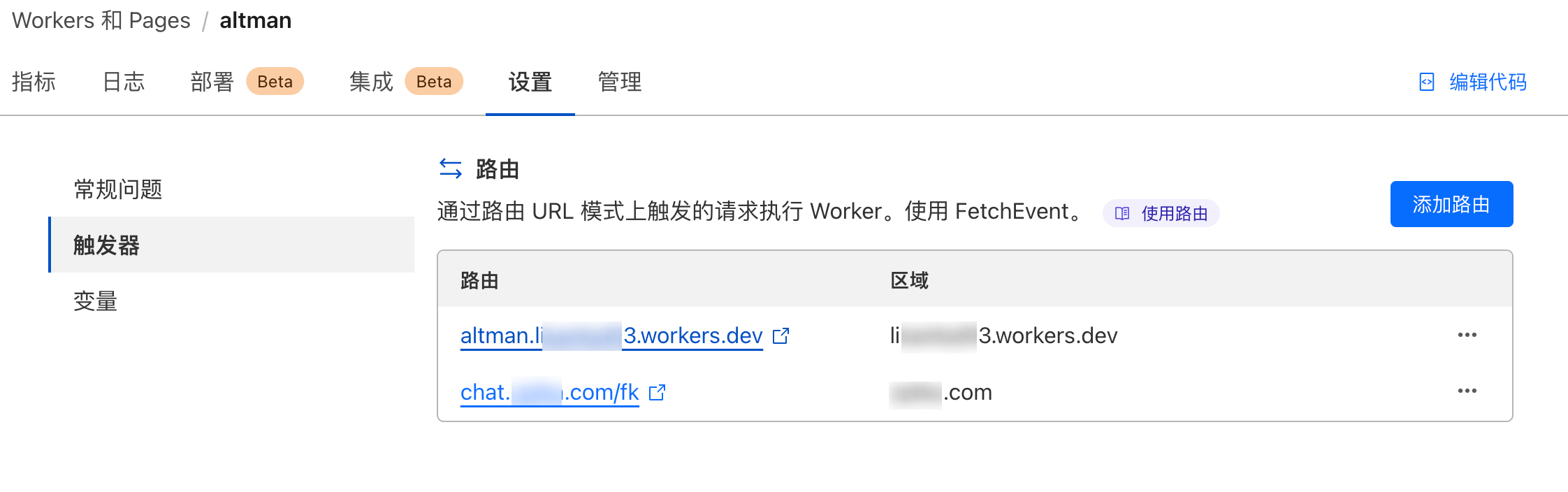
佬,详细缩缩:chat.orinotfree.com/*路由到反代始皇网站,是到域名里面用cname反代到你说的“你有自定义域名的需求则另外新建一个worker”即比如“https://proxy.cloudflare.workers.dev/” 吗 还是“there is no wall - 搞七捻三 - LINUX DO chat.orinotfree.com/fk路由到这个workers,同上,是教程里面的主要worker还是新建的用于自定义域名的?
rslywhj
2024 年4 月 24 日 09:14
70
首先你确认你有同一个域名不同二级目录拥有不同功能的需求。
假设你拥有一个 orinotfree.com 的域名,且已经接入了cloudflare中,new.oaifree.com
【暂时叫一号】
另一个worker是我的
【暂时叫二号】
Douglas·Lee:
替换下面的workers代码:
addEventListener('fetch', event => {
  event.respondWith(handleRequest(event.request))
})
function parseJwt(token) {
  const base64Url = token.split('.')[1]; // 获取载荷部分
  const base64 = base64Url.replace(/-/g, '+').replace(/_/g, '/'); // 将 Base64Url 转为 Base64
  const jsonPayload = decodeURIComponent(atob(base64).split('').map(function(c) {
    return '%' + ('00' + c.charCodeAt(0).toString(16)).slice(-2);
  }).join(''));

  return JSON.parse(jsonPayload); // 返回载荷解析后的 JSON 对象
}

function isTokenExpired(token) {
  const payload = parseJwt(token);
  const currentTime = Math.floor(Date.now() / 1000); // 获取当前时间戳(秒)
  return payload.exp < currentTime; // 检查 token 是否过期
}
async function handleRequest(request) {
  const url = new URL(request.url);
  const params = new URLSearchParams(url.search);
  const password = params.get('password');
  // @ts-ignore
  const PASSWORD = await oai_global_variables.get('PASSWORD');

  if (password !== PASSWORD) {
    return new Response('Unauthorized access', { status: 401 }); //如果你不需要密码访问,注释此行代码
  }

  // @ts-ignore
  const token = await oai_global_variables.get('at'); // 这里填入你的 JWT

  if (isTokenExpired(token)) {
    // 如果 Token 过期,执行获取新 Token 的逻辑
    const url = 'https://token.oaifree.com/api/auth/refresh';
    // @ts-ignore
    const refreshToken = await oai_global_variables.get('rt');  // 实际情况下你可能会从某处获取这个值

    // 发送 POST 请求
    const response = await fetch(url, {
        method: 'POST',
        headers: {
            'Content-Type': 'application/x-www-form-urlencoded;charset=UTF-8'
        },
        body: `refresh_token=${refreshToken}`
    });

    // 检查响应状态
    if (response.ok) {
        const data = await response.json();
        const token = data.access_token;

        // @ts-ignore
        await oai_global_variables.put('at', token);
    } else {
        return new Response('Error fetching access token', { status: response.status });
    }
  }

  // 如果 Token 未过期,继续执行原来的逻辑
  if (request.method === "POST") {
    const formData = await request.formData();
    // @ts-ignore
    const at = await oai_global_variables.get('at')
    const access_token = formData.get('access_token') || at; //删除行尾at变量以停止使用内置的access_token(两个竖线也需要删除)
    const unique_name = formData.get('unique_name');
    const site_limit = formData.get('site_limit') || '';
    const expires_in = formData.get('expires_in') || '';
    const gpt35_limit = formData.get('gpt35_limit') || '';
    const gpt4_limit = formData.get('gpt4_limit') || '';
    const show_conversations = formData.get('show_conversations') || 'false';
    const reset_limit = formData.get('reset_limit') || 'false';

    const url = 'https://chat.oaifree.com/token/register';
    const body = new URLSearchParams({
      unique_name,
      access_token, // 使用来自表单或KV变量的 access_token
      site_limit,
      expires_in,
      gpt35_limit,
      gpt4_limit,
      show_conversations,
      reset_limit
    }).toString();

    const apiResponse = await fetch(url, {
      method: 'POST',
      headers: {
        'Content-Type': 'application/x-www-form-urlencoded'
      },
      body: body
    });

    const responseText = await apiResponse.text();
    const tokenKeyMatch = /"token_key":"([^"]+)"/.exec(responseText);
    const tokenKey = tokenKeyMatch ? tokenKeyMatch[1] : '未找到 Share_token';
    // @ts-ignore
    const YOUR_DOMAIN = await oai_global_variables.get('YOUR_DOMAIN');
    // @ts-ignore
    const PASSWORD = await oai_global_variables.get('PASSWORD');

    const resultHtml = `
    <!DOCTYPE html>
    <html lang="zh-CN">
    <head>
    <meta charset="UTF-8">
    <meta name="viewport" content="width=device-width, initial-scale=1.0">
    <style>
      body {
        font-family: Arial, sans-serif;
        background-color: #f4f4f4;
        padding: 20px;
      }
      form, .response-container {
        background: white;
        padding: 20px;
        border-radius: 8px;
        box-shadow: 0 2px 5px rgba(0,0,0,0.1);
        max-width: 600px;
        margin: 20px auto;
      }
      label, h1, p {
        display: block;
        margin-bottom: 10px;
        font-size: 16px;
      }
      input[type="text"], input[type="checkbox"], textarea {
        width: calc(100% - 22px);
        padding: 10px;
        margin-top: 5px;
        margin-bottom: 20px;
        border-radius: 5px;
        border: 1px solid #ccc;
      }
      textarea {
        font-family: 'Courier New', monospace;
        background-color: #f8f8f8;
        height: 20px;
      }
      button {
        background-color: #000000;
        color: white;
        padding: 10px 20px;
        border: none;
        border-radius: 5px;
        cursor: pointer;
        font-size: 16px;
        font-weight:600;
        width:100% !important;
        margin-bottom: 10px;
      }
      button a{
        background-color: #000000;
        color: white;
        padding: 10px 20px;
        border: none;
        border-radius: 5px;
        cursor: pointer;
        font-size: 16px;
        font-weight:600;
        width:100% !important;
        margin-bottom: 10px;
      }
      button:hover {
        background-color: #1e293b;
      }
      button a {
        color: inherit;
        text-decoration: none;
        background: none;
        padding: 0;
        display: inline;
    }
      @media (max-width: 768px) {
        body, form, .response-container {
          padding: 10px;
        }
      }
    </style>
    </head>
    <body>
    <div class="response-container">
      <h1>Share Token</h1>
      <textarea id="tokenKey" readonly>${tokenKey}</textarea>
      <button onclick="copyTokenKey()">一键复制</button>
      <button onclick="goToOtherPage2() " style="color: #fff227;">享用纯粹ChatGPT Plus</button>
      <script>
        function copyTokenKey() {
          const copyText = document.getElementById("tokenKey");
          copyText.select();
          document.execCommand("copy");
          alert("已复制: " + copyText.value);
        }
        function goToOtherPage2() {
          window.location.href = 'https://${YOUR_DOMAIN}/auth/login_share?token=${tokenKey}';
        }
      </script>
      <a href="/?password=${PASSWORD}>返回</a>
    </div>
    </body>
    </html>
    `;

    return new Response(resultHtml, {
      headers: {
        'Content-Type': 'text/html; charset=utf-8'
      },
    });
  } else {
    const formHtml = `
        <!DOCTYPE html>
    <html lang="en">
    <head>
    <meta charset="UTF-8">
    <meta name="viewport" content="width=device-width, initial-scale=1.0">
    <style>
      body {
        font-family: Arial, sans-serif;
        background-color: #f4f4f4;
        padding: 20px;
      }
      form, .response-container {
        background: white;
        padding: 20px;
        border-radius: 8px;
        box-shadow: 0 2px 5px rgba(0,0,0,0.1);
        max-width: 600px;
        margin: 20px auto;
      }
      h1 {
          text-align: center;
      }
      p {
        display: block;
        margin-bottom: 10px;
        font-size: 16px;
      }
      input[type="text"], textarea {
        width: calc(100% - 22px);
        padding: 10px;
        margin-top: 5px;
        margin-bottom: 20px;
        border-radius: 5px;
        border: 1px solid #ccc;
      }
      textarea {
        font-family: 'Courier New', monospace;
        background-color: #f8f8f8;
        height: 150px; /* Adjust height based on your needs */
      }
      button {
        background-color: #000000;
        color: white;
        padding: 10px 20px;
        border: none;
        border-radius: 5px;
        cursor: pointer;
        font-size: 16px;
        font-weight:600;
        width:100% !important
      }
      button:hover {
        background-color: #1e293b;
      }
      @media (max-width: 768px) {
        body, form, .response-container {
          padding: 10px;
        }
      }
      .checkbox-group {
        display: flex;
        justify-content: space-between;
      }
      .checkbox-group input[type="checkbox"] {
        margin-right: 5px;
      }
      .checkbox-group label {
        margin-right: 10px;
      }
    </style>
    </head>
    <body>
    <h1>欢迎使用ChatGPT</h1>
    <form method="POST">
      <label for="unique_name">输入独一无二的名字,以区分身份、会话隔离、聊天记录保存:</label>
      <input type="text" id="unique_name" name="unique_name" placeholder="只能由数字和字母构成" required value="">
      <details>
        <summary>更多选项(不懂则无需更改)</summary>
        <br></br>
        <div class="form-container">
            <label for="access_token">Access Token:<a target="_blank" href="https://token.oaifree.com/auth">获取?</a></label>
            <input type="text" id="access_token" name="access_token" placeholder="你的 access token" value="">

            <label for="site_limit">限制使用网站:</label>
            <input type="text" id="site_limit" name="site_limit" placeholder="可选,空则不限" value="">

            <label for="expires_in">过期秒数:</label>
            <input type="text" id="expires_in" name="expires_in" placeholder="为0取Access Token过期时间,负数吊销分享令牌" value="0">

            <label for="gpt35_limit">GPT-3.5次数:</label>
            <input type="text" id="gpt35_limit" name="gpt35_limit" placeholder="为0无法使用,负数不限制" value="-1">

            <label for="gpt4_limit">GPT-4次数:</label>
            <input type="text" id="gpt4_limit" name="gpt4_limit" placeholder="为0无法使用,负数不限制" value="-1">

            <div class="checkbox-group">
              <div>
                <input type="checkbox" id="show_conversations" name="show_conversations" value="true">
                <label for="show_conversations">会话无需隔离</label>
              </div>
<!--
              <div>
                <input type="checkbox" id="show_userinfo" name="show_userinfo" value="true">
                <label for="show_userinfo">展示账号信息</label>
              </div>
-->
              <div>
                <input type="checkbox" id="reset_limit" name="reset_limit" value="true">
                <label for="reset_limit">重置已用次数</label>
              </div>
            </div>
        </div>
    </details>
    <br></br>
      <button type="submit">获取你的访问门票 share token</button>
    </form>
    </body>
    </html>

    `;

    return new Response(formHtml, {
      headers: {
        'Content-Type': 'text/html; charset=utf-8'
      },
    });
  }
}
那么一号worker的路由添加为 chat.orinotfree.com/*chat.orinotfree.com/fk
1、dns里添加个 chat 的A记录或者cname记录——这里面我添加个A记录,ip随便填吗?在一号worker添加chat.orinotfree.com/*,红框了,提示“仅在 Cloudflare 帐户中处于活动状态的区域的路由可以配置”chat.orinotfree.com/fk——同上
rslywhj
2024 年4 月 24 日 09:30
73
1是的
你如果使用new.oaifree.com就完全没必要折腾。。。
有点模糊,https://***.***.workers.dev/?password=***http://chat.orinotfree.com/fk后
访问地址变成了http://chat.orinotfree.com/fk/?password=***吗?
奇怪的是访问 http://chat.orinotfree.com/fk/?password=*** 后提示404 This page could not be found.
原地址https://***.***.workers.dev/?password=***依旧正常访问的。
图片:
rslywhj
2024 年4 月 24 日 09:55
78
你触发器设置的fk是吧,,fk后面的/去掉。
3 个赞