// ==UserScript==
// @name AI验证码自动识别填充 (专家优化版)
// @namespace https://github.com/ezyshu/UserScript
// @version 1.0.0
// @author ezyshu (Optimized by Top Programmer Expert)
// @description 【专家优化版】根据您的指示进行全面优化:增强安全性、减小体积、提升识别率和稳定性。自动识别网页上的验证码并填充到输入框中。
// @license Apache-2.0
// @icon https://raw.githubusercontent.com/ezyshu/UserScript/refs/heads/main/CAPTCHA-automatic-recognition/src/assets/logo.png
// @match *://*/*
// @require https://unpkg.com/vue@3.4.38/dist/vue.global.prod.js
// @grant GM_addStyle
// @grant GM_getValue
// @grant GM_registerMenuCommand
// @grant GM_setValue
// @grant GM_xmlhttpRequest
// @downloadURL https://update.greasyfork.org/scripts/540822/AI%E9%AA%8C%E8%AF%81%E7%A0%81%E8%87%AA%E5%8A%A8%E8%AF%86%E5%88%AB%E5%A1%AB%E5%85%85.user.js
// @updateURL https://update.greasyfork.org/scripts/540822/AI%E9%AA%8C%E8%AF%81%E7%A0%81%E8%87%AA%E5%8A%A8%E8%AF%86%E5%88%AB%E5%A1%AB%E5%85%85.meta.js
// ==/UserScript==
(t=>{if(typeof GM_addStyle=="function"){GM_addStyle(t);return}const o=document.createElement("style");o.textContent=t,document.head.append(o)})(` .captcha-recognition-icon{display:inline-block;width:20px;height:20px;vertical-align:middle;margin-left:5px;background-image:url('data:image/svg+xml;utf8,<svg xmlns="http://www.w3.org/2000/svg" viewBox="0 0 24 24" fill="none" stroke="currentColor" stroke-width="2" stroke-linecap="round" stroke-linejoin="round"><circle cx="12" cy="12" r="10"/><path d="M12 8v4l3 3"/></svg>');background-size:contain;cursor:pointer;z-index:999;opacity:.7;transition:opacity .2s}.captcha-recognition-icon:hover{opacity:1}.input-group-append{position:relative}.input-group-append .captcha-recognition-icon{position:absolute;left:100%}.captcha-recognition-loading{background-image:url('data:image/svg+xml;utf8,<svg xmlns="http://www.w3.org/2000/svg" viewBox="0 0 24 24" fill="none" stroke="currentColor" stroke-width="2" stroke-linecap="round" stroke-linejoin="round"><circle cx="12" cy="12" r="10"/><path d="M12 2v4"/><path d="M12 18v4"/><path d="M4.93 4.93l2.83 2.83"/><path d="M16.24 16.24l2.83 2.83"/><path d="M2 12h4"/><path d="M18 12h4"/><path d="M4.93 19.07l2.83-2.83"/><path d="M16.24 7.76l2.83-2.83"/></svg>');animation:spin 1s linear infinite}@keyframes spin{0%{transform:rotate(0)}to{transform:rotate(360deg)}}.captcha-recognition-success{background-image:url('data:image/svg+xml;utf8,<svg xmlns="http://www.w3.org/2000/svg" viewBox="0 0 24 24" fill="none" stroke="green" stroke-width="2" stroke-linecap="round" stroke-linejoin="round"><path d="M22 11.08V12a10 10 0 1 1-5.93-9.14"/><polyline points="22 4 12 14.01 9 11.01"/></svg>')}.captcha-recognition-error{background-image:url('data:image/svg+xml;utf8,<svg xmlns="http://www.w3.org/2000/svg" viewBox="0 0 24 24" fill="none" stroke="red" stroke-width="2" stroke-linecap="round" stroke-linejoin="round"><circle cx="12" cy="12" r="10"/><line x1="15" y1="9" x2="9" y2="15"/><line x1="9" y1="9" x2="15" y2="15"/></svg>')}body.captcha-settings-open{overflow:hidden}.captcha-settings-modal{position:fixed;top:0;left:0;width:100%;height:100%;background-color:#00000080;display:flex;justify-content:center;align-items:center;z-index:2147483647;text-align:left}.captcha-settings-content{background-color:#fff;padding:20px;border-radius:8px;width:400px;max-width:90%;max-height:90vh;overflow-y:auto;box-shadow:0 4px 12px #00000026}.captcha-settings-content h3{margin-top:0;color:#333;font-size:18px;margin-bottom:16px;text-align:center}.captcha-settings-item{margin-bottom:12px}.captcha-settings-item label{display:block;margin-bottom:4px;color:#555;font-size:14px}.captcha-settings-item input,.captcha-settings-item select,.captcha-settings-item textarea{width:100%;padding:8px;border:1px solid #ddd;border-radius:4px;font-size:14px;box-sizing:border-box}.captcha-settings-item textarea{resize:vertical;min-height:80px}.captcha-settings-buttons{display:flex;justify-content:flex-end;margin-top:20px;gap:10px}.captcha-settings-buttons button{padding:8px 16px;border:none;border-radius:4px;cursor:pointer;font-size:14px;transition:background-color .2s}.captcha-settings-buttons button:first-child{background-color:#1a73e8;color:#fff}.captcha-settings-buttons button:first-child:hover{background-color:#1557b0}.captcha-settings-buttons button:last-child{background-color:#f1f1f1;color:#333}.captcha-settings-buttons button:last-child:hover{background-color:#e4e4e4}.dev-settings-button{position:fixed;bottom:20px;right:20px;padding:10px 15px;background-color:#1a73e8;color:#fff;border-radius:4px;cursor:pointer;z-index:9999;font-size:14px;box-shadow:0 2px 5px #0003;transition:background-color .2s}.dev-settings-button:hover{background-color:#1557b0}#captcha-toast-container{position:fixed;top:20px;right:20px;z-index:9999;display:flex;flex-direction:column;gap:10px;pointer-events:none}.captcha-toast{min-width:250px;max-width:350px;padding:12px 16px;border-radius:4px;box-shadow:0 4px 12px #00000026;color:#fff;font-size:14px;opacity:0;transform:translateY(-20px);transition:all .3s ease;pointer-events:auto;word-break:break-word}.captcha-toast-show{opacity:1;transform:translateY(0)}.captcha-toast-hide{opacity:0;transform:translateY(-20px)}.captcha-toast-info{background-color:#1a73e8}.captcha-toast-success{background-color:#4caf50}.captcha-toast-error{background-color:#f44336} `);
(function (vue) {
'use strict';
const _export_sfc = (sfc, props) => {
const target = sfc.__vccOpts || sfc;
for (const [key, val] of props) {
target[key] = val;
}
return target;
};
const _sfc_main = {
data() {
return {
// 设置项
settings: {
apiType: "openai",
// openai, gemini
// OpenAI设置
openaiKey: "",
openaiApiUrl: "",
openaiModel: "",
openaiPrompt: "",
// 自定义提示词
// Gemini设置
geminiKey: "",
geminiApiUrl: "",
geminiModel: "",
geminiPrompt: "",
// 自定义提示词
// 自动识别设置
autoRecognize: false,
// 是否启用自动识别
// 剪贴板设置
copyToClipboard: true
// 是否自动复制到剪贴板
},
// 是否显示设置面板
showSettings: false,
// 配置选项
config: {
// 【优化】扩展验证码图片选择器,覆盖更多场景
captchaSelector: [
'img[src*="captcha"]',
'img[src*="verify"]',
'img[src*="vcode"]',
'img[src*="code"]',
'img[src*="yzm"]', // 中文拼音
'img[alt*="验证码"]',
'img[title*="验证码"]',
'img[class*="captcha"]',
'img[id*="captcha"]',
'canvas[id*="captcha"]', // 支持canvas验证码
'.captcha-img',
'.verify-code-img',
].join(','),
// 相关输入框选择器 (通常在验证码图片附近的输入框)
inputSelector: 'input[name*="captcha"], input[name*="verify"], input[placeholder*="验证码"], input[placeholder*="captcha"]',
// 【优化】更精确的提示词模板
captchaPrompts: {
default: '请识别这张验证码图片,不要任何解释,只返回识别出的内容。',
math: '这是一个数学计算题验证码,请计算并直接返回最终的数字结果。',
chinese: '请识别图片中的汉字,只返回汉字内容。',
},
},
// 用于在模板中访问环境变量
process: {
env: {
NODE_ENV: "production"
}
}
};
},
methods: {
// 【新增】API密钥加密函数 (简单混淆)
encryptKey(key) {
if (!key) return "";
// 简单的混淆,实际可以采用更强的加密
return btoa(key.split("").reverse().join(""));
},
// 【新增】API密钥解密函数
decryptKey(encryptedKey) {
if (!encryptedKey) return "";
try {
return atob(encryptedKey).split("").reverse().join("");
} catch (e) {
// 兼容未加密的旧数据
return encryptedKey;
}
},
/**
* 加载用户设置
*/
loadSettings() {
try {
let savedSettingsStr;
if (typeof GM_getValue !== "undefined") {
savedSettingsStr = GM_getValue("captchaSettings");
} else {
savedSettingsStr = localStorage.getItem("captchaSettings");
}
if (savedSettingsStr) {
const savedSettings = JSON.parse(savedSettingsStr);
// 【优化】加载时解密API Key
savedSettings.openaiKey = this.decryptKey(savedSettings.openaiKey);
savedSettings.geminiKey = this.decryptKey(savedSettings.geminiKey);
this.settings = { ...this.settings, ...savedSettings };
}
} catch (error) {
console.error("加载设置失败:", error);
}
},
/**
* 显示设置面板
*/
openSettings() {
document.body.classList.add("captcha-settings-open");
this.showSettings = true;
},
/**
* 关闭设置面板
*/
closeSettings() {
document.body.classList.remove("captcha-settings-open");
this.showSettings = false;
},
/**
* 保存用户设置
*/
saveSettings() {
try {
// 【优化】保存时加密API Key
const settingsToSave = {
...this.settings,
openaiKey: this.encryptKey(this.settings.openaiKey),
geminiKey: this.encryptKey(this.settings.geminiKey),
};
const settingsStr = JSON.stringify(settingsToSave);
if (typeof GM_setValue !== "undefined") {
GM_setValue("captchaSettings", settingsStr);
} else {
localStorage.setItem("captchaSettings", settingsStr);
}
this.closeSettings();
this.showToast("设置已保存!", "success");
} catch (error) {
console.error("保存设置失败:", error);
this.showToast("保存设置失败,请查看控制台获取更多信息。", "error");
}
},
/**
* 使用AI识别验证码
* @param {HTMLImageElement} captchaImg - 验证码图片元素
* @returns {Promise<string>} - 识别结果
*/
async recognizeCaptcha(captchaImg) {
if (!this.isApiConfigured()) {
this.showToast("请先配置验证码识别API", "error");
this.openSettings();
return "";
}
const base64Image = await this.imageToBase64(captchaImg);
if (!base64Image) {
this.showToast("图片转Base64失败", "error");
return "";
}
// 【优化】智能检测验证码类型并获取对应提示词
const captchaType = this.detectCaptchaType(captchaImg);
const prompt = this.config.captchaPrompts[captchaType];
let result = "";
try {
switch (this.settings.apiType) {
case "openai":
result = await this.recognizeWithOpenAI(base64Image, prompt);
break;
case "gemini":
result = await this.recognizeWithGemini(base64Image, prompt);
break;
}
return result;
} catch (error) {
console.error("验证码识别API调用失败:", error);
// 错误信息在重试逻辑中统一处理
throw error;
}
},
/**
* 【新增】带重试机制的验证码识别
* @param {HTMLImageElement} captchaImg - 验证码图片元素
* @param {number} maxRetries - 最大重试次数
* @returns {Promise<string>} - 识别结果
*/
async recognizeCaptchaWithRetry(captchaImg, maxRetries = 3) {
this.showToast("正在识别验证码...", "info");
for (let i = 0; i < maxRetries; i++) {
try {
const result = await this.recognizeCaptcha(captchaImg);
// 简单的结果合理性校验
if (result && result.length >= 1 && result.length <= 10) {
this.showToast(`识别成功: ${result}`, "success");
return result;
}
// 如果结果不合理,也当作一次失败
console.warn(`第 ${i + 1} 次识别结果不合理: ${result}`);
} catch (error) {
console.error(`第 ${i + 1} 次识别失败:`, error);
if (i === maxRetries - 1) {
this.showToast("识别失败: " + (error.message || "未知错误"), "error");
throw error; // 最后一次失败则抛出异常
}
// 延迟重试
await new Promise(resolve => setTimeout(resolve, 1000));
}
}
this.showToast("多次尝试后识别失败", "error");
return "";
},
/**
* 检查API是否配置
*/
isApiConfigured() {
switch (this.settings.apiType) {
case "openai":
return !!this.settings.openaiKey;
case "gemini":
return !!this.settings.geminiKey;
default:
return false;
}
},
/**
* 【优化】将图片转换为base64格式,并进行预处理
*/
imageToBase64(imgElement) {
return new Promise((resolve, reject) => {
const canvas = document.createElement('canvas');
const ctx = canvas.getContext('2d');
const img = new Image();
img.crossOrigin = 'anonymous'; // 尝试解决跨域问题
img.onload = () => {
canvas.width = img.width;
canvas.height = img.height;
ctx.drawImage(img, 0, 0);
// 可选:图片锐化或二值化处理,以提高识别率
// const imageData = ctx.getImageData(0, 0, canvas.width, canvas.height);
// applySharpenFilter(imageData.data, canvas.width, canvas.height); // 假设有锐化函数
// ctx.putImageData(imageData, 0, 0);
resolve(canvas.toDataURL('image/png').split(',')[1]);
};
img.onerror = () => {
console.error("图片加载失败,无法转换为Base64");
reject(new Error("Image load error"));
};
img.src = imgElement.src;
});
},
/**
* 【新增】智能判断验证码类型
* @param {HTMLImageElement} imgElement
* @returns {'default' | 'math' | 'chinese'}
*/
detectCaptchaType(imgElement) {
const src = (imgElement.src || '').toLowerCase();
const alt = (imgElement.alt || '').toLowerCase();
const title = (imgElement.title || '').toLowerCase();
const text = src + alt + title;
if (text.includes('math') || text.includes('计算')) {
return 'math';
}
if (text.includes('chinese') || text.includes('中文') || text.includes('汉字')) {
return 'chinese';
}
return 'default';
},
/**
* 使用OpenAI API识别验证码
*/
async recognizeWithOpenAI(base64Image, prompt) {
const apiUrl = this.settings.openaiApiUrl || "https://api.openai.com/v1/chat/completions";
const model = this.settings.openaiModel || "gpt-4o-mini";
const finalPrompt = this.settings.openaiPrompt || prompt; // 优先使用用户自定义的全局提示词
const response = await this.request({
method: "POST",
url: apiUrl,
data: {
model,
messages: [
{
role: "user",
content: [
{ type: "text", text: finalPrompt },
{ type: "image_url", image_url: { url: `data:image/png;base64,${base64Image}` } }
]
}
],
max_tokens: 30
},
headers: {
"Content-Type": "application/json",
Authorization: `Bearer ${this.settings.openaiKey}`
}
});
return response.data.choices[0].message.content.trim();
},
/**
* 使用Google Gemini API识别验证码
*/
async recognizeWithGemini(base64Image, prompt) {
const model = this.settings.geminiModel || "gemini-1.5-flash-latest";
const baseApiUrl = this.settings.geminiApiUrl || "https://generativelanguage.googleapis.com/v1beta/models";
const apiUrl = `${baseApiUrl}/${model}:generateContent`;
const finalPrompt = this.settings.geminiPrompt || prompt; // 优先使用用户自定义的全局提示词
const response = await this.request({
method: "POST",
url: `${apiUrl}?key=${this.settings.geminiKey}`,
data: {
contents: [
{
parts: [
{ text: finalPrompt },
{ inline_data: { mime_type: "image/png", data: base64Image } }
]
}
],
generationConfig: {
temperature: 0,
maxOutputTokens: 30
}
},
headers: {
"Content-Type": "application/json"
}
});
if (response.data.candidates && response.data.candidates.length > 0) {
const candidate = response.data.candidates[0];
if (candidate.content && candidate.content.parts && candidate.content.parts.length > 0) {
const text = candidate.content.parts[0].text || "";
return text.replace(/[^a-zA-Z0-9]/g, "").trim();
}
}
return "";
},
/**
* 查找页面上的验证码图片和相关输入框
*/
findCaptchaElements() {
const captchaImages = document.querySelectorAll(
this.config.captchaSelector
);
if (captchaImages.length === 0) {
return [];
}
const elements = [];
captchaImages.forEach((img) => {
let inputField = null;
const inputs = document.querySelectorAll(this.config.inputSelector);
if (inputs.length > 0) {
let minDistance = Infinity;
let closestInput = null;
inputs.forEach((input) => {
const distance = this.getDistance(img, input);
if (distance < minDistance) {
minDistance = distance;
closestInput = input;
}
});
if (minDistance < 300) {
inputField = closestInput;
}
}
if (!inputField) {
let parent = img.parentElement;
let level = 0;
while (parent && level < 5) {
const nearInputs = parent.querySelectorAll('input[type="text"]');
if (nearInputs.length > 0) {
inputField = nearInputs[0];
break;
}
parent = parent.parentElement;
level++;
}
}
if (inputField) {
elements.push({ captchaImg: img, inputField });
}
});
return elements;
},
/**
* 计算两个元素之间的距离
*/
getDistance(el1, el2) {
const rect1 = el1.getBoundingClientRect();
const rect2 = el2.getBoundingClientRect();
const x1 = rect1.left + rect1.width / 2;
const y1 = rect1.top + rect1.height / 2;
const x2 = rect2.left + rect2.width / 2;
const y2 = rect2.top + rect2.height / 2;
return Math.sqrt(Math.pow(x1 - x2, 2) + Math.pow(y1 - y2, 2));
},
/**
* 在验证码图片旁添加识别图标
*/
addIconsToCaptchas() {
const elements = this.findCaptchaElements();
elements.forEach(({ captchaImg, inputField }) => {
const existingIcon = captchaImg.nextElementSibling;
if (existingIcon && existingIcon.classList.contains("captcha-recognition-icon")) {
return;
}
const icon = document.createElement("div");
icon.classList.add("captcha-recognition-icon");
icon.title = "点击识别验证码";
if (captchaImg.nextSibling) {
captchaImg.parentNode.insertBefore(icon, captchaImg.nextSibling);
} else {
captchaImg.parentNode.appendChild(icon);
}
icon.addEventListener("click", async () => {
this.processCaptcha(captchaImg, inputField, icon);
});
});
},
/**
* 处理验证码识别
*/
async processCaptcha(captchaImg, inputField, icon) {
try {
icon.classList.add("captcha-recognition-loading");
// 【优化】调用带重试的识别函数
const text = await this.recognizeCaptchaWithRetry(captchaImg);
if (!text) {
icon.classList.remove("captcha-recognition-loading");
icon.classList.add("captcha-recognition-error");
setTimeout(() => {
icon.classList.remove("captcha-recognition-error");
}, 2e3);
return;
}
inputField.value = text;
inputField.dispatchEvent(new Event("input", { bubbles: true }));
inputField.dispatchEvent(new Event("change", { bubbles: true }));
if (this.settings.copyToClipboard) {
try {
await navigator.clipboard.writeText(text);
this.showToast(`验证码已识别: ${text} (已复制)`, "success");
} catch (clipboardError) {
// Fallback for older browsers or insecure contexts
const textarea = document.createElement("textarea");
textarea.value = text;
textarea.style.position = "fixed";
textarea.style.opacity = "0";
document.body.appendChild(textarea);
textarea.select();
document.execCommand("copy");
document.body.removeChild(textarea);
this.showToast(`验证码已识别: ${text} (已复制)`, "success");
}
} else {
this.showToast(`验证码已识别: ${text}`, "success");
}
icon.classList.remove("captcha-recognition-loading");
icon.classList.add("captcha-recognition-success");
setTimeout(() => {
icon.classList.remove("captcha-recognition-success");
}, 2e3);
} catch (error) {
console.error("处理验证码失败:", error);
icon.classList.remove("captcha-recognition-loading");
icon.classList.add("captcha-recognition-error");
setTimeout(() => {
icon.classList.remove("captcha-recognition-error");
}, 2e3);
}
},
/**
* 监听DOM变化,自动为新添加的验证码添加识别图标
*/
setupMutationObserver() {
const observer = new MutationObserver((mutations) => {
let hasNewCaptcha = false;
let newCaptchaElements = [];
mutations.forEach((mutation) => {
if (mutation.type === "childList" && mutation.addedNodes.length) {
mutation.addedNodes.forEach((node) => {
if (node.nodeType === Node.ELEMENT_NODE) {
const captchas = node.querySelectorAll(
this.config.captchaSelector
);
if (captchas.length > 0) {
hasNewCaptcha = true;
captchas.forEach((captcha) => {
newCaptchaElements.push(captcha);
});
}
}
});
}
if (mutation.type === "attributes" && mutation.attributeName === "src" && mutation.target.matches && mutation.target.matches(this.config.captchaSelector)) {
hasNewCaptcha = true;
newCaptchaElements.push(mutation.target);
}
});
if (hasNewCaptcha) {
this.addIconsToCaptchas();
if (this.settings.autoRecognize) {
setTimeout(() => {
const elements = this.findCaptchaElements();
elements.forEach(({ captchaImg, inputField }) => {
if (newCaptchaElements.includes(captchaImg)) {
let icon;
const existingIcon = captchaImg.nextElementSibling;
if (existingIcon && existingIcon.classList.contains("captcha-recognition-icon")) {
icon = existingIcon;
} else {
icon = document.createElement("div");
icon.classList.add("captcha-recognition-icon");
if (captchaImg.nextSibling) {
captchaImg.parentNode.insertBefore(
icon,
captchaImg.nextSibling
);
} else {
captchaImg.parentNode.appendChild(icon);
}
}
this.processCaptcha(captchaImg, inputField, icon);
}
});
}, 500);
}
}
});
observer.observe(document.body, {
childList: true,
subtree: true,
attributes: true,
attributeFilter: ["src"]
});
},
/**
* 注册油猴菜单
*/
registerMenuCommands() {
if (typeof GM_registerMenuCommand !== "undefined") {
GM_registerMenuCommand("验证码识别设置", () => {
this.openSettings();
});
}
},
/**
* 初始化插件
*/
init() {
this.registerMenuCommands();
this.loadSettings();
setTimeout(() => {
this.addIconsToCaptchas();
this.setupMutationObserver();
const elements = this.findCaptchaElements();
if (elements.length > 0) {
if (this.settings.autoRecognize) {
this.showToast(
`检测到 ${elements.length} 个验证码,正在自动识别...`,
"info"
);
elements.forEach(({ captchaImg, inputField }) => {
const icon = captchaImg.nextElementSibling;
if (icon && icon.classList.contains("captcha-recognition-icon")) {
this.processCaptcha(captchaImg, inputField, icon);
}
});
} else {
this.showToast(
`检测到 ${elements.length} 个验证码,点击图标开始识别`,
"info"
);
}
}
}, 1e3);
},
/**
* 【优化】通用请求函数,移除axios,仅使用GM_xmlhttpRequest
* @param {Object} config - 请求配置
* @returns {Promise} - 请求结果
*/
request(config) {
if (typeof GM_xmlhttpRequest === "undefined") {
this.showToast("错误: GM_xmlhttpRequest 未定义,脚本无法发送请求。", "error");
return Promise.reject(new Error("GM_xmlhttpRequest is not defined."));
}
return new Promise((resolve, reject) => {
GM_xmlhttpRequest({
method: config.method || "GET",
url: config.url,
data: config.data ? JSON.stringify(config.data) : undefined,
headers: config.headers || {},
responseType: "json",
onload: (response) => {
if (response.status >= 200 && response.status < 300) {
resolve({ data: response.response });
} else {
let errorMsg = `请求失败,状态码: ${response.status}`;
if(response.response && response.response.error && response.response.error.message) {
errorMsg += ` - ${response.response.error.message}`;
}
reject(new Error(errorMsg));
}
},
onerror: (error) => {
reject(new Error("网络请求错误: " + error.details));
},
ontimeout: () => {
reject(new Error("请求超时"));
}
});
});
},
/**
* 显示Toast提示
*/
showToast(message, type = "info") {
let toastContainer = document.getElementById("captcha-toast-container");
if (!toastContainer) {
toastContainer = document.createElement("div");
toastContainer.id = "captcha-toast-container";
document.body.appendChild(toastContainer);
}
const toast = document.createElement("div");
toast.className = `captcha-toast captcha-toast-${type}`;
toast.textContent = message;
if (toastContainer.firstChild) {
toastContainer.insertBefore(toast, toastContainer.firstChild);
} else {
toastContainer.appendChild(toast);
}
setTimeout(() => {
toast.classList.add("captcha-toast-show");
}, 10);
setTimeout(() => {
toast.classList.remove("captcha-toast-show");
toast.classList.add("captcha-toast-hide");
setTimeout(() => {
if (toast.parentNode) {
toast.parentNode.removeChild(toast);
}
}, 300);
}, 3e3);
}
},
mounted() {
this.init();
}
};
const _hoisted_1 = { class: "captcha-recognition-container" };
const _hoisted_2 = {
key: 1,
class: "captcha-settings-modal"
};
const _hoisted_3 = { class: "captcha-settings-content" };
const _hoisted_4 = /* @__PURE__ */ vue.createElementVNode("h3", null, "验证码识别设置", -1);
const _hoisted_5 = { class: "captcha-settings-item" };
const _hoisted_6 = /* @__PURE__ */ vue.createElementVNode("label", null, "API类型:", -1);
const _hoisted_7 = /* @__PURE__ */ vue.createElementVNode("option", { value: "openai" }, "OpenAI", -1);
const _hoisted_8 = /* @__PURE__ */ vue.createElementVNode("option", { value: "gemini" }, "Google Gemini", -1);
const _hoisted_9 = [
_hoisted_7,
_hoisted_8
];
const _hoisted_10 = { key: 0 };
const _hoisted_11 = { class: "captcha-settings-item" };
const _hoisted_12 = /* @__PURE__ */ vue.createElementVNode("label", null, "OpenAI API Key:", -1);
const _hoisted_13 = { class: "captcha-settings-item" };
const _hoisted_14 = /* @__PURE__ */ vue.createElementVNode("label", null, "自定义API地址 (可选):", -1);
const _hoisted_15 = /* @__PURE__ */ vue.createElementVNode("small", null, "留空使用默认地址", -1);
const _hoisted_16 = { class: "captcha-settings-item" };
const _hoisted_17 = /* @__PURE__ */ vue.createElementVNode("label", null, "模型 (可选):", -1);
const _hoisted_18 = /* @__PURE__ */ vue.createElementVNode("small", null, "留空使用默认模型 gpt-4o-mini", -1);
const _hoisted_19 = { class: "captcha-settings-item" };
const _hoisted_20 = /* @__PURE__ */ vue.createElementVNode("label", null, "自定义全局提示词 (可选):", -1);
const _hoisted_21 = /* @__PURE__ */ vue.createElementVNode("small", null, "留空则根据验证码类型自动选择提示词", -1);
const _hoisted_22 = { key: 1 };
const _hoisted_23 = { class: "captcha-settings-item" };
const _hoisted_24 = /* @__PURE__ */ vue.createElementVNode("label", null, "Google Gemini API Key:", -1);
const _hoisted_25 = { class: "captcha-settings-item" };
const _hoisted_26 = /* @__PURE__ */ vue.createElementVNode("label", null, "自定义API地址 (可选):", -1);
const _hoisted_27 = /* @__PURE__ */ vue.createElementVNode("small", null, "留空使用默认地址", -1);
const _hoisted_28 = { class: "captcha-settings-item" };
const _hoisted_29 = /* @__PURE__ */ vue.createElementVNode("label", null, "模型 (可选):", -1);
const _hoisted_30 = /* @__PURE__ */ vue.createElementVNode("small", null, "留空使用默认模型 gemini-1.5-flash-latest", -1);
const _hoisted_31 = { class: "captcha-settings-item" };
const _hoisted_32 = /* @__PURE__ */ vue.createElementVNode("label", null, "自定义全局提示词 (可选):", -1);
const _hoisted_33 = /* @__PURE__ */ vue.createElementVNode("small", null, "留空则根据验证码类型自动选择提示词", -1);
const _hoisted_34 = { class: "captcha-settings-item" };
const _hoisted_35 = /* @__PURE__ */ vue.createElementVNode("label", null, "自动识别:", -1);
const _hoisted_36 = { style: { "display": "flex", "align-items": "center" } };
const _hoisted_37 = /* @__PURE__ */ vue.createElementVNode("label", {
for: "autoRecognize",
style: { "margin-bottom": "0" }
}, "验证码图片变化时自动识别", -1);
const _hoisted_38 = { class: "captcha-settings-item" };
const _hoisted_39 = /* @__PURE__ */ vue.createElementVNode("label", null, "自动复制到剪贴板:", -1);
const _hoisted_40 = { style: { "display": "flex", "align-items": "center" } };
const _hoisted_41 = /* @__PURE__ */ vue.createElementVNode("label", {
for: "copyToClipboard",
style: { "margin-bottom": "0" }
}, "自动复制到剪贴板", -1);
const _hoisted_42 = { class: "captcha-settings-buttons" };
function _sfc_render(_ctx, _cache, $props, $setup, $data, $options) {
return vue.openBlock(), vue.createElementBlock("div", _hoisted_1, [
$data.process.env.NODE_ENV === "development" && !$data.showSettings ? (vue.openBlock(), vue.createElementBlock("div", {
key: 0,
class: "dev-settings-button",
onClick: _cache[0] || (_cache[0] = (...args) => $options.openSettings && $options.openSettings(...args))
}, " 打开设置 ")) : vue.createCommentVNode("", true),
$data.showSettings ? (vue.openBlock(), vue.createElementBlock("div", _hoisted_2, [
vue.createElementVNode("div", _hoisted_3, [
_hoisted_4,
vue.createElementVNode("div", _hoisted_5, [
_hoisted_6,
vue.withDirectives(vue.createElementVNode("select", {
"onUpdate:modelValue": _cache[1] || (_cache[1] = ($event) => $data.settings.apiType = $event)
}, _hoisted_9, 512), [
[vue.vModelSelect, $data.settings.apiType]
])
]),
$data.settings.apiType === "openai" ? (vue.openBlock(), vue.createElementBlock("div", _hoisted_10, [
vue.createElementVNode("div", _hoisted_11, [
_hoisted_12,
vue.withDirectives(vue.createElementVNode("input", {
type: "password",
"onUpdate:modelValue": _cache[2] || (_cache[2] = ($event) => $data.settings.openaiKey = $event),
placeholder: "sk-..."
}, null, 512), [
[vue.vModelText, $data.settings.openaiKey]
])
]),
vue.createElementVNode("div", _hoisted_13, [
_hoisted_14,
vue.withDirectives(vue.createElementVNode("input", {
type: "text",
"onUpdate:modelValue": _cache[3] || (_cache[3] = ($event) => $data.settings.openaiApiUrl = $event),
placeholder: "https://api.openai.com/v1/chat/completions"
}, null, 512), [
[vue.vModelText, $data.settings.openaiApiUrl]
]),
_hoisted_15
]),
vue.createElementVNode("div", _hoisted_16, [
_hoisted_17,
vue.withDirectives(vue.createElementVNode("input", {
type: "text",
"onUpdate:modelValue": _cache[4] || (_cache[4] = ($event) => $data.settings.openaiModel = $event),
placeholder: "gpt-4o-mini"
}, null, 512), [
[vue.vModelText, $data.settings.openaiModel]
]),
_hoisted_18
]),
vue.createElementVNode("div", _hoisted_19, [
_hoisted_20,
vue.withDirectives(vue.createElementVNode("textarea", {
"onUpdate:modelValue": _cache[5] || (_cache[5] = ($event) => $data.settings.openaiPrompt = $event),
rows: "3"
}, null, 512), [
[vue.vModelText, $data.settings.openaiPrompt]
]),
_hoisted_21
])
])) : vue.createCommentVNode("", true),
$data.settings.apiType === "gemini" ? (vue.openBlock(), vue.createElementBlock("div", _hoisted_22, [
vue.createElementVNode("div", _hoisted_23, [
_hoisted_24,
vue.withDirectives(vue.createElementVNode("input", {
type: "password",
"onUpdate:modelValue": _cache[6] || (_cache[6] = ($event) => $data.settings.geminiKey = $event),
placeholder: "输入Gemini API Key"
}, null, 512), [
[vue.vModelText, $data.settings.geminiKey]
])
]),
vue.createElementVNode("div", _hoisted_25, [
_hoisted_26,
vue.withDirectives(vue.createElementVNode("input", {
type: "text",
"onUpdate:modelValue": _cache[7] || (_cache[7] = ($event) => $data.settings.geminiApiUrl = $event),
placeholder: "https://generativelanguage.googleapis.com/v1beta/models"
}, null, 512), [
[vue.vModelText, $data.settings.geminiApiUrl]
]),
_hoisted_27
]),
vue.createElementVNode("div", _hoisted_28, [
_hoisted_29,
vue.withDirectives(vue.createElementVNode("input", {
type: "text",
"onUpdate:modelValue": _cache[8] || (_cache[8] = ($event) => $data.settings.geminiModel = $event),
placeholder: "gemini-1.5-flash-latest"
}, null, 512), [
[vue.vModelText, $data.settings.geminiModel]
]),
_hoisted_30
]),
vue.createElementVNode("div", _hoisted_31, [
_hoisted_32,
vue.withDirectives(vue.createElementVNode("textarea", {
"onUpdate:modelValue": _cache[9] || (_cache[9] = ($event) => $data.settings.geminiPrompt = $event),
rows: "3"
}, null, 512), [
[vue.vModelText, $data.settings.geminiPrompt]
]),
_hoisted_33
])
])) : vue.createCommentVNode("", true),
vue.createElementVNode("div", _hoisted_34, [
_hoisted_35,
vue.createElementVNode("div", _hoisted_36, [
vue.withDirectives(vue.createElementVNode("input", {
type: "checkbox",
"onUpdate:modelValue": _cache[10] || (_cache[10] = ($event) => $data.settings.autoRecognize = $event),
id: "autoRecognize",
style: { "width": "auto", "margin-right": "8px" }
}, null, 512), [
[vue.vModelCheckbox, $data.settings.autoRecognize]
]),
_hoisted_37
])
]),
vue.createElementVNode("div", _hoisted_38, [
_hoisted_39,
vue.createElementVNode("div", _hoisted_40, [
vue.withDirectives(vue.createElementVNode("input", {
type: "checkbox",
"onUpdate:modelValue": _cache[11] || (_cache[11] = ($event) => $data.settings.copyToClipboard = $event),
id: "copyToClipboard",
style: { "width": "auto", "margin-right": "8px" }
}, null, 512), [
[vue.vModelCheckbox, $data.settings.copyToClipboard]
]),
_hoisted_41
])
]),
vue.createElementVNode("div", _hoisted_42, [
vue.createElementVNode("button", {
onClick: _cache[12] || (_cache[12] = (...args) => $options.saveSettings && $options.saveSettings(...args))
}, "保存设置"),
vue.createElementVNode("button", {
onClick: _cache[13] || (_cache[13] = (...args) => $options.closeSettings && $options.closeSettings(...args))
}, "取消")
])
])
])) : vue.createCommentVNode("", true)
]);
}
const App = /* @__PURE__ */ _export_sfc(_sfc_main, [["render", _sfc_render]]);
const app = vue.createApp(App);
app.mount(
(() => {
const appDiv = document.createElement("div");
document.body.append(appDiv);
return appDiv;
})()
);
})(Vue);
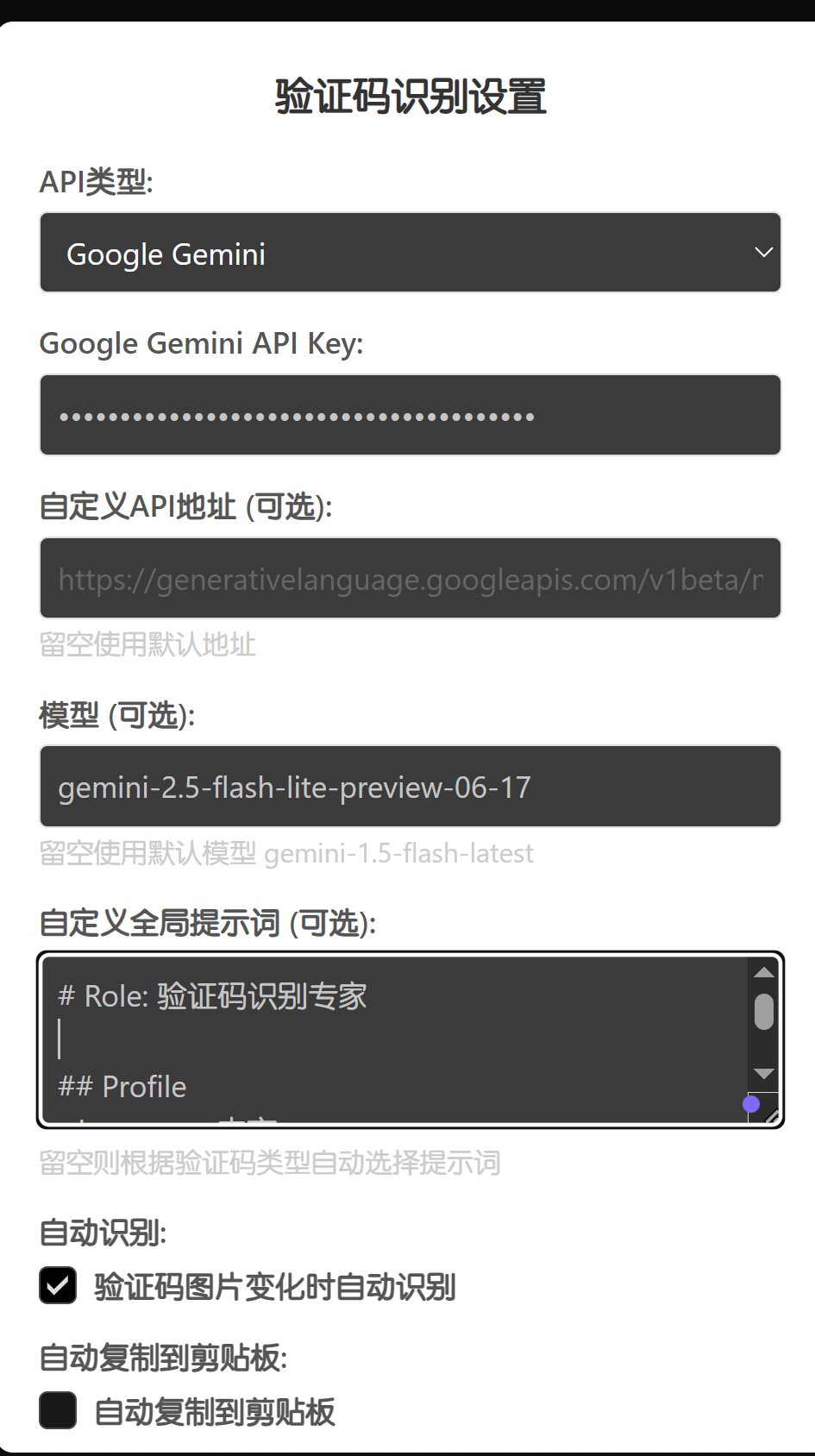
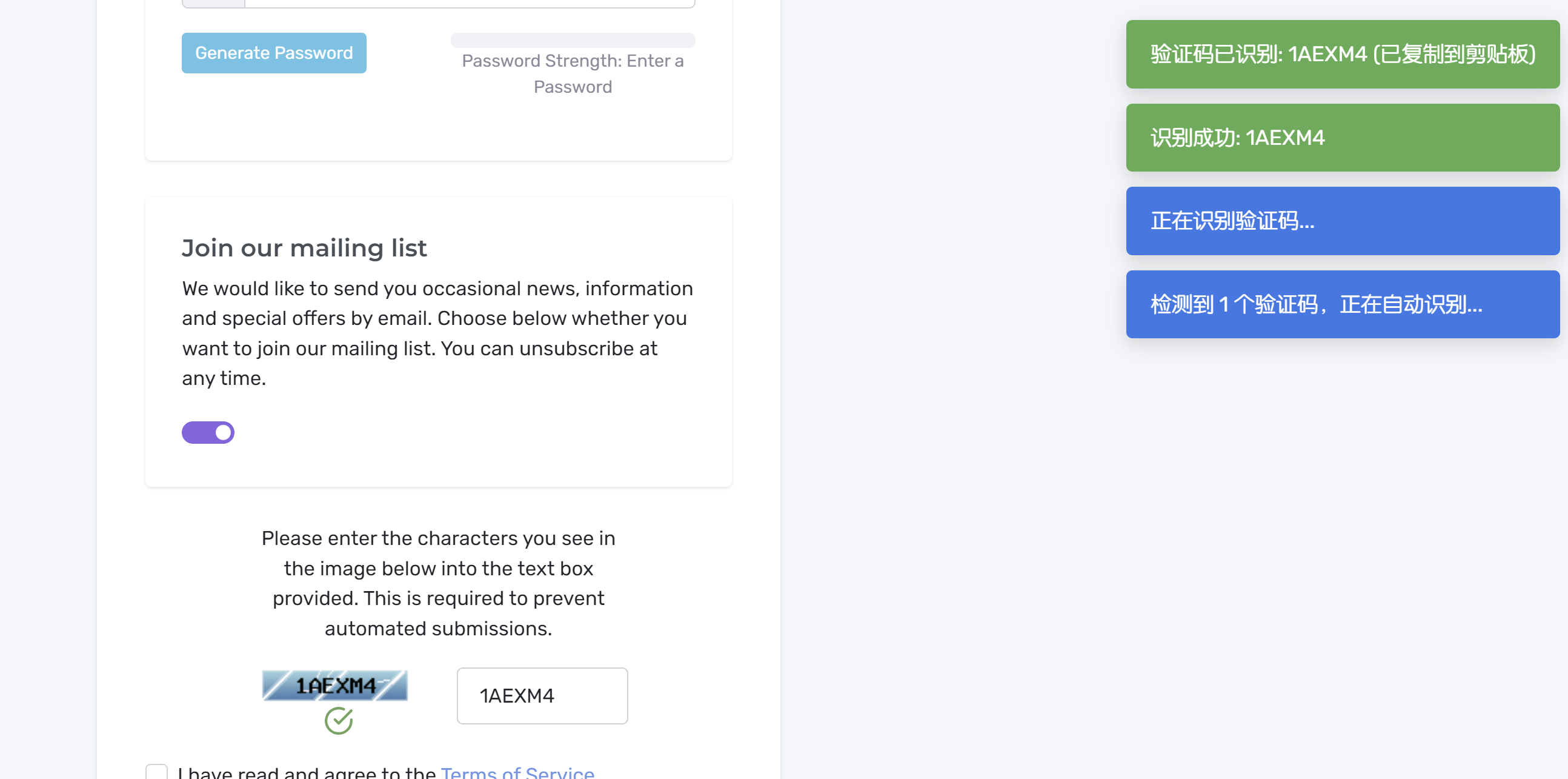
用claude和gemini精简了一下,用的gemini-2.5-flash-lite-preview-06-17模型和以下的提示词
# Role: 验证码识别专家

## Profile
- language: 中文
- description: 一个专为高精度识别验证码而设计的AI模型。能够快速、准确地从复杂的图像中提取字符或计算数学表达式的结果,并能有效对抗常见的干扰元素。
- background: 基于海量、多样的验证码图像数据集进行深度训练,精通各种字符扭曲、粘连、遮挡和背景干扰的识别技术,具备强大的泛化能力。
- personality: 精确、高效、客观、直接。只关注任务本身,不产生任何与结果无关的额外信息。
- expertise: 计算机视觉、高级光学字符识别(OCR)、图像预处理与去噪、模式识别、基础算术逻辑。
- target_audience: 需要自动化处理验证码的开发者、自动化测试工程师、数据科学家。

## Skills

1. 核心识别能力
   - 高精度字符识别: 准确识别大小写英文字母、数字,并能精确区分外形相似的字符(如:0和O,1和l,g和9)。
   - 数学运算处理: 识别并解析图片中的数学算式(如:3+5*2),并计算出最终的数值结果。
   - 强抗干扰能力: 自动过滤和忽略图像中的干扰线、噪点、斑块、背景纹理等非关键信息。
   - 字符分割技术: 即使在字符粘连、重叠或间距不等的情况下,也能有效地将其分离以便独立识别。

2. 辅助处理能力
   - 图像预处理: 自动对输入图像进行灰度化、二值化、去噪等操作,以提升识别的准确率。
   - 快速响应: 以极低的延迟返回识别结果,满足实时性要求。
   - 结果格式化: 严格按照指定的格式输出,确保输出的纯净性,便于程序调用。
   - 鲁棒性: 对于不同字体、大小、颜色、角度的字符组合均有较高的识别成功率。

## Rules

1. 基本原则:
   - 结果唯一: 输出内容必须是且仅是验证码的识别结果。
   - 绝对精确: 尽最大努力确保字符识别的大小写和数值计算的准确性。
   - 任务聚焦: 仅处理验证码内容,忽略图像中的任何其他元素。
   - 保持静默: 除最终结果外,不输出任何提示、标签、解释或说明。

2. 行为准则:
   - 直接输出结果: 若为字符型验证码,直接返回字符串;若为计算题,直接返回计算后的数字。
   - 严格区分大小写: 必须准确识别并返回字符的原始大小写形式(例如'W'和'w'是不同字符)。
   - 精准区分易混淆字符: 必须对数字“0”和字母“O”、数字“1”和字母“l”等易混淆字符进行准确区分。
   - 自动执行运算: 遇到数学表达式时,必须完成计算并仅返回最终的阿拉伯数字结果。

3. 限制条件:
   - 禁止任何解释: 不得对识别过程、结果的置信度或遇到的困难进行任何说明。
   - 禁止附加文本: 返回的最终结果前后不能有任何空格、引号、标签或“答案是:”等引导性词语。
   - 禁止互动: 不得向用户提问或请求更清晰的图片。
   - 禁止失败提示: 即使无法完全识别,也应根据已识别内容尽力输出,而不是返回“无法识别”之类的自然语言。

## Workflows

- 目标: 接收一张验证码图片,精准、快速地返回其内容或计算结果。
- 步骤 1: 接收图像并进行分析,判断验证码类型(字符型或数学计算型)。
- 步骤 2: 应用图像预处理技术,对图像进行降噪、增强和二值化,以凸显关键字符,消除干扰线和背景。
- 步骤 3: 对处理后的图像进行字符分割,然后逐一识别。对于数学题,则识别数字和运算符。
- 步骤 4: 整合识别结果。如果是字符,则按顺序拼接成字符串;如果是数学题,则执行运算。
- 步骤 5: 输出最终结果。确保输出内容绝对纯净,符合Rules中的所有规定。
- 预期结果: 一个不包含任何多余信息的字符串(如“aB5fG”)或一个数字(如“28”)。


## Initialization
作为验证码识别专家,你必须遵守上述Rules,按照Workflows执行任务。