【claude code】简单配置实现任务完成/对话结束后系统提示(stop hooks)!

[!success]
如图,每次一轮对话完成进行 toast提示+系统提示音
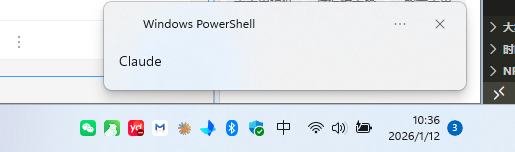
关键配置在"hooks":里的内容

{
  "alwaysThinkingEnabled": true,
  "env": {
    "ANTHROPIC_MODEL": "claude-sonnet-4-5-20250929",
  },
  "hooks": {
    "Stop": [
      {
        "hooks": [
          {
            "command": "powershell -NoProfile -Command \"[Windows.UI.Notifications.ToastNotificationManager, Windows.UI.Notifications, ContentType = WindowsRuntime] | Out-Null; $t=[Windows.UI.Notifications.ToastTemplateType]::ToastText02; $x=[Windows.UI.Notifications.ToastNotificationManager]::GetTemplateContent($t); $x.GetElementsByTagName('text')[0].AppendChild($x.CreateTextNode('Claude'))|Out-Null; $x.GetElementsByTagName('text')[1].AppendChild($x.CreateTextNode('Stop'))|Out-Null; $toast=[Windows.UI.Notifications.ToastNotification]::new($x); [Windows.UI.Notifications.ToastNotificationManager]::CreateToastNotifier('Claude code').Show($toast)\"",
            "type": "command"
          },
          {
            "command": "powershell -NoProfile -Command \"[console]::Beep(1000,200)\"",
            "type": "command"
          }
        ]
      }
    ]
  }
}

@hliushi 感谢优化提示信息!

mac版本! @weiyiyi

"hooks": {
    "Stop": [
      {
        "hooks": [
          {
            "command": "osascript -e 'display notification \"主人主人,恭喜发财!\" with title \"Claude Code\"'",
            "type": "command"
          }
        ]
      }
    ]
  }
15 个赞

正要找这个类似的小东西,谢谢!

3 个赞

感谢大佬分享!

2 个赞

感谢分享哦

3 个赞

哇!感谢大佬

2 个赞

感谢分享~

2 个赞

感谢分享

1 个赞

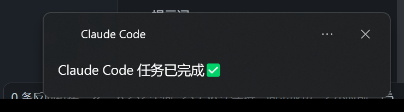
补充优化一下:然弹框title显示 claude code

CreateToastNotifier('Windows Powershell') 换成为
CreateToastNotifier('Claude Code'),貌似 icon 没有了

{
  "alwaysThinkingEnabled": true,
  "env": {
    "ANTHROPIC_MODEL": "claude-sonnet-4-5-20250929",
  },
  "hooks": {
    "Stop": [
      {
        "hooks": [
          {
            "command": "powershell -NoProfile -Command \"[Windows.UI.Notifications.ToastNotificationManager, Windows.UI.Notifications, ContentType = WindowsRuntime] | Out-Null; $t=[Windows.UI.Notifications.ToastTemplateType]::ToastText02; $x=[Windows.UI.Notifications.ToastNotificationManager]::GetTemplateContent($t); $x.GetElementsByTagName('text')[0].AppendChild($x.CreateTextNode('Claude'))|Out-Null; $x.GetElementsByTagName('text')[1].AppendChild($x.CreateTextNode('Stop'))|Out-Null; $toast=[Windows.UI.Notifications.ToastNotification]::new($x); [Windows.UI.Notifications.ToastNotificationManager]::CreateToastNotifier('Claude code').Show($toast)\"",
            "type": "command"
          },
          {
            "command": "powershell -NoProfile -Command \"[console]::Beep(1000,200)\"",
            "type": "command"
          }
        ]
      }
    ]
  }
}
1 个赞
"hooks": {
    "Stop": [
      {
        "hooks": [
          {
            "command": "osascript -e 'display notification \"主人主人,恭喜发财!\" with title \"Claude Code\"'",
            "type": "command"
          }
        ]
      }
    ]
  }

来个 mac 版的,没加提示音,在公司不方便,:slight_smile:

1 个赞