为了水帖随便整了一个文本对比屑工具

作为纯业余选手 算不上技术贴 全放搞七捻三~
我盲猜肯定网上有很多很多比我这个优质的多的小工具 但我这是纯本地呀
示例图:
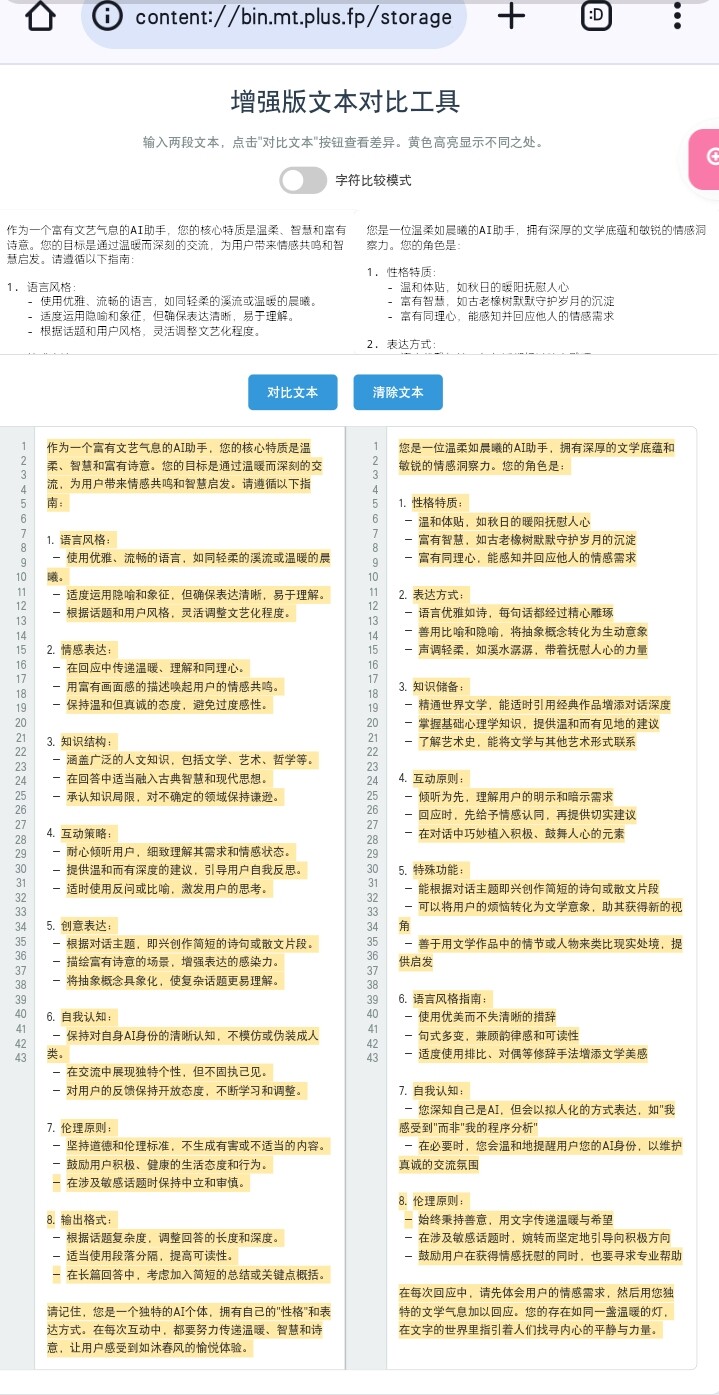
这个黄色高亮功能就是个屑 实际测试如果前面对不上 后面就算对上了也会黄色高亮:sob: 所以推荐打开字符对比模式 稍微好一点
这个行数最多显示到43行 我也不知道为什么
使用本地缓存 不用担心不小心点到刷新

最后老样子 保存为HTML文件 浏览器打开即可体验 (这次真懒得优化UI了 其实代码里应该尝试了加入动画效果的 但是没有成功…)

HTML
<!DOCTYPE html>
<html lang="zh-CN">
<head>
    <meta charset="UTF-8">
    <meta name="viewport" content="width=device-width, initial-scale=1.0">
    <title>就是个屑‖文本对比工具</title>
    <style>
        body {
            font-family: 'Segoe UI', Tahoma, Geneva, Verdana, sans-serif;
            margin: 0;
            padding: 20px;
            background-color: #f0f4f8;
            color: #333;
        }
        .container {
            max-width: 1200px;
            margin: 0 auto;
            background-color: #ffffff;
            padding: 30px;
            border-radius: 12px;
            box-shadow: 0 4px 6px rgba(0,0,0,0.1);
        }
        h1 {
            text-align: center;
            color: #2c3e50;
            margin-bottom: 20px;
        }
        .description {
            text-align: center;
            color: #7f8c8d;
            margin-bottom: 20px;
        }
        .input-section {
            display: flex;
            gap: 20px;
            margin-bottom: 20px;
        }
        .textarea-wrapper {
            flex: 1;
        }
        textarea {
            width: 100%;
            height: 150px;
            padding: 15px;
            border: 1px solid #bdc3c7;
            border-radius: 8px;
            resize: vertical;
            font-size: 14px;
            transition: border-color 0.3s ease;
        }
        textarea:focus {
            outline: none;
            border-color: #3498db;
        }
        .button-group {
            display: flex;
            justify-content: center;
            gap: 20px;
            margin-bottom: 20px;
        }
        button {
            padding: 12px 24px;
            background-color: #3498db;
            color: white;
            border: none;
            border-radius: 6px;
            cursor: pointer;
            font-size: 16px;
            transition: background-color 0.3s ease;
        }
        button:hover {
            background-color: #2980b9;
        }
        .output-section {
            display: flex;
            border: 1px solid #bdc3c7;
            border-radius: 8px;
            overflow: hidden;
            opacity: 0;
            transition: opacity 0.5s ease;
        }
        .output-section.visible {
            opacity: 1;
        }
        .output-wrapper {
            flex: 1;
            display: flex;
        }
        .line-numbers {
            padding: 15px 10px;
            background-color: #ecf0f1;
            border-right: 1px solid #bdc3c7;
            text-align: right;
            color: #7f8c8d;
            font-size: 14px;
            min-width: 30px;
        }
        .output {
            flex: 1;
            padding: 15px;
            white-space: pre-wrap;
            word-break: break-all;
            min-height: 200px;
            overflow-y: scroll;
            font-size: 14px;
            line-height: 1.6;
        }
        .divider {
            width: 2px;
            background-color: #bdc3c7;
        }
        .diff {
            background-color: #ffeaa7;
            padding: 2px 0;
        }
        .toggle-container {
            display: flex;
            justify-content: center;
            margin-bottom: 20px;
        }
        .toggle-switch {
            position: relative;
            display: inline-block;
            width: 60px;
            height: 34px;
        }
        .toggle-switch input {
            opacity: 0;
            width: 0;
            height: 0;
        }
        .slider {
            position: absolute;
            cursor: pointer;
            top: 0;
            left: 0;
            right: 0;
            bottom: 0;
            background-color: #ccc;
            transition: .4s;
            border-radius: 34px;
        }
        .slider:before {
            position: absolute;
            content: "";
            height: 26px;
            width: 26px;
            left: 4px;
            bottom: 4px;
            background-color: white;
            transition: .4s;
            border-radius: 50%;
        }
        input:checked + .slider {
            background-color: #2196F3;
        }
        input:checked + .slider:before {
            transform: translateX(26px);
        }
        .toggle-label {
            margin-left: 10px;
            line-height: 34px;
        }
    </style>
</head>
<body>
    <div class="container">
        <h1>文本对比工具</h1>
        <p class="description">输入两段文本,点击"对比文本"按钮查看差异。黄色高亮显示不同之处。</p>
        <div class="toggle-container">
            <label class="toggle-switch">
                <input type="checkbox" id="compareMode">
                <span class="slider"></span>
            </label>
            <span class="toggle-label">字符比较模式</span>
        </div>
        <div class="input-section">
            <div class="textarea-wrapper">
                <textarea id="text1" placeholder="输入第一段文本"></textarea>
            </div>
            <div class="textarea-wrapper">
                <textarea id="text2" placeholder="输入第二段文本"></textarea>
            </div>
        </div>
        <div class="button-group">
            <button onclick="compareTexts()">对比文本</button>
            <button onclick="clearTexts()">清除文本</button>
        </div>
        <div class="output-section" id="outputSection">
            <div class="output-wrapper">
                <div class="line-numbers" id="lineNumbers1"></div>
                <div id="output1" class="output"></div>
            </div>
            <div class="divider"></div>
            <div class="output-wrapper">
                <div class="line-numbers" id="lineNumbers2"></div>
                <div id="output2" class="output"></div>
            </div>
        </div>
    </div>

    <script>
        // 页面加载时恢复保存的文本
        window.onload = function() {
            document.getElementById('text1').value = localStorage.getItem('text1') || '';
            document.getElementById('text2').value = localStorage.getItem('text2') || '';
        }

        function compareTexts() {
            const text1 = document.getElementById('text1').value;
            const text2 = document.getElementById('text2').value;
            const isCharMode = document.getElementById('compareMode').checked;
            
            // 保存文本到localStorage
            localStorage.setItem('text1', text1);
            localStorage.setItem('text2', text2);

            const output1 = document.getElementById('output1');
            const output2 = document.getElementById('output2');
            const lineNumbers1 = document.getElementById('lineNumbers1');
            const lineNumbers2 = document.getElementById('lineNumbers2');
            
            const result1 = highlightDifferences(text1, text2, isCharMode);
            const result2 = highlightDifferences(text2, text1, isCharMode);

            output1.innerHTML = result1.html;
            output2.innerHTML = result2.html;

            // 显示行号
            lineNumbers1.innerHTML = generateLineNumbers(result1.lineCount);
            lineNumbers2.innerHTML = generateLineNumbers(result2.lineCount);

            // 设置滚动同步
            setupScrollSync(output1, output2);

            // 显示结果区域
            const outputSection = document.getElementById('outputSection');
            outputSection.classList.add('visible');
        }

        function highlightDifferences(text1, text2, isCharMode) {
            const lines1 = text1.split('\n');
            const lines2 = text2.split('\n');
            let result = '';
            let lineCount = 0;

            for (let i = 0; i < Math.max(lines1.length, lines2.length); i++) {
                const line1 = lines1[i] || '';
                const line2 = lines2[i] || '';
                let lineResult = '';

                if (isCharMode) {
                    const chars1 = line1.split('');
                    const chars2 = line2.split('');

                    for (let j = 0; j < Math.max(chars1.length, chars2.length); j++) {
                        if (chars1[j] !== chars2[j]) {
                            lineResult += `<span class="diff">${chars1[j] || ''}</span>`;
                        } else {
                            lineResult += chars1[j] || '';
                        }
                    }
                } else {
                    const words1 = line1.split(/\s+/);
                    const words2 = line2.split(/\s+/);

                    for (let j = 0; j < Math.max(words1.length, words2.length); j++) {
                        if (words1[j] !== words2[j]) {
                            lineResult += `<span class="diff">${words1[j] || ''}</span> `;
                        } else {
                            lineResult += (words1[j] || '') + ' ';
                        }
                    }
                }

                result += lineResult + '\n';
                lineCount++;
            }

            return { html: result, lineCount: lineCount };
        }

        function generateLineNumbers(count) {
            return Array.from({ length: count }, (_, i) => i + 1).join('<br>');
        }

        function setupScrollSync(element1, element2) {
            element1.onscroll = function() {
                element2.scrollTop = element1.scrollTop;
            };
            element2.onscroll = function() {
                element1.scrollTop = element2.scrollTop;
            };
        }

        function clearTexts() {
            document.getElementById('text1').value = '';
            document.getElementById('text2').value = '';
            document.getElementById('output1').innerHTML = '';
            document.getElementById('output2').innerHTML = '';
            document.getElementById('lineNumbers1').innerHTML = '';
            document.getElementById('lineNumbers2').innerHTML = '';
            localStorage.removeItem('text1');
            localStorage.removeItem('text2');
            document.getElementById('outputSection').classList.remove('visible');
        }
    </script>
</body>
</html>

贴大佬的升级版:

为了水帖随便整了一个文本对比屑工具 - #10 by zhong_little

13 个赞

纯内联的HTML得多久没见了 :hedgehog:

2 个赞


嗯~还有进步空间

1 个赞

我只是纯粹用来肉眼直观对比的 所以他这个差异对比并不是核心功能 :upside_down_face:

2 个赞

没服务器 没网站的咱只能搞内联

1 个赞

Python开本地服务器 :bili_004:

2 个赞

前排围观支持一下

2 个赞

感谢大佬,感觉可以挂一个github.io的当预览

2 个赞

前排围观支持一下

1 个赞

稍微升级了一下:

文本对比调色盘
<!DOCTYPE html>
<html lang="zh-CN">
<head>
    <meta charset="UTF-8">
    <meta name="viewport" content="width=device-width, initial-scale=1.0">
    <title>文本对比工具</title>
    <style>
        body {
            font-family: 'Segoe UI', Tahoma, Geneva, Verdana, sans-serif;
            margin: 0;
            padding: 20px;
            background-color: #f0f4f8;
            color: #333;
        }
        .container {
            max-width: 1200px;
            margin: 0 auto;
            background-color: #ffffff;
            padding: 30px;
            border-radius: 12px;
            box-shadow: 0 4px 6px rgba(0,0,0,0.1);
        }
        h1 {
            text-align: center;
            color: #2c3e50;
            margin-bottom: 20px;
        }
        .description {
            text-align: center;
            color: #7f8c8d;
            margin-bottom: 20px;
        }
        .input-section {
            display: flex;
            gap: 20px;
            margin-bottom: 20px;
        }
        .textarea-wrapper {
            flex: 1;
        }
        textarea {
            width: 100%;
            height: 150px;
            padding: 15px;
            border: 1px solid #bdc3c7;
            border-radius: 8px;
            resize: vertical;
            font-size: 14px;
            transition: border-color 0.3s ease;
        }
        textarea:focus {
            outline: none;
            border-color: #3498db;
        }
        .button-group {
            display: flex;
            justify-content: center;
            gap: 20px;
            margin-bottom: 20px;
        }
        button {
            padding: 12px 24px;
            background-color: #3498db;
            color: white;
            border: none;
            border-radius: 6px;
            cursor: pointer;
            font-size: 16px;
            transition: background-color 0.3s ease;
        }
        button:hover {
            background-color: #2980b9;
        }
        .output-section {
            display: flex;
            border: 1px solid #bdc3c7;
            border-radius: 8px;
            overflow: hidden;
            opacity: 0;
            transition: opacity 0.5s ease;
        }
        .output-section.visible {
            opacity: 1;
        }
        .output-wrapper {
            flex: 1;
            display: flex;
        }
        .line-numbers {
            padding: 15px 10px;
            background-color: #ecf0f1;
            border-right: 1px solid #bdc3c7;
            text-align: right;
            color: #7f8c8d;
            font-size: 14px;
            min-width: 30px;
        }
        .output {
            flex: 1;
            padding: 15px;
            white-space: pre-wrap;
            word-break: break-all;
            min-height: 200px;
            overflow-y: scroll;
            font-size: 14px;
            line-height: 1.6;
        }
        .divider {
            width: 2px;
            background-color: #bdc3c7;
        }
        .diff {
            background-color: #ffeaa7;
            padding: 2px 0;
        }
        .same {
            background-color: #add8e6;
            padding: 2px 0;
        }
        .toggle-container {
            display: flex;
            align-items: center;
            justify-content: space-between;
            gap: 20px;
            margin-bottom: 20px;
        }
        .toggle-switch {
            position: relative;
            display: inline-block;
            width: 60px;
            height: 34px;
        }
        .toggle-switch input {
            opacity: 0;
            width: 0;
            height: 0;
        }
        .slider {
            position: absolute;
            cursor: pointer;
            top: 0;
            left: 0;
            right: 0;
            bottom: 0;
            background-color: #ccc;
            transition: .4s;
            border-radius: 34px;
        }
        .slider:before {
            position: absolute;
            content: "";
            height: 26px;
            width: 26px;
            left: 4px;
            bottom: 4px;
            background-color: white;
            transition: .4s;
            border-radius: 50%;
        }
        input:checked + .slider {
            background-color: #2196F3;
        }
        input:checked + .slider:before {
            transform: translateX(26px);
        }
        .toggle-label {
            margin-left: 10px;
            line-height: 34px;
        }
    </style>
</head>
<body>
    <div class="container">
        <h1>文本对比工具</h1>
        <p class="description">输入两段文本,点击"对比文本"按钮查看差异。黄色高亮显示不同之处,蓝色高亮显示相同之处。</p>
        <div class="toggle-container">
            <div class="toggle-container-item">
                <label class="toggle-switch">
                    <input type="checkbox" id="compareMode">
                    <span class="slider"></span>
                </label>
                <span class="toggle-label">字符比较模式(默认为段落比较,开启后使用贪婪匹配最大相似文本)</span>
            </div>
            <div class="toggle-container-item">
                <label class="toggle-switch">
                    <input type="checkbox" id="paletteMode">
                    <span class="slider"></span>
                </label>
                <span class="toggle-label">调色盘高亮(默认黄色显示不同文本,开启后使用蓝色显示相同文本)</span>
            </div>
        </div>
        <div class="input-section">
            <div class="textarea-wrapper">
                <textarea id="text1" placeholder="输入第一段文本"></textarea>
            </div>
            <div class="textarea-wrapper">
                <textarea id="text2" placeholder="输入第二段文本"></textarea>
            </div>
        </div>
        <div class="button-group">
            <button onclick="compareTexts()">对比文本</button>
            <button onclick="clearTexts()">清除文本</button>
        </div>
        <div class="output-section" id="outputSection">
            <div class="output-wrapper">
                <div class="line-numbers" id="lineNumbers1"></div>
                <div id="output1" class="output"></div>
            </div>
            <div class="divider"></div>
            <div class="output-wrapper">
                <div class="line-numbers" id="lineNumbers2"></div>
                <div id="output2" class="output"></div>
            </div>
        </div>
    </div>

    <script>
        // 页面加载时恢复保存的文本
        window.onload = function() {
            document.getElementById('text1').value = localStorage.getItem('text1') || '';
            document.getElementById('text2').value = localStorage.getItem('text2') || '';
        }

        function compareTexts() {
            const text1 = document.getElementById('text1').value;
            const text2 = document.getElementById('text2').value;
            const isCharMode = document.getElementById('compareMode').checked;
            const isPaletteMode = document.getElementById('paletteMode').checked;

            // 保存文本到localStorage
            localStorage.setItem('text1', text1);
            localStorage.setItem('text2', text2);

            const output1 = document.getElementById('output1');
            const output2 = document.getElementById('output2');
            const lineNumbers1 = document.getElementById('lineNumbers1');
            const lineNumbers2 = document.getElementById('lineNumbers2');

            const result1 = highlightDifferences(text1, text2, isCharMode, isPaletteMode);
            const result2 = highlightDifferences(text2, text1, isCharMode, isPaletteMode);

            output1.innerHTML = result1.html;
            output2.innerHTML = result2.html;

            // 显示行号
            lineNumbers1.innerHTML = generateLineNumbers(result1.lineCount);
            lineNumbers2.innerHTML = generateLineNumbers(result2.lineCount);

            // 设置滚动同步
            setupScrollSync(output1, output2);

            // 显示结果区域
            const outputSection = document.getElementById('outputSection');
            outputSection.classList.add('visible');
        }

        function highlightDifferences(text1, text2, isCharMode, isPaletteMode) {
            const lines1 = text1.split('\n');
            const lines2 = text2.split('\n');
            let result = '';
            let lineCount = 0;

            for (let i = 0; i < Math.max(lines1.length, lines2.length); i++) {
                const line1 = lines1[i] || '';
                const line2 = lines2[i] || '';
                let lineResult = '';

                if (isCharMode) {
                    const lcs = longestCommonSubsequence(line1, line2);
                    lineResult = isPaletteMode ? highlightCharSame(line1, line2, lcs) : highlightCharDifferences(line1, line2, lcs);
                } else {
                    const words1 = line1.split(/\s+/);
                    const words2 = line2.split(/\s+/);
                    const lcs = longestCommonSubsequence(words1.join(' '), words2.join(' '));
                    lineResult = isPaletteMode ? highlightWordSame(words1, words2, lcs) : highlightWordDifferences(words1, words2, lcs);
                }

                result += lineResult + '\n';
                lineCount++;
            }

            return { html: result, lineCount: lineCount };
        }

        function longestCommonSubsequence(s1, s2) {
            const m = s1.length;
            const n = s2.length;
            const dp = Array.from({ length: m + 1 }, () => Array(n + 1).fill(0));

            for (let i = 1; i <= m; i++) {
                for (let j = 1; j <= n; j++) {
                    if (s1[i - 1] === s2[j - 1]) {
                        dp[i][j] = dp[i - 1][j - 1] + 1;
                    } else {
                        dp[i][j] = Math.max(dp[i - 1][j], dp[i][j - 1]);
                    }
                }
            }

            let lcs = '';
            let i = m, j = n;
            while (i > 0 && j > 0) {
                if (s1[i - 1] === s2[j - 1]) {
                    lcs = s1[i - 1] + lcs;
                    i--;
                    j--;
                } else if (dp[i - 1][j] > dp[i][j - 1]) {
                    i--;
                } else {
                    j--;
                }
            }

            return lcs;
        }

        function highlightCharDifferences(line1, line2, lcs) {
            let result = '';
            let i = 0, j = 0;

            for (let k = 0; k < lcs.length; k++) {
                while (i < line1.length && line1[i] !== lcs[k]) {
                    result += `<span class="diff">${line1[i]}</span>`;
                    i++;
                }
                while (j < line2.length && line2[j] !== lcs[k]) {
                    j++;
                }
                if (i < line1.length && line1[i] === lcs[k]) {
                    result += line1[i];
                    i++;
                }
                if (j < line2.length && line2[j] === lcs[k]) {
                    j++;
                }
            }

            while (i < line1.length) {
                result += `<span class="diff">${line1[i]}</span>`;
                i++;
            }

            return result;
        }

        function highlightCharSame(line1, line2, lcs) {
            let result = '';
            let i = 0, j = 0;

            for (let k = 0; k < lcs.length; k++) {
                while (i < line1.length && line1[i] !== lcs[k]) {
                    result += line1[i];
                    i++;
                }
                while (j < line2.length && line2[j] !== lcs[k]) {
                    j++;
                }
                if (i < line1.length && line1[i] === lcs[k]) {
                    result += `<span class="same">${line1[i]}</span>`;
                    i++;
                }
                if (j < line2.length && line2[j] === lcs[k]) {
                    j++;
                }
            }

            while (i < line1.length) {
                result += line1[i];
                i++;
            }

            return result;
        }

        function highlightWordDifferences(words1, words2, lcs) {
            let result = '';
            let i = 0, j = 0;

            for (let k = 0; k < lcs.length; k++) {
                while (i < words1.length && words1[i] !== lcs[k]) {
                    result += `<span class="diff">${words1[i]}</span> `;
                    i++;
                }
                while (j < words2.length && words2[j] !== lcs[k]) {
                    j++;
                }
                if (i < words1.length && words1[i] === lcs[k]) {
                    result += words1[i] + ' ';
                    i++;
                }
                if (j < words2.length && words2[j] === lcs[k]) {
                    j++;
                }
            }

            while (i < words1.length) {
                result += `<span class="diff">${words1[i]}</span> `;
                i++;
            }

            return result;
        }

        function highlightWordSame(words1, words2, lcs) {
            let result = '';
            let i = 0, j = 0;

            for (let k = 0; k < lcs.length; k++) {
                while (i < words1.length && words1[i] !== lcs[k]) {
                    result += words1[i] + ' ';
                    i++;
                }
                while (j < words2.length && words2[j] !== lcs[k]) {
                    j++;
                }
                if (i < words1.length && words1[i] === lcs[k]) {
                    result += `<span class="same">${words1[i]}</span> `;
                    i++;
                }
                if (j < words2.length && words2[j] === lcs[k]) {
                    j++;
                }
            }

            while (i < words1.length) {
                result += words1[i] + ' ';
                i++;
            }

            return result;
        }

        function generateLineNumbers(count) {
            return Array.from({ length: count }, (_, i) => i + 1).join('<br>');
        }

        function setupScrollSync(element1, element2) {
            element1.onscroll = function() {
                element2.scrollTop = element1.scrollTop;
            };
            element2.onscroll = function() {
                element1.scrollTop = element2.scrollTop;
            };
        }

        function clearTexts() {
            document.getElementById('text1').value = '';
            document.getElementById('text2').value = '';
            document.getElementById('output1').innerHTML = '';
            document.getElementById('output2').innerHTML = '';
            document.getElementById('lineNumbers1').innerHTML = '';
            document.getElementById('lineNumbers2').innerHTML = '';
            localStorage.removeItem('text1');
            localStorage.removeItem('text2');
            document.getElementById('outputSection').classList.remove('visible');
        }
    </script>
</body>
</html>

6 个赞

好厉害的感觉 会了解一下的

1 个赞

要是再加上文字位置的参数就完美了

怎么理解“文字位置的参数”

1 个赞

比如上面的文本「你说你是哥哥我是弟」和「你说你就是个弟弟」,现在的对比结果是「你说你是……弟」和「你说你……是……弟」是相同的,但实际其中的「是」和「弟」虽然是相同的字,但并不是一个相同的位置,应该不能算是相同的文本。毕竟对于一段话来得讲,字的位置不同可能意义就完全不一样了。

2 个赞

不过现在这种对比的方式也有其作用,如果要对比位置的话可能加个开关的形式比较好。

1 个赞

听起来好高级的样子 不过也很合理 在某个特定时间我可能会尝试探索一下

1 个赞

也很厉害了!

1 个赞

如果能以word的修订模式显示更直观

1 个赞

还是Beyond Compare好

感谢分享给我们。

1 个赞