WSL2其实非常方便 维护迁移都不错,唯一的问题就是网络太恼人,每次重启后WSL的IP就变,很麻烦。很多人因为各种各样的原因没法开TUN模式。于是我让AI安排了这3个脚本,集合了自启动+保活+自动识别IP并映射 用了一段时间非常方便 也没问题 这里分享下
以V2rayn默认代理端口10808 龙虾端口18789为例
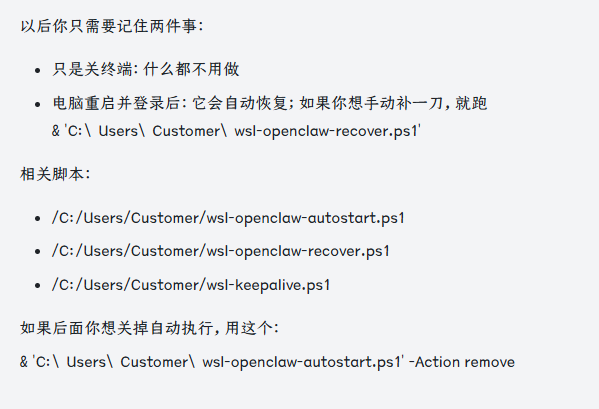
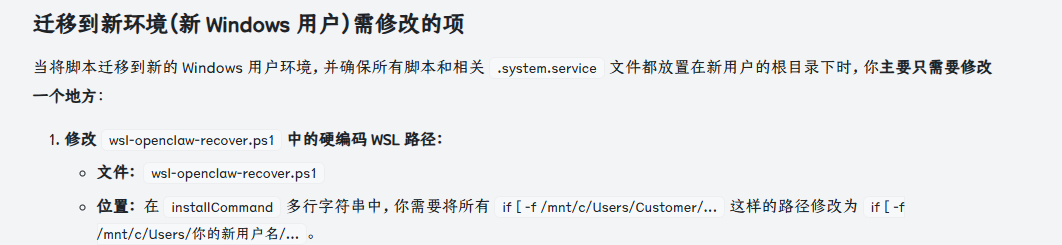
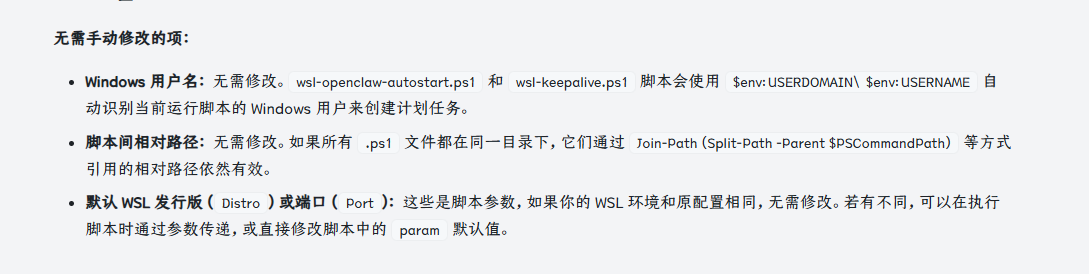
注意:Customer需要改成你Windows的当前用户名 这三个脚本也放到你对应的用户名目录下
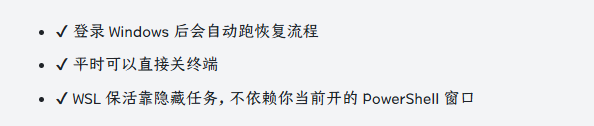
运行下面命令就可以加入开机自动运行
& 'C:\Users\你的用户名\wsl-openclaw-autostart.ps1' -Action install
运行下面命令可以重启/恢复服务
& 'C:\Users\Customer\wsl-openclaw-recover.ps1'
wsl-openclaw-recover.ps1
param(
    [string]$Distro = 'Debian',
    [int]$Port = 18789,
    [int]$StaticPort = 18080,
    [string]$GatewayUnit = 'openclaw-gateway.service',
    [string]$StaticUnit = 'openclaw-static-http.service',
    [int]$WaitTimeoutSeconds = 240
)

$ErrorActionPreference = 'Stop'
$Root = Split-Path -Parent $PSCommandPath
$KeepAliveScript = Join-Path $Root 'wsl-keepalive.ps1'
$PortProxyScript = Join-Path $Root 'wsl-openclaw-portproxy.ps1'
$ServiceTemplate = Join-Path $Root 'openclaw-gateway.system.service'
$StaticServiceTemplate = Join-Path $Root 'openclaw-static-http.system.service'

function Wait-ForPort {
    param(
        [int]$TargetPort
    )

    $deadline = (Get-Date).AddSeconds($WaitTimeoutSeconds)
    while ((Get-Date) -lt $deadline) {
        & wsl.exe -d $Distro -- sh -lc "ss -ltn | grep -q ':$TargetPort '" | Out-Null
        if ($LASTEXITCODE -eq 0) {
            return $true
        }

        Start-Sleep -Seconds 3
    }

    return $false
}

try {
    & $KeepAliveScript -Action stop | Out-Null
}
catch {
}

& wsl.exe --shutdown
Start-Sleep -Seconds 3

& $KeepAliveScript -Action start

$installCommand = @"
if [ -f /mnt/c/Users/Customer/openclaw-gateway.system.service ]; then
  install -m 0644 /mnt/c/Users/Customer/openclaw-gateway.system.service /etc/systemd/system/openclaw-gateway.service
fi
if [ -f /mnt/c/Users/Customer/openclaw-static-http.system.service ]; then
  install -m 0644 /mnt/c/Users/Customer/openclaw-static-http.system.service /etc/systemd/system/openclaw-static-http.service
fi
systemctl daemon-reload
systemctl enable $GatewayUnit >/dev/null 2>&1 || true
systemctl restart $GatewayUnit
if [ -f /mnt/c/Users/Customer/openclaw-static-http.system.service ]; then
  systemctl enable $StaticUnit >/dev/null 2>&1 || true
  systemctl restart $StaticUnit
fi
"@

& wsl.exe -u root -d $Distro -- sh -lc $installCommand | Out-Null

$ready = Wait-ForPort -TargetPort $Port
if (-not $ready) {
    throw "OpenClaw gateway did not start listening on port $Port within $WaitTimeoutSeconds seconds."
}

if (Test-Path $StaticServiceTemplate) {
    $staticReady = Wait-ForPort -TargetPort $StaticPort
    if (-not $staticReady) {
        throw "OpenClaw static HTTP did not start listening on port $StaticPort within $WaitTimeoutSeconds seconds."
    }
}

& $PortProxyScript -Distro $Distro -Port $Port
if (Test-Path $StaticServiceTemplate) {
    & $PortProxyScript -Distro $Distro -Port $StaticPort
}

$wslIp = (& wsl.exe -d $Distro -- sh -lc "hostname -I | cut -d' ' -f1").Trim()
$keepAliveStatus = & $KeepAliveScript -Action status
$serviceStatus = & wsl.exe -u root -d $Distro -- systemctl is-active $GatewayUnit
$staticServiceStatus = if (Test-Path $StaticServiceTemplate) {
    & wsl.exe -u root -d $Distro -- systemctl is-active $StaticUnit
} else {
    'not-installed'
}

Write-Output "RECOVER_OK Distro=$Distro WSL_IP=$wslIp PORT=$Port Service=$serviceStatus"
Write-Output "STATIC_OK Distro=$Distro WSL_IP=$wslIp PORT=$StaticPort Service=$staticServiceStatus"
Write-Output $keepAliveStatus
Write-Output "URLs: http://127.0.0.1:$Port/  http://${wslIp}:$Port/"
if (Test-Path $StaticServiceTemplate) {
    Write-Output "Static URLs: http://127.0.0.1:$StaticPort/  http://${wslIp}:$StaticPort/"
}
wsl-openclaw-autostart.ps1
param(
    [ValidateSet('install', 'remove', 'status', 'run-now')]
    [string]$Action = 'status',
    [string]$Distro = 'Debian'
)

$ErrorActionPreference = 'Stop'
$TaskName = 'WSL OpenClaw Recover'
$RunnerPath = (Get-Process -Id $PID).Path
$RecoverScript = Join-Path (Split-Path -Parent $PSCommandPath) 'wsl-openclaw-recover.ps1'
$RecoverWaitTimeoutSeconds = 240
$UserId = "$env:USERDOMAIN\$env:USERNAME"

function Test-IsAdmin {
    $currentIdentity = [Security.Principal.WindowsIdentity]::GetCurrent()
    $principal = [Security.Principal.WindowsPrincipal]::new($currentIdentity)
    $principal.IsInRole([Security.Principal.WindowsBuiltInRole]::Administrator)
}

function Get-Task {
    Get-ScheduledTask -TaskName $TaskName -ErrorAction SilentlyContinue
}

if ($Action -in @('install', 'remove', 'run-now') -and -not (Test-IsAdmin)) {
    $arguments = @(
        '-NoLogo',
        '-NoProfile',
        '-ExecutionPolicy', 'Bypass',
        '-File', $PSCommandPath,
        '-Action', $Action,
        '-Distro', $Distro
    )
    $process = Start-Process -FilePath $RunnerPath -Verb RunAs -ArgumentList $arguments -PassThru -Wait
    exit $process.ExitCode
}

switch ($Action) {
    'install' {
        $taskAction = New-ScheduledTaskAction -Execute $RunnerPath -Argument "-NoLogo -NoProfile -WindowStyle Hidden -ExecutionPolicy Bypass -File `"$RecoverScript`" -Distro `"$Distro`" -WaitTimeoutSeconds $RecoverWaitTimeoutSeconds"
        $trigger = New-ScheduledTaskTrigger -AtLogOn -User $UserId
        $principal = New-ScheduledTaskPrincipal -UserId $UserId -LogonType Interactive -RunLevel Highest
        $settings = New-ScheduledTaskSettingsSet -AllowStartIfOnBatteries -DontStopIfGoingOnBatteries -MultipleInstances IgnoreNew -ExecutionTimeLimit (New-TimeSpan -Days 3650)

        Register-ScheduledTask -TaskName $TaskName -Action $taskAction -Trigger $trigger -Principal $principal -Settings $settings -Description 'Auto-run WSL/OpenClaw recovery after Windows login.' -Force | Out-Null
        $task = Get-Task
        Write-Output "AUTOSTART_INSTALLED TASK_STATE=$($task.State)"
        break
    }
    'remove' {
        $task = Get-Task
        if (-not $task) {
            Write-Output 'AUTOSTART_NOT_FOUND'
            break
        }

        Unregister-ScheduledTask -TaskName $TaskName -Confirm:$false
        Write-Output 'AUTOSTART_REMOVED'
        break
    }
    'status' {
        $task = Get-Task
        if (-not $task) {
            Write-Output 'AUTOSTART_NOT_FOUND'
            break
        }

        $info = Get-ScheduledTaskInfo -TaskName $TaskName
        Write-Output "AUTOSTART_STATUS TASK_STATE=$($task.State) LAST_RESULT=$($info.LastTaskResult)"
        break
    }
    'run-now' {
        $task = Get-Task
        if (-not $task) {
            throw 'Autostart task is not installed.'
        }

        Start-ScheduledTask -TaskName $TaskName
        Start-Sleep -Seconds 3
        $task = Get-Task
        Write-Output "AUTOSTART_STARTED TASK_STATE=$($task.State)"
        break
    }
}
wsl-keepalive.ps1
param(
    [ValidateSet('start', 'stop', 'status', 'hold')]
    [string]$Action = 'status',
    [string]$Distro = 'Debian'
)

$ErrorActionPreference = 'Stop'
$TaskName = "WSL KeepAlive $Distro"
$RunnerPath = (Get-Process -Id $PID).Path
$HoldCommand = 'while true; do sleep 2147483647; done'

function Get-Task {
    Get-ScheduledTask -TaskName $TaskName -ErrorAction SilentlyContinue
}

function Get-WslIp {
    $ip = (& wsl.exe -d $Distro -- sh -lc "hostname -I | cut -d' ' -f1").Trim()
    if (-not $ip) {
        throw "Failed to resolve WSL IP for $Distro."
    }

    return $ip
}

function Ensure-Task {
    $action = New-ScheduledTaskAction -Execute $RunnerPath -Argument "-NoLogo -NoProfile -WindowStyle Hidden -ExecutionPolicy Bypass -File `"$PSCommandPath`" -Action hold -Distro `"$Distro`""
    $trigger = New-ScheduledTaskTrigger -AtLogOn -User "$env:USERDOMAIN\$env:USERNAME"
    $principal = New-ScheduledTaskPrincipal -UserId "$env:USERDOMAIN\$env:USERNAME" -LogonType Interactive -RunLevel Limited
    $settings = New-ScheduledTaskSettingsSet -AllowStartIfOnBatteries -DontStopIfGoingOnBatteries -MultipleInstances IgnoreNew -ExecutionTimeLimit (New-TimeSpan -Days 3650)

    Register-ScheduledTask -TaskName $TaskName -Action $action -Trigger $trigger -Principal $principal -Settings $settings -Description "Keep WSL distro $Distro active from Windows." -Force | Out-Null
    Get-Task
}

switch ($Action) {
    'start' {
        & wsl.exe -d $Distro -- true | Out-Null
        Ensure-Task | Out-Null
        $task = Get-Task
        if ($task.State -ne 'Running') {
            Start-ScheduledTask -TaskName $TaskName
            Start-Sleep -Seconds 3
            $task = Get-Task
        }

        $wslIp = Get-WslIp
        Write-Output "KEEPALIVE_STARTED TASK_STATE=$($task.State) WSL_IP=$wslIp"
        break
    }
    'stop' {
        $task = Get-Task
        if (-not $task) {
            Write-Output 'KEEPALIVE_NOT_FOUND'
            break
        }

        Stop-ScheduledTask -TaskName $TaskName -ErrorAction SilentlyContinue
        Unregister-ScheduledTask -TaskName $TaskName -Confirm:$false
        Write-Output 'KEEPALIVE_STOPPED'
        break
    }
    'status' {
        $task = Get-Task
        if (-not $task) {
            Write-Output 'KEEPALIVE_NOT_FOUND'
            break
        }

        $info = Get-ScheduledTaskInfo -TaskName $TaskName
        $wslIp = 'UNKNOWN'
        try {
            $wslIp = Get-WslIp
        }
        catch {
        }

        Write-Output "KEEPALIVE_STATUS TASK_STATE=$($task.State) LAST_RESULT=$($info.LastTaskResult) WSL_IP=$wslIp"
        break
    }
    'hold' {
        & wsl.exe -d $Distro -- sh -lc $HoldCommand
        break
    }
}