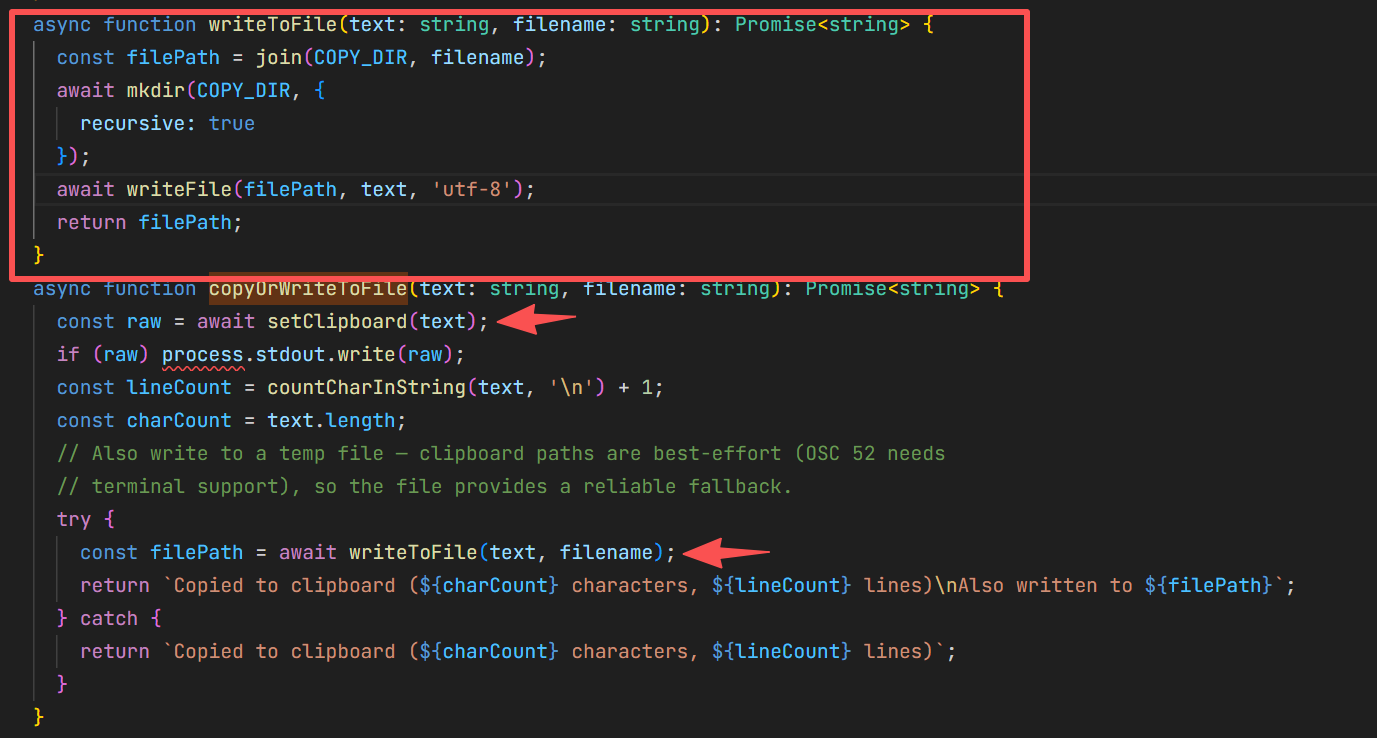
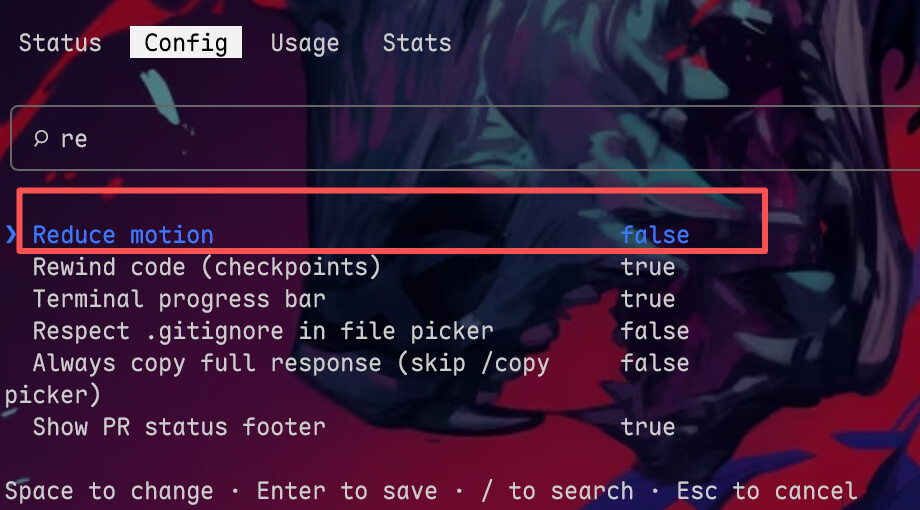
是这个帖子的延续
已经超过一个月,那个帖子不能再编辑了,所以开个新帖,分析下为什么又出现这个问题:
写在前面
如果是配置了"CLAUDE_CODE_NO_FLICKER": "1"导致出现复制的各种奇怪问题
我这边暂时还没研究明白,后面有空研究明白了再来编辑帖子
以下讨论的是原来的那种TUI模式下,/copy乱码的解决
测试升级2.1.92之后用补丁,且设置了NO_FLICKER,/copy正常,从屏幕ctrl C正常,鼠标默认复制这个就不往下深究了(我用的Windows Teminal)
/copy 剪贴板写入链路
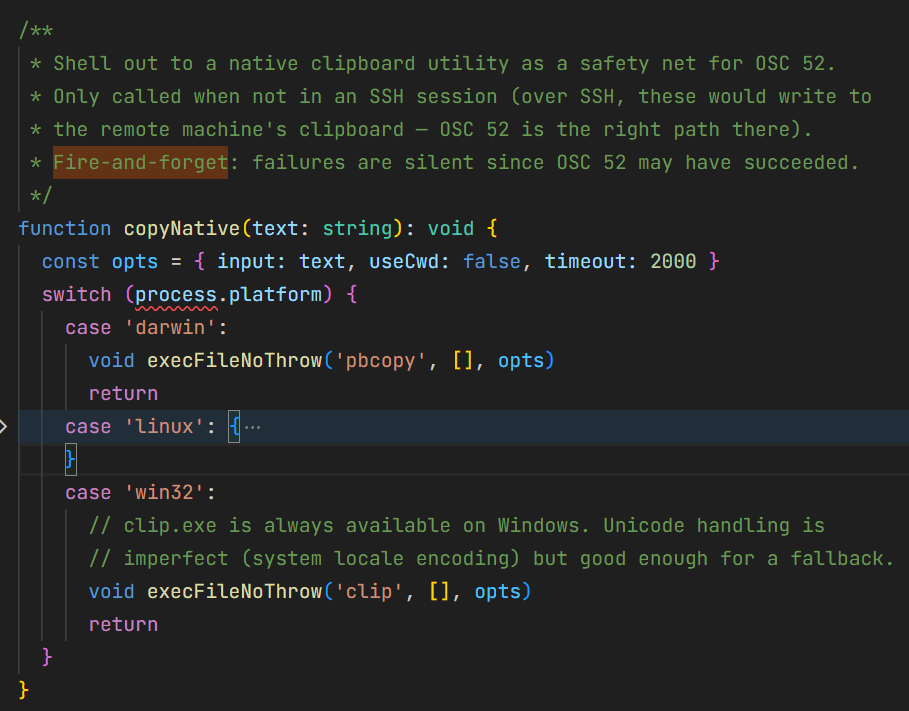
当你按下 /copy 时,Claude Code 执行的是 setClipboard 函数(如果你有那份神秘源码的话,位置在 src/ink/termio/osc.ts),它会同时发射两条路径:
setClipboard(text) 被调用
│
├─ ① copyNative(text) [fire-and-forget,不等结果]
│ └─ switch(process.platform)
│ ├─ “darwin” → pbcopy (macOS,原生 UTF-8)
│ ├─ “linux” → wl-copy/xclip/xsel (Linux,原生 UTF-8)
│ └─ “win32” → clip.exe (Windows,使用系统代码页!)
│
├─ ② 构造 OSC 52 转义序列(base64 编码的 UTF-8)
│ └─ 写入 process.stdout → 到达终端
│ └─ 终端如果支持 OSC 52 → 正确设置剪贴板
│
└─ return OSC 52 序列
这两条路径是并行的,不是 fallback 关系。设计意图是"双保险"
OSC 52 依赖终端支持(有些终端默认关闭),native 工具作为本地保险。
问题出在哪
在中文 Windows 上(系统代码页 CP936/GBK,不一定会产生这个问题,这是情况之一):
1: copyNative 发射 clip.exe(异步,进程慢慢启动)
2: OSC 52 写入 stdout → 终端正确设置剪贴板 
3: clip.exe 启动完毕,用 CP936 解读 UTF-8 stdin → 乱码覆盖剪贴板 
最终结果: 剪贴板 = clip.exe 写的乱码
OSC 52 先到且正确,但 clip.exe 后到用乱码覆盖了正确结果。如果你的终端不支持 OSC 52(部分环境下确实如此),那只有 clip.exe 一条路径生效,直接就是乱码。
说人话:是的,本质还是跟之前一样是clip没处理的问题
为什么之前好了现在又会了
官方修复与回归时间线
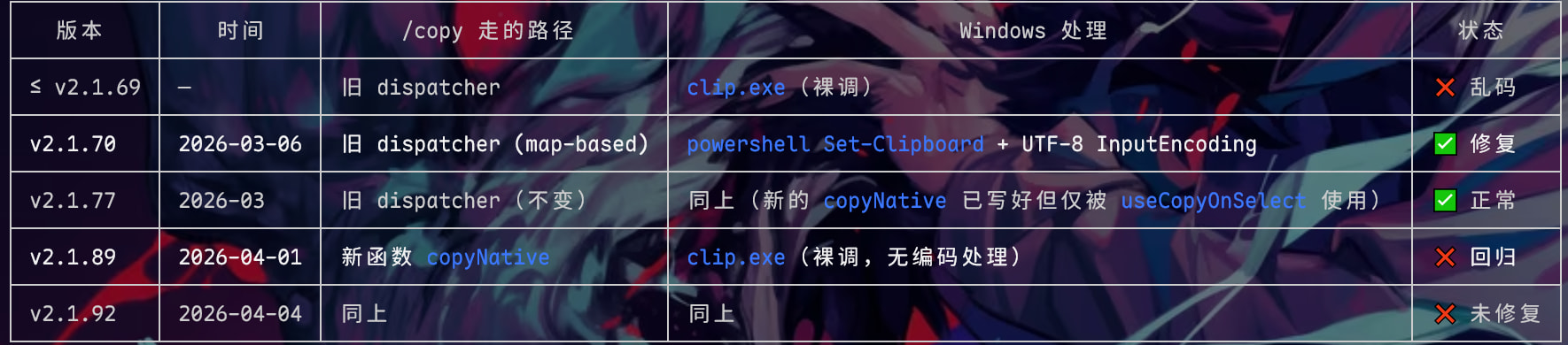
v2.1.77 时,官方为终端内鼠标选中文本的自动复制功能(useCopyOnSelect)写了一个新的 copyNative 函数。这个函数按 process.platform switch,直接 spawn clip,没有 UTF-8 处理。但此时/copy 命令还走旧的 map-based dispatcher(带 Set-Clipboard),所以用户无感。
两套代码并存了约 12 个版本。v2.1.不知道88还是89 时,旧的 dispatcher 被整个删除,/copy 被切换到新的 copyNative——也就是那个没有 UTF-8 处理的版本。
解决方案
原帖子里面的方案二、以及alias clip都可以(如果之前处理过的话应该也不会出现这个问题)
如果是采用方案一的,补丁脚本的代码替换成:
#!/usr/bin/env node
/**
 * Claude Code /copy UTF-8 修复补丁 (AST 版)
 * ============================================
 * 修复 Windows 上 /copy 命令中文乱码:clip.exe 使用系统代码页 (CP936 等)
 * 读取 Node.js 写入的 UTF-8 字节,导致非 ASCII 字符变成乱码。
 *
 * 用法:node fix-claude-copy.mjs [选项]
 *
 * 选项:
 *   (无)        应用补丁
 *   --check     检查补丁状态(exit 0=已打, exit 1=未打, exit 2=异常)
 *   --dry-run   预览补丁内容,不实际修改
 *   --revert    恢复到补丁前的备份
 *   --help      显示帮助
 *
 * 原理:copyNative 函数中 Windows 分支直接调用 clip.exe(AST 结构):
 *         SwitchStatement discriminant: process.platform
 *           SwitchCase test: "win32"
 *             CallExpression: fn("clip", [], opts)
 *       本补丁将其改为:
 *         fn("cmd", ["/d", "/s", "/c", "chcp 65001 >nul & clip"], opts)
 *       通过 cmd.exe 先切换代码页到 UTF-8 再调 clip,使 clip.exe 正确读取 UTF-8 stdin。
 *
 * 定位策略:
 *   1. 用 acorn 解析 cli.js 为 AST
 *   2. 查找 discriminant 为 process.platform 的 SwitchStatement
 *   3. 通过 case "darwin" 中包含 "pbcopy" 调用来确认是 copyNative 函数的 switch
 *   4. 在 case "win32" 中定位 fn("clip", [], opts) 调用
 *   5. 精确替换前两个参数:"clip",[] → "cmd",["/d","/s","/c","chcp 65001 >nul & clip"]
 *   不依赖任何混淆后的变量名,跨版本健壮。
 *
 * 回归背景:
 *   v2.1.70 官方修复(用 PowerShell Set-Clipboard),v2.1.89 重构时丢失修复。
 *   详见 https://github.com/anthropics/claude-code/issues/22346
 *        https://github.com/anthropics/claude-code/issues/41235
 */

import { readFileSync, writeFileSync, copyFileSync, existsSync, readdirSync, unlinkSync } from 'fs';
import { execSync } from 'child_process';
import { join, dirname } from 'path';
import { createRequire } from 'module';
import { tmpdir } from 'os';

const BACKUP_SUFFIX = 'utf8-copy-patch-bak';
// 兼容旧版正则补丁的备份 suffix
const LEGACY_BACKUP_SUFFIX = 'utf8-patch-bak';

// ── 参数解析 ─────────────────────────────────────────────────

const isRevert = process.argv.includes('--revert');
const isCheck = process.argv.includes('--check');
const isDryRun = process.argv.includes('--dry-run');
const isHelp = process.argv.includes('--help') || process.argv.includes('-h');

if (isHelp) {
  console.log(`Claude Code /copy UTF-8 修复补丁 (AST 版)

用法:node fix-claude-copy.mjs [选项]

选项:
  (无)        应用补丁
  --check     检查补丁状态 (exit 0=已打, 1=未打, 2=异常)
  --dry-run   预览补丁变更,不实际修改文件
  --revert    恢复到补丁前的备份
  --help      显示此帮助

每次 Claude Code 更新后需重新运行。`);
  process.exit(0);
}

// ── 定位 cli.js ──────────────────────────────────────────────

function findCliJs() {
  const candidates = [];

  try {
    const prefix = execSync('npm config get prefix', { encoding: 'utf-8' }).trim();
    candidates.push(join(prefix, 'node_modules', '@anthropic-ai', 'claude-code', 'cli.js'));
  } catch {}
  try {
    const root = execSync('npm root -g', { encoding: 'utf-8' }).trim();
    candidates.push(join(root, '@anthropic-ai', 'claude-code', 'cli.js'));
  } catch {}
  try {
    const bin = execSync(
      process.platform === 'win32' ? 'where.exe claude' : 'which claude',
      { encoding: 'utf-8' },
    ).trim().split(/\r?\n/)[0];
    candidates.push(join(dirname(bin), 'node_modules', '@anthropic-ai', 'claude-code', 'cli.js'));
  } catch {}

  const home = process.env.USERPROFILE || process.env.HOME;
  candidates.push(
    join(home, '.claude', 'local', 'node_modules', '@anthropic-ai', 'claude-code', 'cli.js'),
    join(home, 'AppData', 'Roaming', 'npm', 'node_modules', '@anthropic-ai', 'claude-code', 'cli.js'),
    '/usr/lib/node_modules/@anthropic-ai/claude-code/cli.js',
    '/usr/local/lib/node_modules/@anthropic-ai/claude-code/cli.js',
  );

  for (const p of candidates) {
    if (existsSync(p)) return p;
  }
  return null;
}

// ── 获取 acorn ───────────────────────────────────────────────

function loadAcorn() {
  const require = createRequire(import.meta.url);

  // 1) 尝试本地已安装的 acorn
  try { return require('acorn'); } catch {}

  // 2) 尝试从 temp 缓存加载
  const cached = join(tmpdir(), 'acorn-claude-patch.js');
  if (existsSync(cached)) {
    try { return require(cached); } catch {}
  }

  // 3) 下载到 temp
  console.log('📦 正在下载 acorn parser...');
  try {
    execSync(`node -e "const r=require('https');const f=require('fs');r.get('https://unpkg.com/acorn@8.14.0/dist/acorn.js',res=>{let d='';res.on('data',c=>d+=c);res.on('end',()=>f.writeFileSync('${cached.replace(/\\/g, '\\\\')}',d))})"`, { stdio: 'pipe' });
  } catch {
    try {
      execSync(`node -e "fetch('https://unpkg.com/acorn@8.14.0/dist/acorn.js').then(r=>r.text()).then(t=>require('fs').writeFileSync('${cached.replace(/\\/g, '\\\\')}',t))"`, { stdio: 'pipe' });
    } catch {
      console.error('❌ 无法下载 acorn parser,请手动安装: npm i -g acorn');
      process.exit(2);
    }
  }
  return require(cached);
}

// ── AST 工具 ─────────────────────────────────────────────────

/** 递归遍历 AST,收集满足 predicate 的节点 */
function findNodes(node, predicate, results = []) {
  if (!node || typeof node !== 'object') return results;
  if (predicate(node)) results.push(node);
  for (const key in node) {
    if (key === 'type') continue;
    const child = node[key];
    if (child && typeof child === 'object') {
      if (Array.isArray(child)) {
        child.forEach(c => findNodes(c, predicate, results));
      } else {
        findNodes(child, predicate, results);
      }
    }
  }
  return results;
}

/** 判断节点是否为 process.platform 的 MemberExpression */
function isProcessPlatform(node) {
  return (
    node.type === 'MemberExpression' &&
    !node.computed &&
    node.object.type === 'Identifier' &&
    node.object.name === 'process' &&
    node.property.type === 'Identifier' &&
    node.property.name === 'platform'
  );
}

/** 在节点树中查找第一个 CallExpression,其第一个参数为指定字符串字面量 */
function findCallWithFirstArg(root, targetStr) {
  const calls = findNodes(root, n =>
    n.type === 'CallExpression' &&
    n.arguments.length >= 1 &&
    n.arguments[0].type === 'Literal' &&
    n.arguments[0].value === targetStr
  );
  return calls[0] || null;
}

/** 在 SwitchStatement 中按 test 值查找 SwitchCase */
function findCase(switchStmt, testValue) {
  return switchStmt.cases.find(c =>
    c.test && c.test.type === 'Literal' && c.test.value === testValue
  ) || null;
}

// ── 主流程 ───────────────────────────────────────────────────

const cliPath = findCliJs();
if (!cliPath) {
  console.error('❌ 找不到 Claude Code cli.js,请确认已全局安装 @anthropic-ai/claude-code');
  process.exit(2);
}
console.log(`📂 cli.js: ${cliPath}`);

// 读取版本
let version = 'unknown';
try {
  const pkg = JSON.parse(readFileSync(join(cliPath, '..', 'package.json'), 'utf-8'));
  version = pkg.version;
} catch {}
console.log(`📦 版本: ${version}`);

// 平台提示
if (process.platform !== 'win32') {
  console.log('⚠️  当前不是 Windows 环境。补丁仅影响 case "win32" 分支,在其他平台上无实际效果。');
}

// ── 恢复 ──

if (isRevert) {
  const dir = dirname(cliPath);
  // 同时搜索新旧两种备份 suffix
  const files = readdirSync(dir)
    .filter(f =>
      f.startsWith('cli.js.' + BACKUP_SUFFIX) ||
      f.startsWith('cli.js.' + LEGACY_BACKUP_SUFFIX)
    )
    .sort()
    .reverse();
  if (files.length === 0) {
    console.error('❌ 备份文件不存在,无法恢复');
    process.exit(2);
  }
  const bakPath = join(dir, files[0]);
  console.log(`🔍 找到备份: ${files[0]}`);
  if (isDryRun) {
    console.log('📝 [DRY-RUN] 将恢复此备份并删除,但实际未执行');
    process.exit(0);
  }
  copyFileSync(bakPath, cliPath);
  unlinkSync(bakPath);
  console.log(`✅ 已恢复并删除备份。请重启 Claude Code 生效。`);
  if (files.length > 1) {
    console.log(`💡 还有 ${files.length - 1} 个历史备份,如需清理请手动删除`);
  }
  process.exit(0);
}

// ── 读取 & 解析 ──

let code = readFileSync(cliPath, 'utf-8');

// 处理 shebang
let shebang = '';
if (code.startsWith('#!')) {
  const idx = code.indexOf('\n');
  shebang = code.slice(0, idx + 1);
  code = code.slice(idx + 1);
}

console.log('📦 正在加载 AST parser...');
const acorn = loadAcorn();

console.log('🔍 正在解析 cli.js(可能需要几秒)...');
let ast;
try {
  ast = acorn.parse(code, { ecmaVersion: 2022, sourceType: 'module' });
} catch (e) {
  console.error('❌ AST 解析失败:', e.message);
  process.exit(2);
}

const src = (node) => code.slice(node.start, node.end);

// ── Step 1: 查找 switch(process.platform) 语句 ──

const platformSwitches = findNodes(ast, n =>
  n.type === 'SwitchStatement' && isProcessPlatform(n.discriminant)
);

if (platformSwitches.length === 0) {
  console.error('❌ 未找到 switch(process.platform) 语句');
  process.exit(2);
}
console.log(`🔍 找到 switch(process.platform) 语句 (${platformSwitches.length} 处)`);

// ── Step 2: 筛选出 copyNative 的 switch ──
//
// copyNative 的 switch 特征:
//   - 有 case "darwin",其中包含对 "pbcopy" 的调用
//   - 有 case "win32",其中包含对 "clip" 或 "cmd"(已打补丁) 的调用

/** @type {'unpatched' | 'patched' | null} */
let patchState = null;
let targetSwitch = null;
let win32Case = null;
let clipCall = null;

for (const sw of platformSwitches) {
  const darwinCase = findCase(sw, 'darwin');
  const winCase = findCase(sw, 'win32');

  if (!darwinCase || !winCase) continue;

  // 确认 darwin case 包含 "pbcopy" 调用(copyNative 的指纹)
  if (!findCallWithFirstArg(darwinCase, 'pbcopy')) continue;

  // 检查 win32 case 的状态
  const clip = findCallWithFirstArg(winCase, 'clip');
  if (clip) {
    patchState = 'unpatched';
    targetSwitch = sw;
    win32Case = winCase;
    clipCall = clip;
    break;
  }

  // 已打补丁?检查 cmd + chcp 65001
  const cmdCall = findCallWithFirstArg(winCase, 'cmd');
  if (cmdCall) {
    const hasChcp = findNodes(cmdCall, n =>
      n.type === 'Literal' && typeof n.value === 'string' && n.value.includes('chcp 65001')
    );
    if (hasChcp.length > 0) {
      patchState = 'patched';
      targetSwitch = sw;
      win32Case = winCase;
      break;
    }
  }
}

if (!targetSwitch) {
  console.error('❌ 未找到 copyNative 函数的 switch(process.platform)');
  console.error('   要求:case "darwin" 中含 "pbcopy" 调用,case "win32" 中含 "clip" 或 "cmd" 调用');
  console.error(`   已检查 ${platformSwitches.length} 个 switch(process.platform) 语句`);
  process.exit(2);
}

console.log(`🔍 定位 copyNative switch at offset ${targetSwitch.start}-${targetSwitch.end}`);

// ── 已打补丁的处理 ──

if (patchState === 'patched') {
  const patchedCall = findCallWithFirstArg(win32Case, 'cmd');
  console.log(`✅ 补丁已生效 (win32 case 已使用 cmd + chcp 65001)`);
  if (patchedCall) {
    console.log(`   当前代码: ${src(patchedCall)}`);
  }
  if (isCheck) {
    // --check: exit 0 表示补丁已就位
    process.exit(0);
  }
  if (isDryRun) {
    console.log('📝 [DRY-RUN] 补丁已存在,无需任何操作');
    process.exit(0);
  }
  // 正常运行模式
  console.log('💡 无需重复操作');
  process.exit(0);
}

// ── Step 3: 验证 clip 调用结构 ──
//
// 期望的 AST 结构:fn("clip", [], opts)
//   arguments[0]: Literal "clip"
//   arguments[1]: ArrayExpression (empty)
//   arguments[2]: Identifier (opts 变量)

const args = clipCall.arguments;
if (args.length < 2) {
  console.error(`❌ clip 调用参数数量异常: 期望 >= 2, 实际 ${args.length}`);
  process.exit(2);
}

const arg0 = args[0]; // "clip"
const arg1 = args[1]; // []

if (arg0.type !== 'Literal' || arg0.value !== 'clip') {
  console.error(`❌ 第一个参数不是字符串 "clip": ${src(arg0)}`);
  process.exit(2);
}
if (arg1.type !== 'ArrayExpression' || arg1.elements.length !== 0) {
  console.error(`❌ 第二个参数不是空数组: ${src(arg1)}`);
  process.exit(2);
}

const fnName = clipCall.callee.type === 'Identifier'
  ? clipCall.callee.name
  : src(clipCall.callee);
const optsName = args.length >= 3 ? src(args[2]) : '(none)';

console.log(`🔍 定位 clip 调用:`);
console.log(`   位置: offset ${clipCall.start}-${clipCall.end}`);
console.log(`   源码: ${src(clipCall)}`);
console.log(`   结构: ${fnName}("clip", [], ${optsName})`);

// ── --check 模式 ──

if (isCheck) {
  console.log('');
  console.log('⚠️  补丁未应用 — 不带 --check 参数重新运行以应用');
  process.exit(1);
}

// ── Step 4: 构造替换 ──
//
// 替换 arguments[0] 和 arguments[1] 的源码范围:
//   "clip",[]  →  "cmd",["/d","/s","/c","chcp 65001 >nul & clip"]
//
// 只修改这两个参数,保留函数名和 opts 参数不变。

const replaceStart = arg0.start;
const replaceEnd = arg1.end;
const originalText = code.slice(replaceStart, replaceEnd);
const patchedText = '"cmd",["/d","/s","/c","chcp 65001 >nul & clip"]';

console.log(`\n🔧 替换计划:`);
console.log(`   范围: offset ${replaceStart}-${replaceEnd} (${replaceEnd - replaceStart} bytes)`);
console.log(`   原始: ${originalText}`);
console.log(`   替换: ${patchedText}`);

// ── --dry-run 模式 ──

if (isDryRun) {
  // 展示完整的替换前后对比
  const ctxStart = Math.max(0, clipCall.start - 30);
  const ctxEnd = Math.min(code.length, clipCall.end + 30);
  const before = code.slice(ctxStart, ctxEnd);
  const after = code.slice(ctxStart, replaceStart) + patchedText + code.slice(replaceEnd, ctxEnd);
  console.log(`\n   替换前上下文: ...${before}...`);
  console.log(`   替换后上下文: ...${after}...`);
  console.log('\n📝 [DRY-RUN] 以上为预览,未实际修改文件');
  process.exit(0);
}

// ── Step 5: 执行替换 ──

let newCode = code.slice(0, replaceStart) + patchedText + code.slice(replaceEnd);

// ── Step 6: 验证 ──

// 验证补丁内容存在
if (!newCode.includes('chcp 65001 >nul & clip')) {
  console.error('❌ 验证失败:补丁内容未出现在输出中');
  process.exit(2);
}

// 验证 "pbcopy" 仍存在(确认没有误伤其他平台代码)
if (!newCode.includes('"pbcopy"')) {
  console.error('❌ 验证失败:补丁意外影响了其他平台代码');
  process.exit(2);
}

// 验证补丁后的代码可解析(最强验证)
try {
  acorn.parse(newCode, { ecmaVersion: 2022, sourceType: 'module' });
} catch (e) {
  console.error('❌ 验证失败:补丁后代码无法通过 AST 解析');
  console.error(`   ${e.message}`);
  process.exit(2);
}
console.log('✔  补丁后代码 AST 解析验证通过');

// ── Step 7: 备份 & 写入 ──

const timestamp = new Date().toISOString().replace(/[:.]/g, '-').slice(0, 19);
const bakPath = cliPath + '.' + BACKUP_SUFFIX + '-' + timestamp;
copyFileSync(cliPath, bakPath);
console.log(`💾 已备份至: ${bakPath}`);

writeFileSync(cliPath, shebang + newCode, 'utf-8');

console.log('');
console.log(`🔧 补丁已应用:`);
console.log(`   ${fnName}("clip", [], ${optsName})`);
console.log(`   → ${fnName}("cmd", ["/d", "/s", "/c", "chcp 65001 >nul & clip"], ${optsName})`);
console.log('');
console.log('✅ /copy 将使用 UTF-8 代码页写入剪贴板。请重启 Claude Code 生效。');
console.log('💡 恢复原版: node fix-claude-copy.mjs --revert');
console.log('💡 检查状态: node fix-claude-copy.mjs --check');