port: 7890
socks-port: 7891
redir-port: 7892      # Redir 端口
mixed-port: 7893      # 混合端口 HTTP和SOCKS5用一个端口
eodata-mode: true       # 允许局域网的连接(可用来共享代理)
unified-delay: true
tcp-concurrent: true
allow-lan: true
bind-address: "*"     # 仅在将allow-lan设置为true时适用
                      # #"*": 绑定所有IP地址
ipv6: false           # 开启 IPv6 总开关,关闭阻断所有 IPv6 链接和屏蔽 DNS 请求 AAAA 记录
mode: rule            # 规则模式:rule(规则) / global(全局代理)/ direct(全局直连)/ script (脚本)
log-level: info       # 设置日志输出级别 (5 个级别:silent / error / warning / info / debug)
external-controller: 0.0.0.0:9093   #外部控制器,可以使用 RESTful API 来控制你的 clash 内核
global-client-fingerprint: chrome   #全局 TLS 指纹,优先低于 proxy 内的 client-fingerprint
                                    #可选: "chrome","firefox","safari","ios","random","none" options.

geodata-mode: false
geox-url:             #自定义 geodata url
  mmdb: https://raw.githubusercontent.com/Hackl0us/GeoIP2-CN/refs/heads/release/Country.mmdb


profile:
  store-selected: true # 存储 select 选择记录
  store-fake-ip: true  # 持久化 fake-ip

sniffer:               # 嗅探域名 可选配置
  enable: true
  parse-pure-ip: true  # 是否使用嗅探结果作为实际访问,默认 true
  sniff:
    TLS:               # TLS 默认嗅探 443
      ports: [443, 8443]
    HTTP:
      ports: [80, 8080-8880]
      override-destination: true

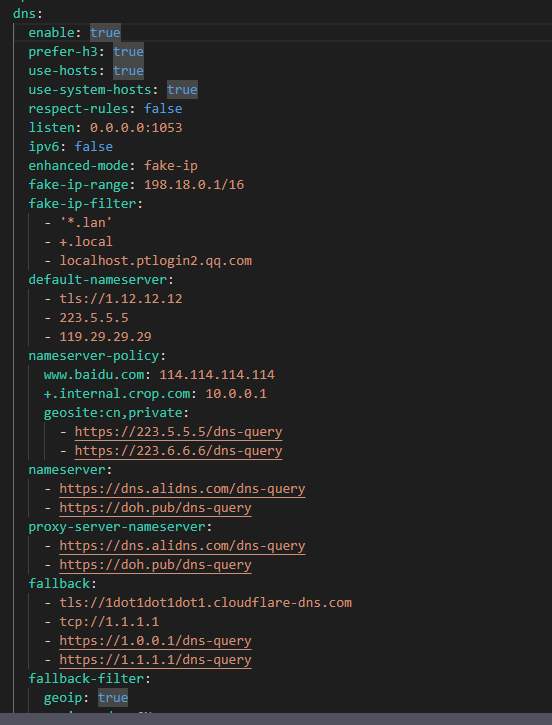
dns:
  enable: true             # 禁用系统 DNS
  ipv6: false              # 关闭 IPv6
  enhanced-mode: fake-ip   # 增强模式:redir-host或fake-ip
  listen: 0.0.0.0:53       # DNS监听地址
  fake-ip-range: 198.18.0.1/16    # Fake-IP解析地址池
  # fake ip 白名单列表'以下地址不会下发fakeip映射用于连接
  fake-ip-filter: ['*.lan', 'cable.auth.com', '*.msftconnecttest.com', '*.msftncsi.com', 'network-test.debian.org', 'detectportal.firefox.com', 'resolver1.opendns.com', '*.srv.nintendo.net', '*.stun.playstation.net', 'xbox.*.microsoft.com', '*.xboxlive.com', 'stun.*', 'global.turn.twilio.com', 'global.stun.twilio.com', 'localhost.*.qq.com', 'localhost.*.weixin.qq.com', '*.logon.battlenet.com.cn', '*.logon.battle.net', '*.blzstatic.cn', 'music.163.com', '*.music.163.com', '*.126.net', 'musicapi.taihe.com', 'music.taihe.com', 'songsearch.kugou.com', 'trackercdn.kugou.com', '*.kuwo.cn', 'api-jooxtt.sanook.com', 'api.joox.com', 'joox.com', 'y.qq.com', '*.y.qq.com', 'streamoc.music.tc.qq.com', 'mobileoc.music.tc.qq.com', 'isure.stream.qqmusic.qq.com', 'dl.stream.qqmusic.qq.com', 'aqqmusic.tc.qq.com', 'amobile.music.tc.qq.com', '*.xiami.com', '*.music.migu.cn', 'music.migu.cn', 'proxy.golang.org', '*.mcdn.bilivideo.cn', '*.cmpassport.com', 'id6.me', 'open.e.189.cn', 'mdn.open.wo.cn', 'opencloud.wostore.cn', 'auth.wosms.cn', '*.jegotrip.com.cn', '*.icitymobile.mobi', '*.pingan.com.cn', '*.cmbchina.com', 'pool.ntp.org', '*.pool.ntp.org', 'ntp.*.com', 'time.*.com', 'ntp?.*.com', 'time?.*.com', 'time.*.gov', 'time.*.edu.cn', '*.ntp.org.cn', 'PDC._msDCS.*.*', 'DC._msDCS.*.*', 'GC._msDCS.*.*']

  nameserver:        # 常规 DNS 服务器
    - 223.5.5.5
    - 119.29.29.29
    - https://doh.pub/dns-query
    - https://dns.alidns.com/dns-query

  fallback:          # 国外 DNS 服务器
    - https://dns.google/dns-query
    - https://cloudflare-dns.com/dns-query

  fallback-filter:   # 回退过滤器
    geoip: true      # GEOIP 启用
    geoip-code: CN   # GEOIP 编码
    ipcidr:          # IPCIDR
      - 240.0.0.0/4

# 代理
proxy-providers:

proxies:

# 策略组
proxy-groups:
  - name: 节点选择
    type: select
    proxies:
      - 🇭🇰 香港节点
      - 🇯🇵 日本节点
      - 🇺🇸 美国节点
      - 🇸🇬 新加坡节点
      - 🇨🇳 台湾节点
      - 手动选择
      - 家庭宽带
      - DIRECT
    icon: https://raw.githubusercontent.com/Koolson/Qure/refs/heads/master/IconSet/Color/Airport.png

  - name: 手动选择
    type: select
    include-all: true
    icon: https://raw.githubusercontent.com/Koolson/Qure/refs/heads/master/IconSet/Color/World_Map.png

  - name: 家庭宽带
    type: select
    filter: "(?i)Home|(?i)Res|家"
    include-all: true
    icon: https://raw.githubusercontent.com/Koolson/Qure/refs/heads/master/IconSet/Color/Back.png

  - name: 微软服务
    type: select
    proxies:
      - 节点选择
      - 🇭🇰 香港节点
      - 🇯🇵 日本节点
      - 🇺🇸 美国节点
      - 🇸🇬 新加坡节点
      - 🇨🇳 台湾节点
      - 手动选择
      - 家庭宽带
      - DIRECT
    icon: https://raw.githubusercontent.com/Koolson/Qure/refs/heads/master/IconSet/Color/Microsoft.png

  - name: 谷歌服务
    type: select
    proxies:
      - 节点选择
      - 🇭🇰 香港节点
      - 🇯🇵 日本节点
      - 🇺🇸 美国节点
      - 🇸🇬 新加坡节点
      - 🇨🇳 台湾节点
      - 手动选择
      - 家庭宽带
      - DIRECT
    icon: https://raw.githubusercontent.com/Koolson/Qure/refs/heads/master/IconSet/Color/Google_Search.png

  - name: 苹果服务
    type: select
    proxies:
      - 节点选择
      - 🇭🇰 香港节点
      - 🇯🇵 日本节点
      - 🇺🇸 美国节点
      - 🇸🇬 新加坡节点
      - 🇨🇳 台湾节点
      - 手动选择
      - 家庭宽带
      - DIRECT
    icon: https://raw.githubusercontent.com/Koolson/Qure/refs/heads/master/IconSet/Color/Apple.png

  - name: 人工智能
    type: select
    proxies:
      - 节点选择
      - 🇭🇰 香港节点
      - 🇯🇵 日本节点
      - 🇺🇸 美国节点
      - 🇸🇬 新加坡节点
      - 🇨🇳 台湾节点
      - 手动选择
      - 家庭宽带
      - DIRECT
    icon: https://raw.githubusercontent.com/Koolson/Qure/refs/heads/master/IconSet/Color/ChatGPT.png

  - name: 油管视频
    type: select
    proxies:
      - 节点选择
      - 🇭🇰 香港节点
      - 🇯🇵 日本节点
      - 🇺🇸 美国节点
      - 🇸🇬 新加坡节点
      - 🇨🇳 台湾节点
      - 手动选择
      - 家庭宽带
      - DIRECT
    icon: https://raw.githubusercontent.com/Koolson/Qure/refs/heads/master/IconSet/Color/YouTube.png

  - name: 网飞视频
    type: select
    proxies:
      - 节点选择
      - 🇭🇰 香港节点
      - 🇯🇵 日本节点
      - 🇺🇸 美国节点
      - 🇸🇬 新加坡节点
      - 🇨🇳 台湾节点
      - 手动选择
      - 家庭宽带
      - DIRECT
    icon: https://raw.githubusercontent.com/Koolson/Qure/refs/heads/master/IconSet/Color/Netflix.png

  - name: 游戏平台
    type: select
    proxies:
      - 节点选择
      - 🇭🇰 香港节点
      - 🇯🇵 日本节点
      - 🇺🇸 美国节点
      - 🇸🇬 新加坡节点
      - 🇨🇳 台湾节点
      - 手动选择
      - 家庭宽带
      - DIRECT
    icon: https://raw.githubusercontent.com/Koolson/Qure/refs/heads/master/IconSet/Color/Steam.png

  - name: 电报消息
    type: select
    proxies:
      - 节点选择
      - 🇭🇰 香港节点
      - 🇯🇵 日本节点
      - 🇺🇸 美国节点
      - 🇸🇬 新加坡节点
      - 🇨🇳 台湾节点
      - 手动选择
      - 家庭宽带
      - DIRECT
    icon: https://raw.githubusercontent.com/Koolson/Qure/refs/heads/master/IconSet/Color/Telegram.png

  - name: 兜底策略
    type: select
    proxies:
      - 节点选择
      - 🇭🇰 香港节点
      - 🇯🇵 日本节点
      - 🇺🇸 美国节点
      - 🇸🇬 新加坡节点
      - 🇨🇳 台湾节点
      - 手动选择
      - 家庭宽带
      - DIRECT
    icon: https://raw.githubusercontent.com/Koolson/Qure/refs/heads/master/IconSet/Color/Final.png

  - name: 🇭🇰 香港节点
    type: select
    filter: "香港|港|HK|(?i)Hong"
    include-all: true
    icon: https://raw.githubusercontent.com/Koolson/Qure/refs/heads/master/IconSet/Color/Hong_Kong.png

  - name: 🇯🇵 日本节点
    type: select
    filter: "日本|日|JP|(?i)Japan"
    include-all: true
    icon: https://raw.githubusercontent.com/Koolson/Qure/refs/heads/master/IconSet/Color/Japan.png

  - name: 🇺🇸 美国节点
    type: select
    filter: "美国|美|US|(?i)States"
    include-all: true
    icon: https://raw.githubusercontent.com/Koolson/Qure/refs/heads/master/IconSet/Color/United_States.png

  - name: 🇸🇬 新加坡节点
    type: select
    filter: "新加坡|狮|SG|(?i)Singapore"
    include-all: true
    icon: https://raw.githubusercontent.com/Koolson/Qure/refs/heads/master/IconSet/Color/Singapore.png

  - name: 🇨🇳 台湾节点
    type: select
    filter: "台湾|湾|TW|(?i)Taiwan"
    include-all: true
    icon: https://raw.githubusercontent.com/Koolson/Qure/refs/heads/master/IconSet/Color/China.png

# 规则提供商
rule-providers:
  Microsoft:
    type: http
    behavior: classical
    url: "https://raw.githubusercontent.com/blackmatrix7/ios_rule_script/refs/heads/master/rule/Clash/Microsoft/Microsoft_No_Resolve.yaml"
    interval: 86400
    path: ./ruleset/Microsoft_No_Resolve.yaml

  Google:
    type: http
    behavior: classical
    url: "https://raw.githubusercontent.com/blackmatrix7/ios_rule_script/refs/heads/master/rule/Clash/Google/Google_No_Resolve.yaml"
    interval: 86400
    path: ./ruleset/Google_No_Resolve.yaml

  Apple:
    type: http
    behavior: classical
    url: "https://raw.githubusercontent.com/blackmatrix7/ios_rule_script/refs/heads/master/rule/Clash/Apple/Apple_No_Resolve.yaml"
    interval: 86400
    path: ./ruleset/Apple_No_Resolve.yaml

  AI:
    type: http
    behavior: classical
    url: "https://raw.githubusercontent.com/blackmatrix7/ios_rule_script/refs/heads/master/rule/Clash/OpenAI/OpenAI_No_Resolve.yaml"
    interval: 86400
    path: ./ruleset/OpenAI_No_Resolve.yaml

  Youtube:
    type: http
    behavior: classical
    url: "https://raw.githubusercontent.com/blackmatrix7/ios_rule_script/refs/heads/master/rule/Clash/YouTube/YouTube_No_Resolve.yaml"
    interval: 86400
    path: ./ruleset/YouTube_No_Resolve.yaml

  Netflix:
    type: http
    behavior: classical
    url: "https://raw.githubusercontent.com/blackmatrix7/ios_rule_script/refs/heads/master/rule/Clash/Netflix/Netflix_No_Resolve.yaml"
    interval: 86400
    path: ./ruleset/Netflix_No_Resolve.yaml

  Game:
    type: http
    behavior: classical
    url: "https://raw.githubusercontent.com/blackmatrix7/ios_rule_script/refs/heads/master/rule/Clash/Game/Game_No_Resolve.yaml"
    interval: 86400
    path: ./ruleset/Game_No_Resolve.yaml

  Telegram:
    type: http
    behavior: classical
    url: "https://raw.githubusercontent.com/blackmatrix7/ios_rule_script/refs/heads/master/rule/Clash/Telegram/Telegram_No_Resolve.yaml"
    interval: 86400
    path: ./ruleset/Telegram_No_Resolve.yaml

  ChinaMax:
    type: http
    behavior: classical
    url: "https://raw.githubusercontent.com/blackmatrix7/ios_rule_script/master/rule/Clash/ChinaMax/ChinaMax_Classical_No_IPv6_No_Resolve.yaml"
    interval: 86400
    path: ./ruleset/ChinaMax_Classical_No_IPv6_No_Resolve.yaml

# 规则
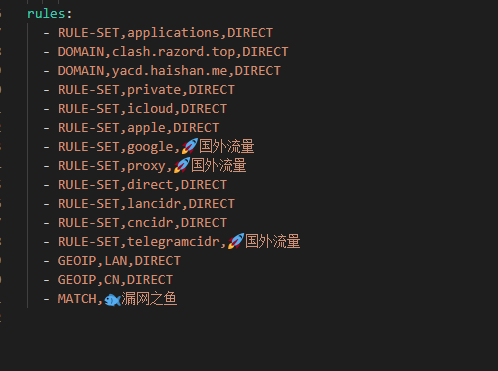
rules:
  - DOMAIN, licenses.graphpad.com, REJECT
  - DOMAIN, isul.graphpad.com, REJECT
  - DOMAIN-SUFFIX, *.adobe.io, REJECT
  - DOMAIN-SUFFIX, adobestats.io, REJECT
  - DOMAIN-SUFFIX, photo-api.adobe.io, DIRECT
  - DOMAIN-SUFFIX, perplexity.ai, 人工智能
  - DOMAIN-SUFFIX, pplx.ai, 人工智能
  - RULE-SET, Microsoft, 微软服务
  - RULE-SET, Google, 谷歌服务
  - RULE-SET, Apple, 苹果服务
  - RULE-SET, AI, 人工智能
  - RULE-SET, Youtube, 油管视频
  - RULE-SET, Netflix, 网飞视频
  - RULE-SET, Game, 游戏平台
  - RULE-SET, Telegram, 电报消息
  - RULE-SET, ChinaMax, DIRECT
  - MATCH, 兜底策略
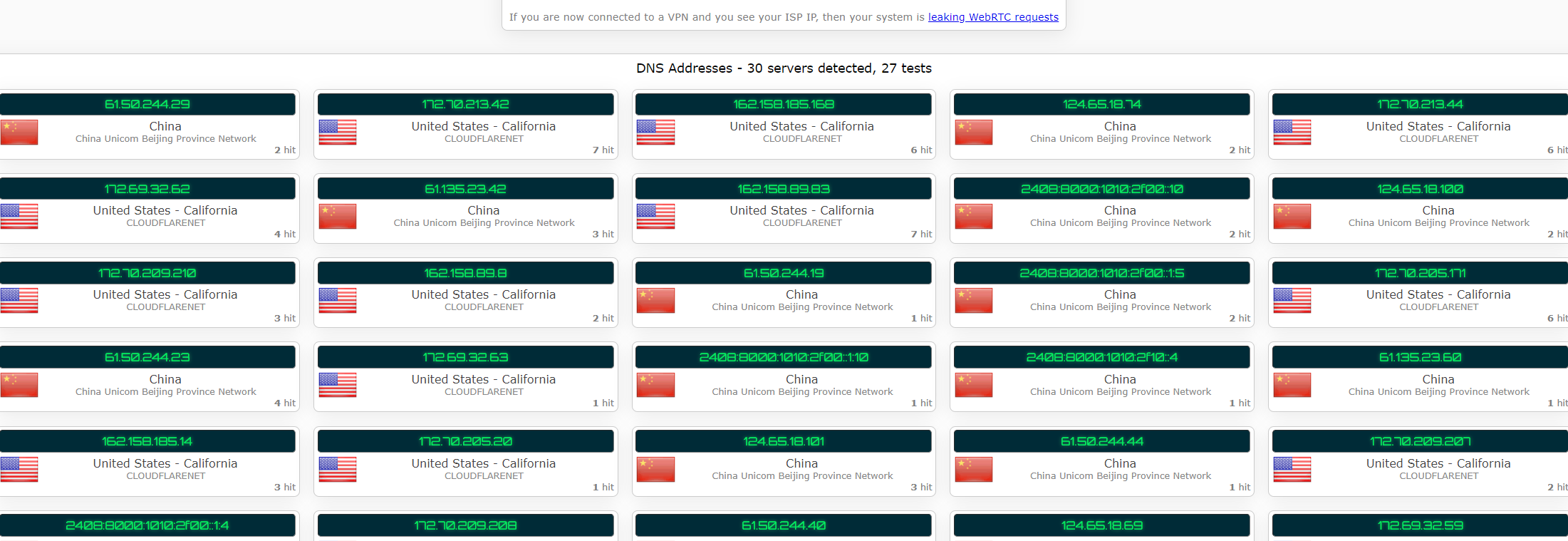
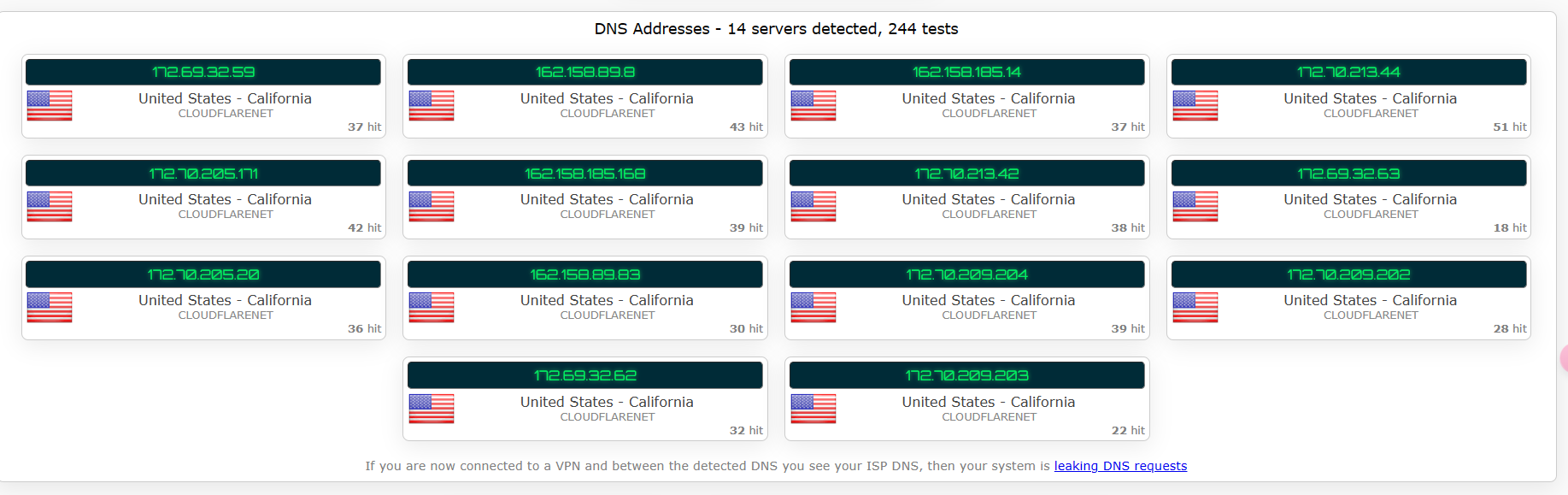
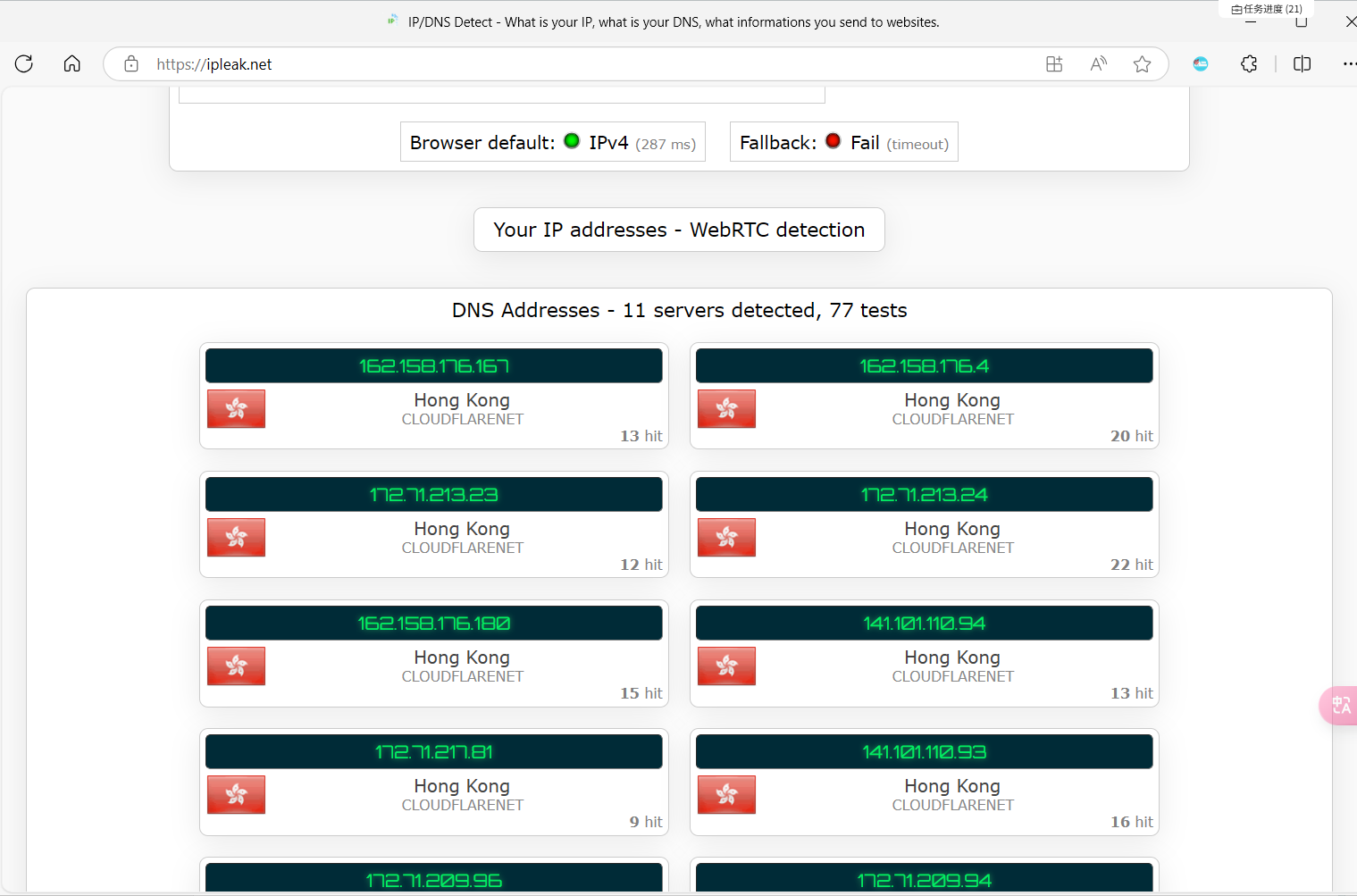
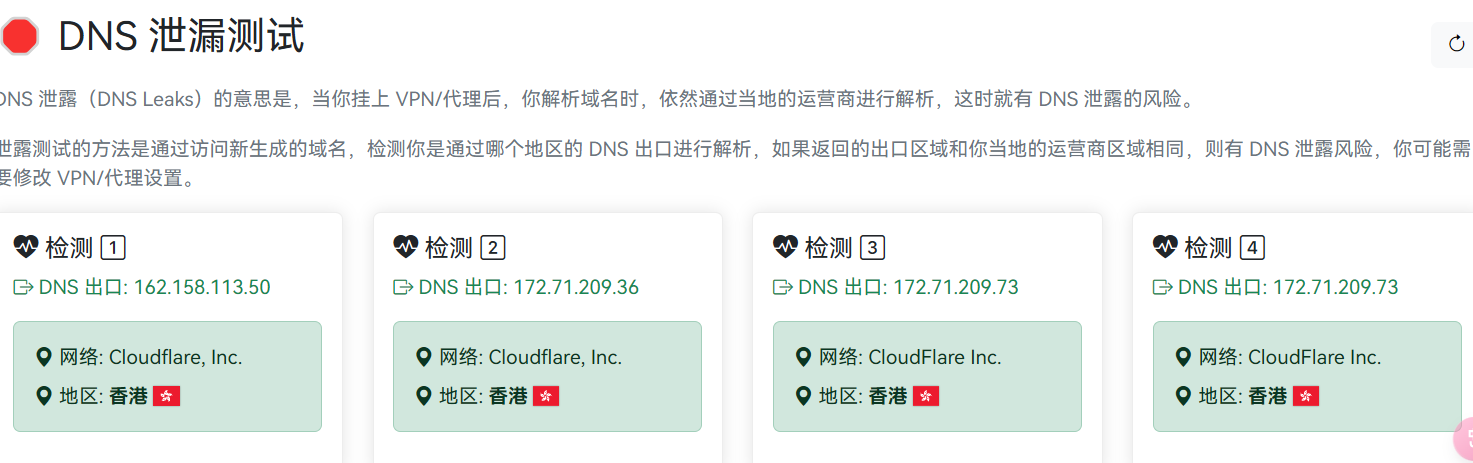
参考mihomo示例配置和库洛米配置手搓的。漏不了一点
geoip开no-resolve的话兜底得走直连,不然国内域名没命中规则,不解析ip也走代理了。
但实际上个人使用真不用管漏不漏的。