RT,隔了两天,终于到账了。还算说到做到啊。
14 个赞
佬,问下这个重置只能客户端登录吗,反代出来的如何重置
4 个赞
是今天又送了一次,应该不是前两天说要送的那一次
1 个赞
hia?那岂不是说,我上一次的到现在还没到账?
1 个赞
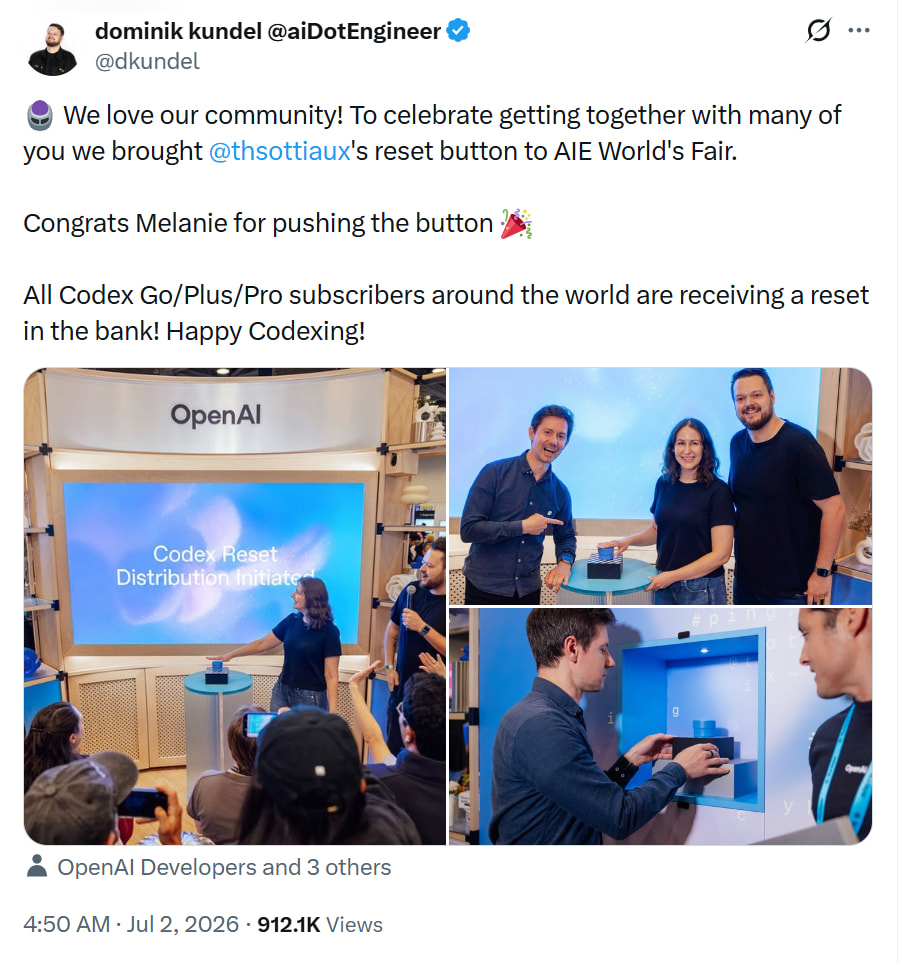

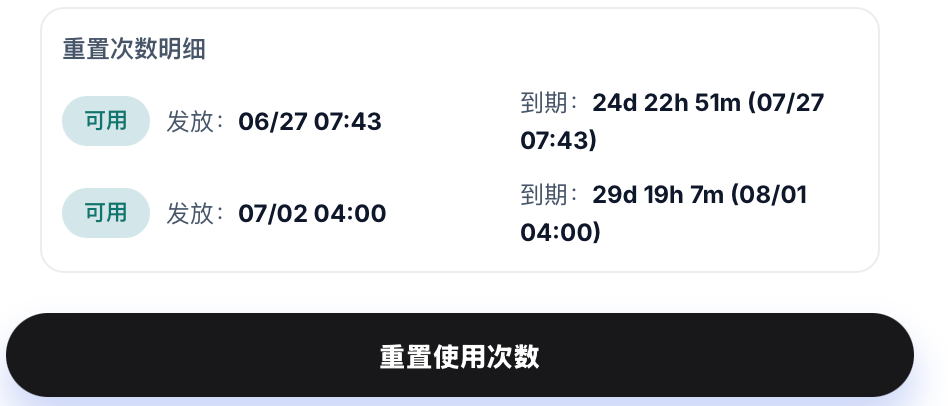
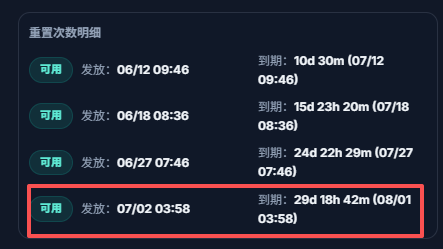
佬哥你这用的是什么插件?我也好几个重置次数不知什么时候过期
帮我用本机 Codex 凭证查一下 rate-limit reset credits,读取 ~/.codex/auth.json 里的 tokens.access_token,请求https://chatgpt.com/backend-api/wham/rate-limit-reset-credits
要求:
如果 401,说明是凭证失效或没带对Authorization header
不要打印 access_token、refresh_token、cookie或完整唯一 ID
只要展示每张重置卡发放时间和过期时间,从 UTC 转成北京时间,用中文回复
把这个prompt给codex让他帮你查就行
3 个赞
真的用不完呀,怎么新号不送,我的月限额的号已经有3次重置额度机会了,用不完,这压力太大了,昨天才费力用了一个号的一半月额度
Cockpit Tools 上个月公益还能用时搞的
1 个赞
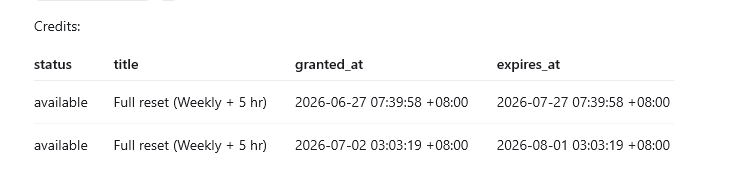
这个重置是重置5小时还是周限? 
一起重置了,同时还会把你7天的CD周期重置了。就是你重置了之后,所有额度都清空了。然后下一次自然CD也是7天后。
明白了,4次重置相当于双倍额度了,感谢各位佬的解答。
这是在哪看的,我咋找不到,看到每次的过期时间挺重要的
可能到不了双倍。因为它会推迟你的7天时间。相当于你用不到8个周限的。
因为存在5小时的限制。正常来说,你要需要两天把周限打满。所以你重置4次,最快也要一周时间了。如果后面都能打满,大约6~8次吧。
当然,你可以用/goal来快速消耗额度。这样可能收益更高一点点。
1 个赞
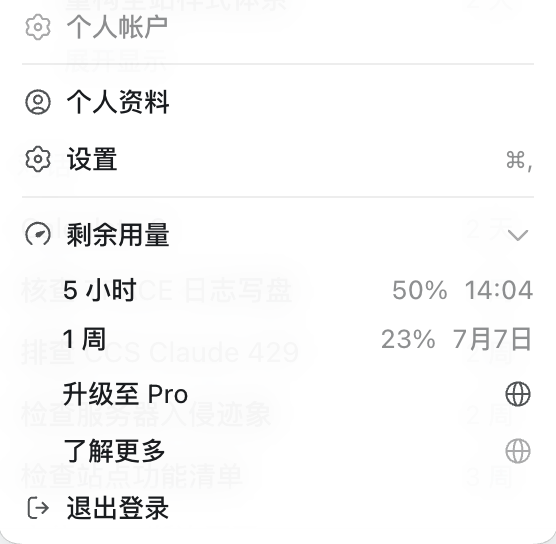
我靠我月限额三次重置额度了,用不完,根本用不完。
// ==UserScript==
// @name         ChatGPT Rate Limit Reset Credits
// @namespace    https://chatgpt.com/
// @version      1.3
// @description  美观显示 rate-limit-reset-credits(支持 ISO 时间格式)
// @author       Grok
// @match        https://chatgpt.com/*
// @run-at       document-idle
// @grant        none
// ==/UserScript==

(function () {
  "use strict";

  let panel, contentDiv;
  let accessToken = "";

  // 智能时间格式化(支持 Unix 时间戳 和 ISO 字符串)
  function formatDate(value) {
    if (!value) return "N/A";

    let date;
    if (typeof value === "string") {
      date = new Date(value);
    } else if (typeof value === "number") {
      date = new Date(value * 1000); // 假设是秒级时间戳
      if (isNaN(date.getTime())) date = new Date(value); // 尝试毫秒
    }

    if (!date || isNaN(date.getTime())) return "Invalid Date";

    return date.toLocaleString("zh-CN", {
      year: "numeric",
      month: "2-digit",
      day: "2-digit",
      hour: "2-digit",
      minute: "2-digit",
      second: "2-digit"
    });
  }

  async function getAccessToken() {
    try {
      const res = await fetch("/api/auth/session", { credentials: "include" });
      const data = await res.json();
      accessToken = data.accessToken || data.access_token || "";
      return accessToken;
    } catch (e) {
      console.warn("获取 Token 失败", e);
      return "";
    }
  }

  async function fetchRateLimit() {
    if (!accessToken) await getAccessToken();

    try {
      const res = await fetch("https://chatgpt.com/backend-api/wham/rate-limit-reset-credits", {
        method: "GET",
        headers: {
          accept: "*/*",
          authorization: `Bearer ${accessToken}`,
        },
        credentials: "include"
      });

      if (res.status === 401) {
        contentDiv.innerHTML = `<span style="color:orange">401 认证失效,正在重试...</span>`;
        await getAccessToken();
        return fetchRateLimit();
      }

      if (!res.ok) throw new Error(`HTTP ${res.status}`);

      const data = await res.json();
      showResult(data);

    } catch (err) {
      contentDiv.innerHTML = `<span style="color:red">请求失败: ${err.message}</span>`;
    }
  }

  function showResult(data) {
    if (!contentDiv) return;

    let html = `<h3 style="margin:0 0 15px 0;color:#1e40af">Rate Limit Reset Credits</h3>`;

    html += `
      <div style="background:#f0f9ff;padding:12px;border-radius:8px;margin-bottom:12px">
        <div><strong>可用次数:</strong><span style="font-size:18px;color:#166534">${data.available_count || 0}</span></div>
        <div><strong>总获得次数:</strong>${data.total_earned_count || 0}</div>
      </div>`;

    if (Array.isArray(data.credits) && data.credits.length > 0) {
      html += `<div style="font-weight:600;margin:12px 0 8px;color:#1e3a8a">额度详情:</div>`;

      data.credits.forEach((c, i) => {
        html += `
          <div style="border:1px solid #bae6fd;background:#f0f9ff;padding:12px;border-radius:8px;margin-bottom:10px">
            <div style="font-weight:600;color:#1e40af">#${i+1} ${c.title || "Full reset"}</div>
            <div style="margin:6px 0">
              <span style="color:#15803d">● ${c.status || "available"}</span>
            </div>
            <div><small>过期时间:</small> <span style="color:#b91c1c">${formatDate(c.expires_at)}</span></div>
            <div><small>授予时间:</small> ${formatDate(c.granted_at)}</div>
            ${c.description ? `<div style="margin-top:8px;font-size:13px;color:#334155">${c.description}</div>` : ''}
          </div>`;
      });
    } else {
      html += `<p style="color:#64748b;text-align:center;padding:20px">暂无可用额度</p>`;
    }

    contentDiv.innerHTML = html;
  }

  function createPanel() {
    panel = document.createElement("div");
    panel.style.cssText = `
      position:fixed; top:80px; right:20px; width:460px; background:#fff;
      border:1px solid #bae6fd; border-radius:12px; box-shadow:0 10px 30px rgba(0,0,0,0.15);
      z-index:99999; padding:16px; font-family:system-ui,sans-serif; font-size:14px;
      color:#1f2937; max-height:80vh; overflow:auto;
    `;

    panel.innerHTML = `
      <div style="margin-bottom:12px;display:flex;justify-content:space-between;align-items:center">
        <h2 style="margin:0;color:#0e7490">Rate Limit Reset Credits</h2>
        <button id="rl-refresh" style="padding:6px 16px;background:#0e7490;color:white;border:none;border-radius:6px;cursor:pointer">刷新</button>
      </div>
      <div id="rl-content"></div>
    `;

    document.body.appendChild(panel);
    contentDiv = panel.querySelector("#rl-content");

    panel.querySelector("#rl-refresh").addEventListener("click", fetchRateLimit);

    setTimeout(() => {
      getAccessToken().then(() => fetchRateLimit());
    }, 800);
  }

  if (document.readyState === "loading") {
    document.addEventListener("DOMContentLoaded", createPanel);
  } else {
    createPanel();
  }
})();
油猴插件,网页登录后刷新后即可查看,不用问codex,直接在网页中查看。
2 个赞