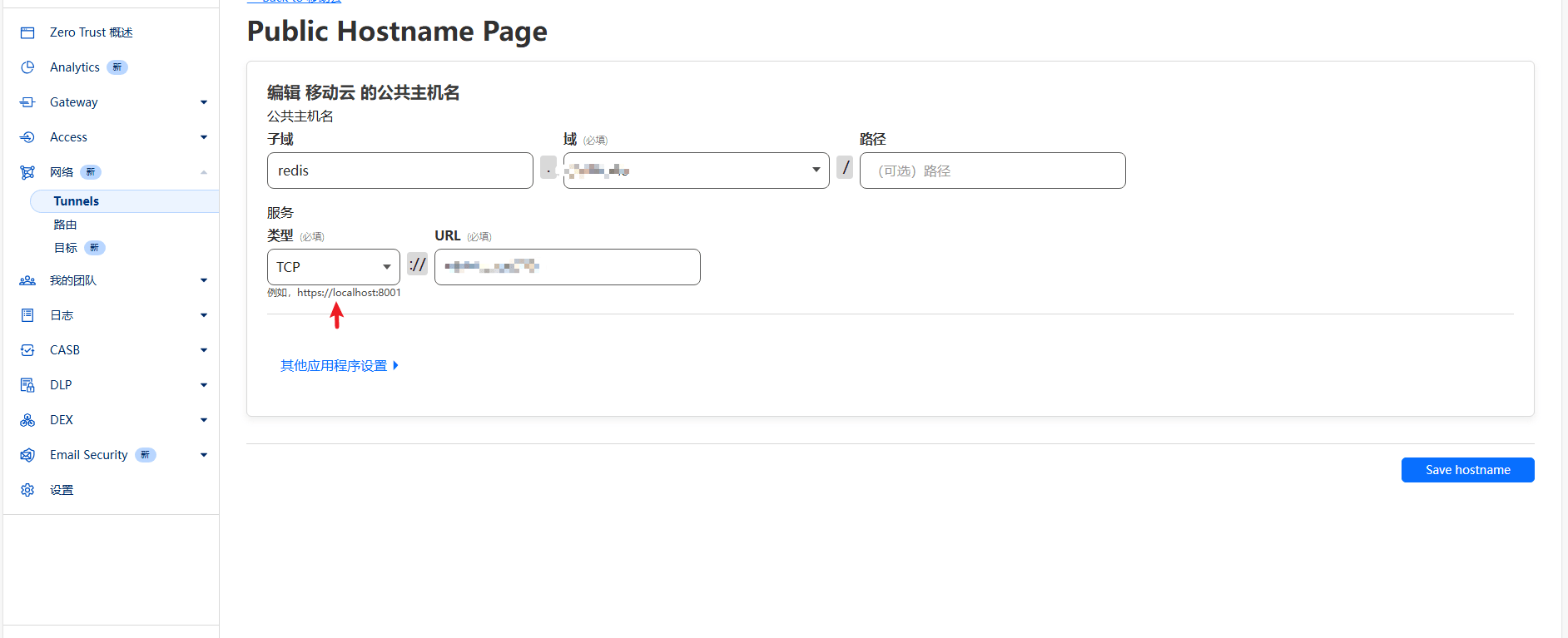
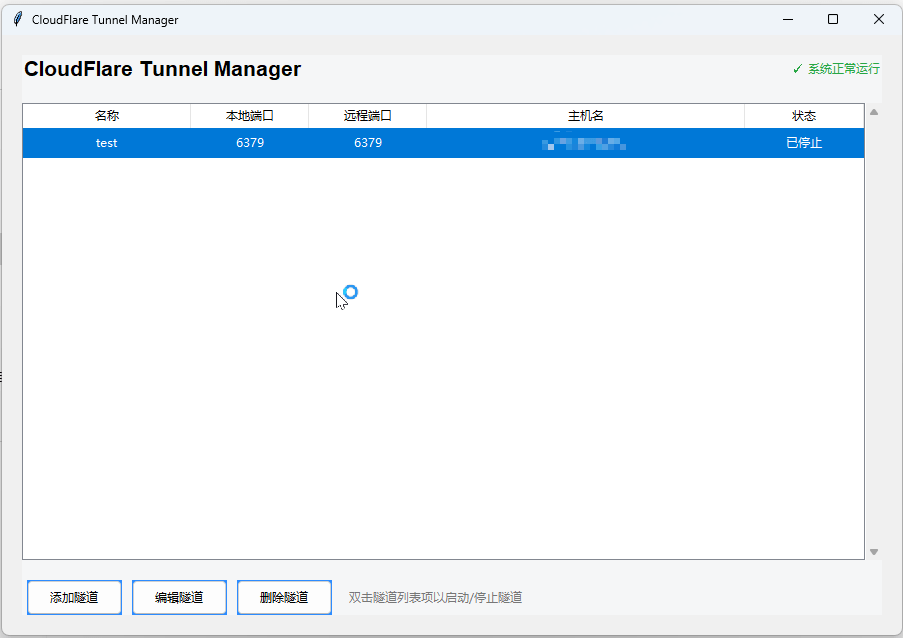
python,你自己试试.代码在这里
import tkinter as tk
from tkinter import ttk, messagebox
import subprocess
import json
import os
from typing import List, Dict, Optional
import platform

class TunnelManager:
    def __init__(self):
        self.root = tk.Tk()
        self.root.title("CloudFlare Tunnel Manager")
        self.root.geometry("900x600")

        # 配置主题色
        self.colors = {
            'bg': '#f5f6f7',
            'primary': '#2d8cff',
            'success': '#28a745',
            'danger': '#dc3545',
            'text': '#333333'
        }

        self.config_file = "config.json"
        self.tunnels: List[Dict] = []

        self.setup_styles()
        self.create_gui()
        self.load_config()

    def setup_styles(self):
        """配置自定义样式"""
        style = ttk.Style()
        style.configure('Custom.TFrame', background=self.colors['bg'])
        style.configure('Custom.TButton',
                       padding=5,
                       background=self.colors['primary'])
        style.configure('Custom.Treeview',
                       background='white',
                       fieldbackground='white',
                       rowheight=30,
                       anchor=tk.CENTER)
        style.configure('Custom.Treeview.Heading', anchor=tk.CENTER)

    def create_gui(self):
        """创建主界面"""
        # 主容器
        self.main_frame = ttk.Frame(self.root, style='Custom.TFrame')
        self.main_frame.pack(fill=tk.BOTH, expand=True, padx=20, pady=20)

        # 顶部信息栏
        self.create_header()

        # 隧道列表
        self.create_tunnel_list()

        # 底部按钮栏
        self.create_control_panel()

    def create_header(self):
        """创建顶部信息栏"""
        header = ttk.Frame(self.main_frame, style='Custom.TFrame')
        header.pack(fill=tk.X, pady=(0, 20))

        title = ttk.Label(header,
                         text="CloudFlare Tunnel Manager",
                         font=('Helvetica', 16, 'bold'),
                         background=self.colors['bg'])
        title.pack(side=tk.LEFT)

        status = ttk.Label(header,
                          text="✓ 系统正常运行",
                          foreground=self.colors['success'],
                          background=self.colors['bg'])
        status.pack(side=tk.RIGHT)

    def create_tunnel_list(self):
        """创建隧道列表"""
        # 列表容器
        list_frame = ttk.Frame(self.main_frame, style='Custom.TFrame')
        list_frame.pack(fill=tk.BOTH, expand=True)

        # 创建树形列表
        columns = ("name", "local_port", "remote_port", "hostname", "status")
        self.tree = ttk.Treeview(list_frame,
                                columns=columns,
                                show='headings',
                                style='Custom.Treeview')

        # 配置列
        column_configs = {
            "name": ("名称", 150),
            "local_port": ("本地端口", 100),
            "remote_port": ("远程端口", 100),
            "hostname": ("主机名", 300),
            "status": ("状态", 100)
        }

        for col, (text, width) in column_configs.items():
            self.tree.heading(col, text=text, anchor=tk.CENTER)
            self.tree.column(col, width=width, anchor=tk.CENTER)

        # 添加滚动条
        scrollbar = ttk.Scrollbar(list_frame,
                                orient=tk.VERTICAL,
                                command=self.tree.yview)
        self.tree.configure(yscrollcommand=scrollbar.set)

        self.tree.pack(side=tk.LEFT, fill=tk.BOTH, expand=True)
        scrollbar.pack(side=tk.RIGHT, fill=tk.Y)

        # 绑定双击事件
        self.tree.bind('<Double-1>', self.on_tunnel_double_click)

    def create_control_panel(self):
        """创建底部控制面板"""
        control_frame = ttk.Frame(self.main_frame, style='Custom.TFrame')
        control_frame.pack(fill=tk.X, pady=(20, 0))

        # 左侧操作按钮
        left_buttons_frame = ttk.Frame(control_frame, style='Custom.TFrame')
        left_buttons_frame.pack(side=tk.LEFT)

        ttk.Button(left_buttons_frame,
                  text="添加隧道",
                  command=self.show_add_dialog,
                  style='Custom.TButton').pack(side=tk.LEFT, padx=5)

        ttk.Button(left_buttons_frame,
                  text="编辑隧道",
                  command=self.show_edit_dialog,
                  style='Custom.TButton').pack(side=tk.LEFT, padx=5)

        ttk.Button(left_buttons_frame,
                  text="删除隧道",
                  command=self.delete_tunnel,
                  style='Custom.TButton').pack(side=tk.LEFT, padx=5)

        # 右侧说明标签
        help_label = ttk.Label(control_frame,
                               text="双击隧道列表项以启动/停止隧道",
                               background=self.colors['bg'],
                               foreground="#777777")
        help_label.pack(side=tk.LEFT, padx=10)

    def load_config(self):
        """加载配置文件"""
        try:
            if os.path.exists(self.config_file):
                with open(self.config_file, 'r') as f:
                    self.tunnels = json.load(f)
            self.refresh_tunnel_list()
        except Exception as e:
            messagebox.showerror("错误", f"加载配置文件失败: {e}")

    def save_config(self):
        """保存配置文件"""
        try:
            with open(self.config_file, 'w') as f:
                json.dump(self.tunnels, f, indent=4)
        except Exception as e:
            messagebox.showerror("错误", f"保存配置文件失败: {e}")

    def refresh_tunnel_list(self):
        """刷新隧道列表"""
        for item in self.tree.get_children():
            self.tree.delete(item)

        for i, tunnel in enumerate(self.tunnels):
            status_text = "运行中" if tunnel.get('process_pid') else "已停止"
            tag = "running" if tunnel.get('process_pid') else "stopped"
            values = (
                tunnel['name'],
                tunnel['local_port'],
                tunnel['remote_port'],
                tunnel['hostname'],
                status_text
            )
            self.tree.insert('', tk.END, values=values, tags=(tag,))

        # 配置 tag 的颜色
        self.tree.tag_configure('running', foreground=self.colors['success'])
        self.tree.tag_configure('stopped', foreground=self.colors['danger'])

    def show_add_dialog(self):
        """显示添加隧道对话框"""
        dialog = TunnelDialog(self.root, "添加隧道")
        if dialog.result:
            self.tunnels.append(dialog.result)
            self.save_config()
            self.refresh_tunnel_list()

    def show_edit_dialog(self):
        """显示编辑隧道对话框"""
        selected = self.tree.selection()
        if not selected:
            messagebox.showinfo("提示", "请先选择要编辑的隧道")
            return

        index = self.tree.index(selected[0])
        dialog = TunnelDialog(self.root, "编辑隧道", self.tunnels[index])
        if dialog.result:
            self.tunnels[index] = dialog.result
            self.save_config()
            self.refresh_tunnel_list()

    def delete_tunnel(self):
        """删除选中的隧道"""
        selected = self.tree.selection()
        if not selected:
            messagebox.showinfo("提示", "请先选择要删除的隧道")
            return

        if messagebox.askyesno("确认", "确定要删除选中的隧道吗?"):
            index = self.tree.index(selected[0])
            if self.tunnels[index].get('process_pid'):
                self.stop_tunnel(index)
            del self.tunnels[index]
            self.save_config()
            self.refresh_tunnel_list()

    def on_tunnel_double_click(self, event):
        """处理隧道双击事件"""
        selected_items = self.tree.selection()
        if selected_items:  # 检查是否有选中的项目
            item = selected_items[0]
            index = self.tree.index(item)
            if self.tunnels[index].get('process_pid'):
                self.stop_tunnel(index)
            else:
                self.start_tunnel(index)

    def start_tunnel(self, index):
        """启动隧道"""
        tunnel = self.tunnels[index]
        try:
            # 根据操作系统设置 creationflags
            if platform.system() == "Windows":
                creationflags = subprocess.CREATE_NO_WINDOW
            else:
                creationflags = 0  # 其他系统不需要特殊标志

            process = subprocess.Popen([
                'cloudflared.exe',
                'access',
                'tcp',
                '--hostname',
                tunnel['hostname'],
                '--url',
                f'tcp://127.0.0.1:{tunnel["local_port"]}'
            ], shell=False, creationflags=creationflags)

            self.tunnels[index]['process_pid'] = process.pid
            self.save_config()
            self.refresh_tunnel_list()
        except FileNotFoundError:
            messagebox.showerror("错误", "找不到 cloudflared.exe,请确保它在系统 PATH 中或与程序在同一目录下。")
        except Exception as e:
            messagebox.showerror("错误", f"启动隧道失败: {e}")

    def stop_tunnel(self, index):
        """停止隧道"""
        pid = self.tunnels[index].get('process_pid')
        if pid:
            try:
                if platform.system() == "Windows":
                    subprocess.run(['taskkill', '/F', '/PID', str(pid)], shell=False, creationflags=subprocess.CREATE_NO_WINDOW)
                else:
                    subprocess.run(['kill', '-9', str(pid)], shell=False)  # Unix-like systems
                self.tunnels[index]['process_pid'] = None
                self.save_config()
                self.refresh_tunnel_list()
            except subprocess.CalledProcessError as e:
                # taskkill 返回非零退出代码时会抛出此异常,表示进程未找到或其他错误
                if "没有找到进程" not in str(e):
                    messagebox.showerror("错误", f"停止隧道失败: {e}")
                else:
                    # 如果是“没有找到进程”的错误,我们认为隧道已经停止了
                    self.tunnels[index]['process_pid'] = None
                    self.save_config()
                    self.refresh_tunnel_list()
            except Exception as e:
                messagebox.showerror("错误", f"停止隧道失败: {e}")

    def run(self):
        """运行程序"""
        self.root.mainloop()

class TunnelDialog:
    """隧道配置对话框"""
    def __init__(self, parent, title, tunnel=None):
        self.result = None

        dialog = tk.Toplevel(parent)
        dialog.title(title)
        dialog.geometry("400x300")
        dialog.transient(parent)
        dialog.grab_set()

        # 创建表单
        ttk.Label(dialog, text="名称:").grid(row=0, column=0, padx=5, pady=5)
        name = ttk.Entry(dialog)
        name.grid(row=0, column=1, padx=5, pady=5)

        ttk.Label(dialog, text="本地端口:").grid(row=1, column=0, padx=5, pady=5)
        local_port = ttk.Entry(dialog)
        local_port.grid(row=1, column=1, padx=5, pady=5)

        ttk.Label(dialog, text="远程端口:").grid(row=2, column=0, padx=5, pady=5)
        remote_port = ttk.Entry(dialog)
        remote_port.grid(row=2, column=1, padx=5, pady=5)

        ttk.Label(dialog, text="主机名:").grid(row=3, column=0, padx=5, pady=5)
        hostname = ttk.Entry(dialog)
        hostname.grid(row=3, column=1, padx=5, pady=5)

        # 如果是编辑模式,填充现有数据
        if tunnel:
            name.insert(0, tunnel['name'])
            local_port.insert(0, str(tunnel['local_port']))
            remote_port.insert(0, str(tunnel['remote_port']))
            hostname.insert(0, tunnel['hostname'])

        def save():
            """保存隧道配置"""
            try:
                self.result = {
                    'name': name.get(),
                    'local_port': int(local_port.get()),
                    'remote_port': int(remote_port.get()),
                    'hostname': hostname.get(),
                    'process_pid': tunnel.get('process_pid') if tunnel else None
                }
                dialog.destroy()
            except ValueError:
                messagebox.showerror("错误", "端口必须是数字")

        ttk.Button(dialog, text="保存", command=save).grid(row=4, column=0, columnspan=2, pady=20)

        dialog.wait_window()

if __name__ == "__main__":
    app = TunnelManager()
    app.run()
 有个小请求,我不知道这个软件是用的啥语言,可以的话,能编译一份Mac版本的吗

