1 是刚刚让 AI 写的脚本。
2,3 是之前手写,今天让 AI 重新写了一遍。
1. LINUX.DO 自动加载新话题
灵感来自: /t/topic/866276

2. LINUX.DO 手动加载更多话题
灵感来自: /t/topic/662977
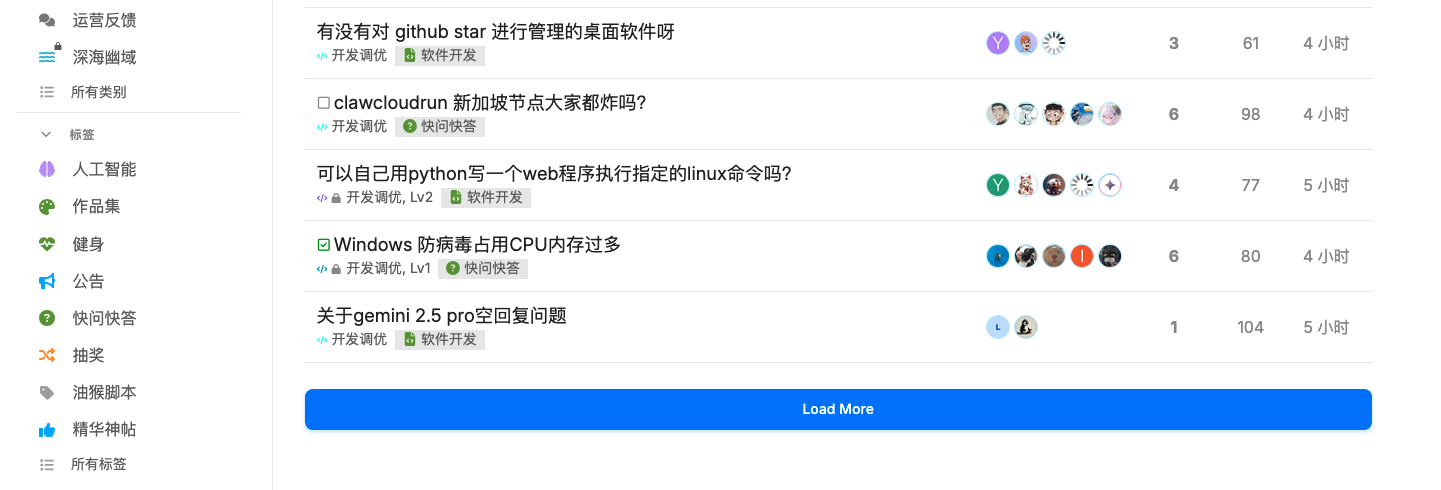
3. 屏蔽 GIF 头像
README 也是让 AI 写的,比我写的好太多了。
项目地址:utags/userscripts
1 是刚刚让 AI 写的脚本。
2,3 是之前手写,今天让 AI 重新写了一遍。
灵感来自: /t/topic/866276
灵感来自: /t/topic/662977
README 也是让 AI 写的,比我写的好太多了。
项目地址:utags/userscripts
感谢大佬分享
太强了!
是 AI 太强了。我只是帮它测试,帮它搬运一下。
君子生非异也,善假于物也!
好实用的脚本!感谢分享
感谢大佬分享!
看起来很实用!顺便骗几个赞
感謝分享
不错
感谢佬友分享的脚本
// ==UserScript==
// @name         L站分数显示
// @namespace    http://tampermonkey.net/
// @version      2025-08-12
// @description  try to take over the world!
// @author       You
// @match        https://linux.do/*
// @icon         https://photo.459122.xyz/i/31d64b3e01fb5a389bfe10cf1f08d497.png
// @grant        none
// ==/UserScript==
(function () {
    'use strict';
    console.log("L站分数显示脚本")

    function insertPowerEL() {
        let headerUL = document.getElementsByClassName("icons d-header-icons")[0]
        let newEle = document.createElement('li');
        newEle.setAttribute('id', 'nodeScoreHeader_score_id');
        newEle.setAttribute('style', `margin-left:12px;display: flex; align-items: center; justify-content: center;`)
        newEle.setAttribute('class', 'icon-header icon-header-small icon-header-link');

        // 创建按钮元素
        let button = document.createElement('button');
        button.setAttribute('id', 'nodeScoreHeader_id_val');
        button.setAttribute('style', 'color: green; width: auto; cursor: pointer;');
        button.setAttribute('class', 'btn no-text btn-icon ai-bot-button icon btn-flat');
        button.setAttribute('title', '当前能量 - 点击查看排行榜');
        button.setAttribute('type', 'button');

        // 添加点击事件
        button.addEventListener('click', function() {
            window.open('https://linux.do/leaderboard/1', '_blank');
        });

        newEle.appendChild(button);

        if(headerUL){
             headerUL.insertBefore(newEle, headerUL.firstChild);
        }
    }

    insertPowerEL()
    let userID = null

    function getUserID() {
        let retryCount = 0;
        const maxRetries = 60; // 1分钟(60次)
        const retryInterval = setInterval(() => {
            try {
                let userImgBTN = document.getElementById("toggle-current-user");
                if (userImgBTN) {
                    let srcURL = userImgBTN.getElementsByTagName("img")[0].src;
                    let srcArr = srcURL.split('/');
                    userID = srcArr[srcArr.length - 3];
                    clearInterval(retryInterval);
                    if (typeof getPower === 'function') {
                        getPower(userID);
                    }
                } else if (retryCount >= maxRetries) {
                    clearInterval(retryInterval);
                    console.error("未找到userImgBTN元素,重试超时");
                }
                retryCount++;
            } catch (err) {
                console.error(err);
                if (retryCount >= maxRetries) {
                    clearInterval(retryInterval);
                }
            }
        }, 1000); // 每秒重试一次
    }

    getUserID()
    getPower(userID)

    function getPower(userID) {
        if(userID==null){
         console.log("userID 为空" )
           return
        }
        let url = `${window.location.origin}/u/${userID}.json`
        fetch(url) // 替换为实际的 URL
            .then(response => {
            if (!response.ok) {
                throw new Error('网络请求失败');
            }
            return response.json(); // 或 response.text() 等
        })
            .then(data => {
            console.log(data.user.gamification_score);
            let score = data.user.gamification_score
            if (score) {
                if( document.getElementById("nodeScoreHeader_id_val")){
                     document.getElementById("nodeScoreHeader_id_val").innerText = score;
                }
            }
        })
            .catch(error => {
            console.error('发生错误:', error);
        });
    }
    // Your code here...
})();
该脚本改写自隔壁站一位大佬写的,我用ai进行L站本土化!可以显示当前自身的分数~
这个功能很实用
我只是搬运工~ 
很实用,感谢大佬分享
很实用,感谢大佬分享